

MP3 Hammer is a powerful and free audio utility designed to solve one common problem — long and unwieldy MP3 files. Whether it’s a multi-hour audiobook, a podcast episode, or an extended lecture recording, MP3 Hammer helps you break it into smaller, equal-duration segments for easy playback, sharing, or organization.
What is MP3 Hammer?
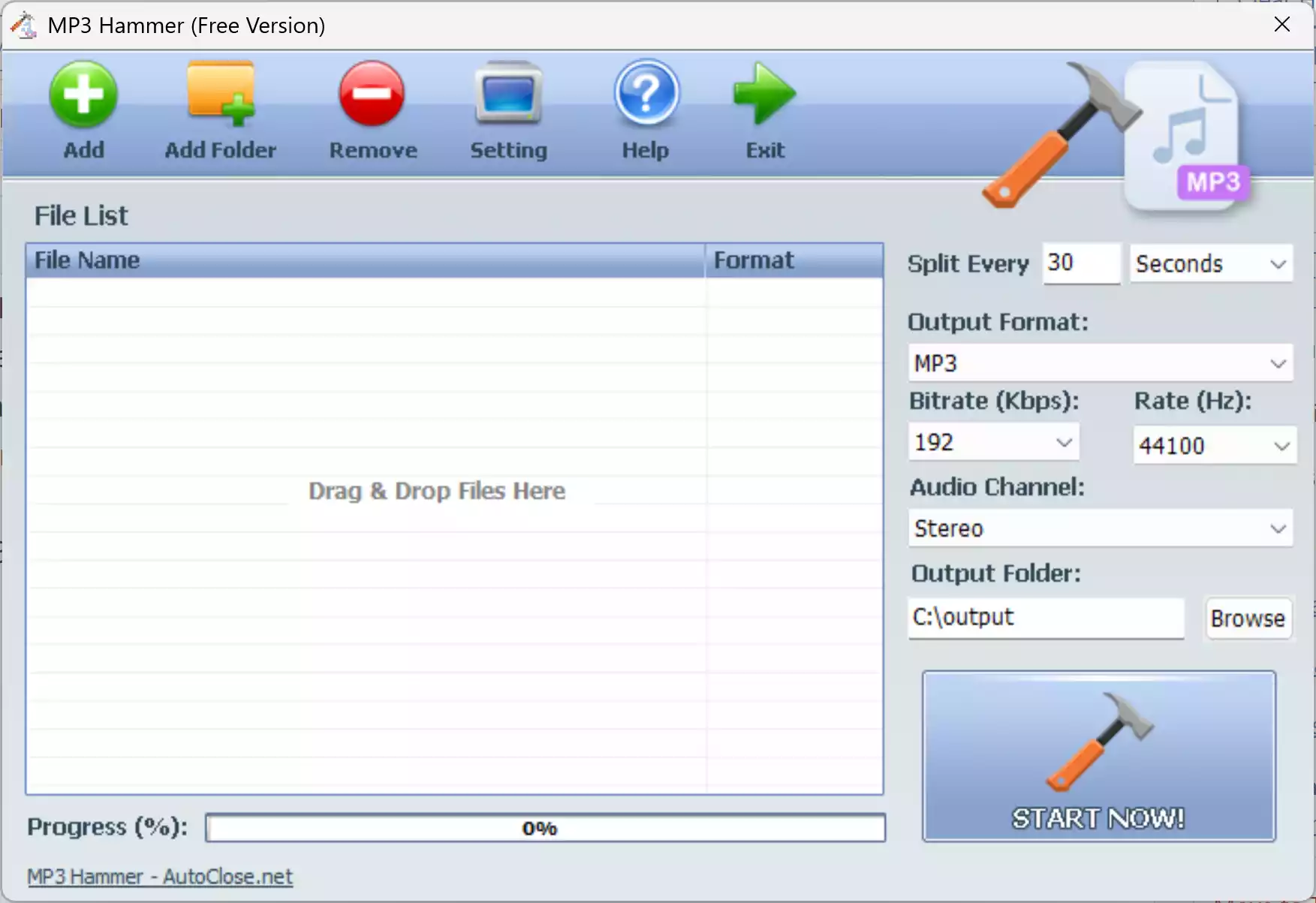
MP3 Hammer is a dedicated batch MP3 segmenting software that automates the process of cutting long audio files into equal-length sections. Unlike typical audio editors that require you to mark start and end points manually, MP3 Hammer lets you simply set the desired duration—say, 5 minutes or 30 minutes—and splits your entire file accordingly. You can even process multiple MP3s in one go.
Why It’s Called “MP3 Hammer”
The name MP3 Hammer perfectly captures its core purpose — a precise, decisive tool that “smashes” long audio files into smaller, more manageable pieces. Just like a hammer breaks apart large objects into usable parts, MP3 Hammer imposes order and structure on oversized, continuous recordings.
How MP3 Hammer Works
Using MP3 Hammer is straightforward:
Step 1. Load one or more long MP3 or supported audio files.
Step 2. Choose how long each segment should be (for example, 15 minutes or 150 seconds).
Step 3. Click the “START NOW!” button to process.
Step 4. MP3 Hammer automatically slices your files and outputs perfectly equal-length audio pieces—no re-encoding, no quality loss.
Key Features
- Batch Processing: Split multiple large audio files simultaneously using the same rules.
- Duration-based Splitting: Define the exact length for each segment in minutes or seconds.
- No Quality Loss: MP3 Hammer cuts the MP3 stream directly without re-encoding, preserving the original bitrate and fidelity.
- Multi-format Support: In addition to MP3, it supports WMA, OGG, WAV, FLAC, AC3, AAC, AMR, and MPG.
- Intuitive Interface: Drag-and-drop your files, set the duration, and let it do the work—no editing skills required.
Why You Need MP3 Hammer
MP3 Hammer is built for anyone who deals with long recordings. Here’s how it makes life easier:
1. Enhanced Portability: Some older audio players and car stereos struggle with large MP3 files. Splitting your recordings into smaller parts ensures smooth playback on every device.
2. Better File Management: Shorter segments make file organization easier. Instead of one 5-hour file, you can have multiple smaller ones like Lecture_01.mp3, Lecture_02.mp3, etc.—much easier to sort and sync.
3. Efficient Study and Review: Students and professionals can break long recordings into topic-based sections for better focus and navigation during playback.
4. Simplified Sharing and Uploading: Need to share only a part of a podcast or lecture? With MP3 Hammer, you can instantly split and upload just the relevant portion instead of the entire file.
System Requirements
Supported OS: Windows 7, 8, 10, 11 (32-bit & 64-bit)
Supported Audio Formats
MP3 Hammer isn’t limited to MP3—it supports several popular formats, including:
- MP3
- WMA
- OGG
- WAV
- FLAC
- AAC
- AC3
- AMR
- MPG
When MP3 Hammer Can Help You
MP3 Hammer is ideal for anyone managing long audio files, such as:
- Podcast editors
- Audiobook enthusiasts
- Educators and students recording lectures
- Musicians organizing long rehearsal tracks
- Archivists preserving large spoken-word recordings
Download MP3 Hammer
Get the official version directly from the developer’s website:
Download MP3 Hammer
Related Free Audio Tools
If you frequently work with audio files, here are some related free utilities you may find useful:
- Best Free MOV to MP3 Converter Tools for PC
- VLC Media Player – A versatile and powerful multimedia player
- KMPlayer – The all-in-one media player for Windows
- SMPlayer – A versatile and customizable multimedia player
- Rename Multiple Files Instantly with Patterns or Regex
FAQs about MP3 Hammer
Q. Is MP3 Hammer free?
Yes, MP3 Hammer is completely free to use for personal and professional purposes.
Q. Does MP3 Hammer reduce audio quality?
No. The tool performs lossless splitting, which means the resulting segments retain the same quality and bitrate as the original file.
Q. Can MP3 Hammer handle other audio formats besides MP3?
Yes, it supports a wide range of audio types, including WMA, OGG, WAV, FLAC, AAC, and more.
Q. Does it re-encode the files?
No. MP3 Hammer performs direct stream cutting, so no re-encoding or conversion occurs during segmentation.
Q. Is MP3 Hammer compatible with Windows 11?
Absolutely. It works perfectly on Windows 11, 10, 8, and 7, including both 32-bit and 64-bit systems.
Conclusion
MP3 Hammer is a powerful yet effortless solution for anyone struggling with lengthy audio recordings. It helps you maintain quality, manage files more efficiently, and listen to or share content without limits. Whether you’re a student, podcaster, or audiophile, this free utility is your go-to hammer for breaking big MP3s into perfectly balanced parts.