

If you’ve ever wanted your computer to read text out loud, you’re in the right place. Our free Text-to-Speech Reader makes it easy to convert written text into spoken words instantly — right inside your browser. There’s no software to install, and everything runs 100% client-side for maximum privacy.
What is a Text-to-Speech Reader?
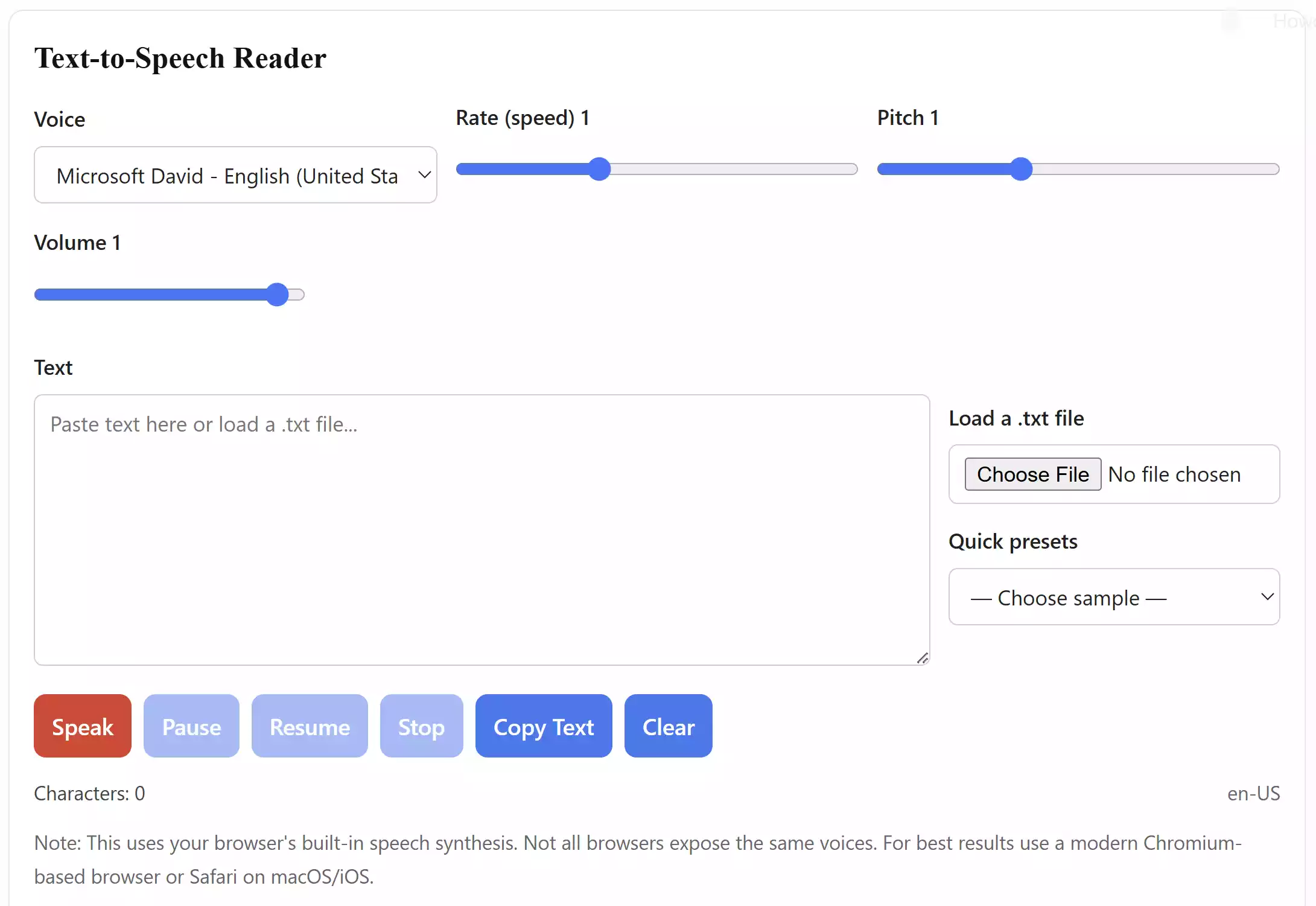
A Text-to-Speech (TTS) Reader is a tool that uses your browser’s built-in speech synthesis technology to transform text into natural-sounding speech. You can paste text, upload a plain .txt file, or select quick samples to hear them spoken aloud.
Why Would You Use a TTS Reader?
There are many reasons why beginners and advanced users alike find TTS helpful:
- Accessibility – Helps visually impaired users consume written content.
- Productivity – Listen to notes, documents, or articles while multitasking.
- Learning – Improve language skills by hearing correct pronunciation.
- Convenience – Turn long articles into audio without any extra apps.
Main Features of the GearUpWindows TTS Reader
- Multiple voice options (depends on browser & OS).
- Adjustable speed (rate), pitch, and volume.
- Play, pause, resume, and stop controls.
- Upload plain text files (.txt) to read instantly.
- Quick sample presets for testing the voices.
- Character counter to track input length.
- 100% free and works fully offline after page load.
How to Use the Text-to-Speech Reader
Getting started is simple:
Step 1. Go to the Text-to-Speech Reader tool.
Step 2. Paste text into the box, upload a .txt file, or pick a sample preset.
Step 3. Choose a voice and adjust rate, pitch, or volume as needed.
Step 4. Click the red Speak button to hear the text aloud.
Step 5. Use Pause, Resume, or Stop controls anytime.
Safe Use Tips for Beginners
- Keep your browser updated for the latest voices.
- Different browsers (Chrome, Edge, Safari) may provide different voice options.
- Works best with shorter text passages for smoother playback.
When Can This Tool Help You?
Whether you’re proofreading an article, learning a new language, or simply prefer listening instead of reading, this TTS tool can be a handy everyday companion. Students, professionals, and hobbyists alike will find it useful.
Try the Free Tool
You don’t need to download anything. Just visit our live Text-to-Speech Reader page and start converting text to voice instantly.
Frequently Asked Questions
Q: Do I need to install software?
No. This runs directly in your browser with no downloads.
Q: Does it work offline?
Yes. Once loaded, it uses your browser’s built-in voices, so no internet connection is required for playback.
Q: Is my text sent to a server?
No. Everything runs locally in your browser for complete privacy.
Q: Which browsers are supported?
Modern browsers like Chrome, Edge, Firefox, and Safari support Speech Synthesis. Voice availability may vary by system.
Conclusion
The GearUpWindows Text-to-Speech Reader is lightweight, free, and easy to use. With adjustable controls and multiple voice options, it’s perfect for anyone who wants text read aloud without complicated setup.