

Looking for a reliable and genuinely free VPN service for Windows 11/10? Windscribe Free VPN might be just what you need. With strong privacy features, a generous monthly data allowance, and user-friendly apps, Windscribe Free stands out as one of the top VPNs that don’t cost a penny. For another excellent free option with unlimited data and no ads, check out our detailed ProtonVPN Free review, PrivadoVPN Free review, and Hide.me Free VPN review.
What is Windscribe Free VPN?
Windscribe Free is the no-cost tier of the Windscribe VPN service. It offers a solid balance of privacy, security, and usability, even without a paid subscription. The free version includes 10GB of data per month (which can be increased through referrals), multiple VPN locations, and advanced features usually reserved for premium users.
Key Features of Windscribe Free VPN
- 10GB Monthly Data – More than many competitors offer for free.
- Multiple Locations – Access up to 11 countries, including the US, UK, Canada, Germany, France, and the Netherlands.
- No Ads – Enjoy an ad-free VPN experience even on the free tier.
- R.O.B.E.R.T. Firewall – Built-in DNS-level ad and malware blocking.
- Strong Encryption – AES-256-bit encryption and secure protocols.
- Unlimited Device Connections – Connect all your devices without limits.
How to Use Windscribe Free on Windows 11/10?
Getting started with Windscribe Free is easy. Here’s how to set it up on your Windows PC:
Step 1. Visit the official Windscribe website and download the Windows app. After downloading, run the setup to install it.
Step 2. Launch Windscribe and click on “Get Started” and “Sign Up” for an account. You can register using just a username and password, but enter your email to claim the full 10GB data.
Step 3. Log in to the app using your credentials. You’ll see the dashboard with server locations and status.
Step 4. Click on a country from the free server list (e.g., US East, Canada, Germany, France) to connect. It also suggests the best locations near you for the fastest speed. Once connected, your IP is hidden, and traffic is encrypted.
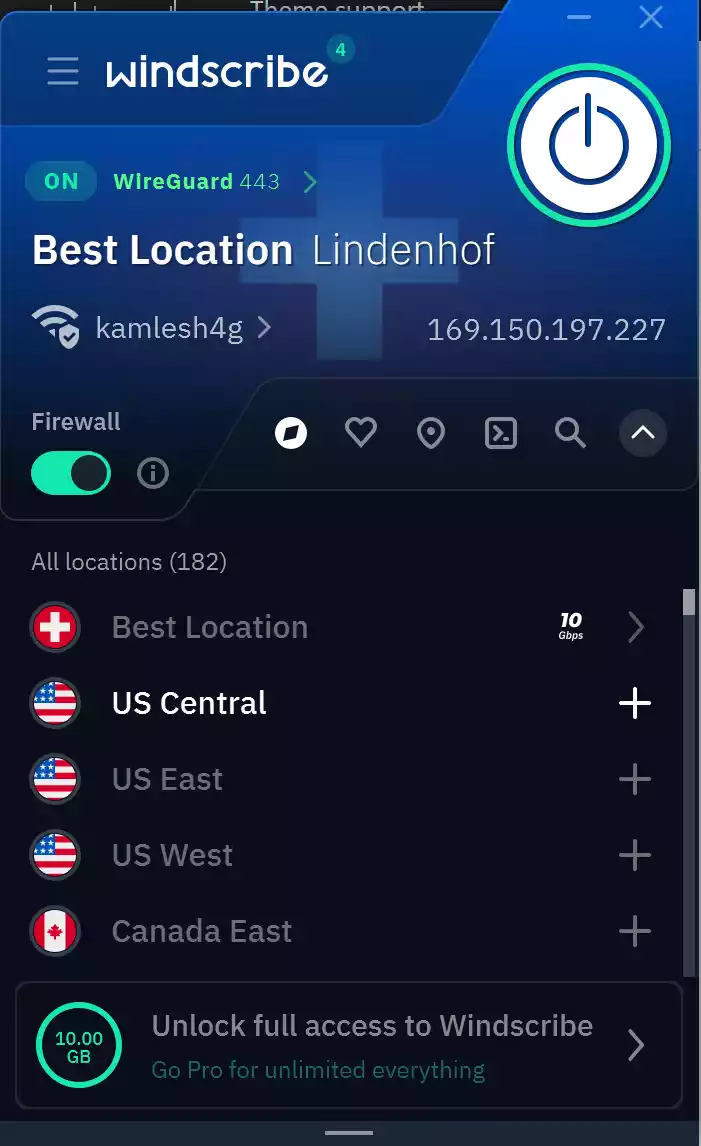
Step 5. Want more privacy? Head into “Preferences” to enable the Kill Switch (Firewall), change protocols, or use R.O.B.E.R.T. filters.
That’s it! Windscribe Free is now active and securing your internet traffic on Windows.
Can You Customize Windscribe Free Settings?
Yes, Windscribe gives free users access to several advanced options:
- Auto-Connect on startup
- Protocol Switching: OpenVPN UDP/TCP, WireGuard, IKEv2
- Firewall (Kill Switch)
- Split Tunneling support
- Ad/Tracker Blocking via R.O.B.E.R.T.
These settings are found under the 3-line icon in the top-left of the app. You can easily optimize your connection or privacy based on your preferences.
Is Windscribe Free Safe?
Absolutely. Windscribe uses top-notch encryption, has a strict no-logs policy, and supports anonymous sign-up. Even on the free plan, your data is secure, and your IP address remains hidden. Windscribe also doesn’t force ads or trackers like some other free VPNs.
Should You Choose Windscribe Free?
If you’re looking for a secure, fast, and ad-free VPN with no strings attached, Windscribe Free is a fantastic choice. The 10GB monthly limit is generous enough for general browsing, email, and occasional streaming. Plus, you can boost your data through referrals or tweeting about the service.
Windscribe Free vs. Windscribe Pro – What’s the Difference?
Windscribe offers both free and premium plans, but how do they stack up against each other? Here’s a quick comparison to help you decide which one fits your needs best:
- Data Limit: Free users get 10GB/month, while Pro users enjoy unlimited data.
- Server Locations: Free plan includes access to 11 countries, while Pro offers servers in 60+ countries and 110+ cities.
- Streaming Access: Windflix (Netflix-optimized servers) is only available on the Pro plan.
- Connection Speed: Pro users get priority bandwidth and often faster speeds.
- Advanced Features: Only Pro supports port forwarding, static IPs, and unlocked R.O.B.E.R.T. features.
If you just need privacy and basic VPN access, the free plan is excellent. But for streaming, unlimited data, and global access, Pro might be worth it.
Does Windscribe Free Work with Streaming Sites?
Windscribe Free can help you browse safely and access geo-restricted content, but it has some limitations when it comes to streaming.
- Netflix: Most free servers do not reliably unblock Netflix. For consistent streaming, you need Windflix servers, which are part of the Pro plan.
- YouTube and Basic Streaming: You can usually access YouTube and some region-locked websites using the free servers.
- Streaming Quality: Free servers may have slower speeds and limited bandwidth, affecting HD or 4K streaming quality.
For light streaming or occasional access to region-blocked content, Windscribe Free is useful. But if your goal is to watch Netflix, Hulu, or other premium platforms, you’ll need to upgrade to Pro for optimal performance.
How to Increase Free Data on Windscribe?
While Windscribe Free starts with 10GB of monthly data, you can easily increase that limit without paying a dime.
- Confirm Your Email: By adding and verifying your email, you instantly get an extra 10GB per month.
- Tweet for 5GB: Tweet about Windscribe using their suggested message to get an additional 5GB.
- Referral Program: Invite friends to Windscribe. When they sign up, you get 1GB for each friend. If they upgrade to Pro, you both get unlimited data for life.
- Monthly Giveaways: Occasionally, Windscribe offers bonus data through newsletters or social media campaigns.
These easy tricks can help extend your VPN usage without switching to a paid plan.
Windscribe Free on Other Platforms (macOS, Android, iOS, Linux)
Windscribe Free isn’t limited to just Windows—it’s also available on several other platforms with similar features and performance.
- macOS: The macOS app offers the same interface, server access, and settings as Windows, including protocol switching and firewall options.
- Android & iOS: Mobile apps are simple to use and support auto-connect, protocol selection, and R.O.B.E.R.T. filtering.
- Linux: Windscribe offers a command-line client for Linux users. While it’s less visual, it provides full access to VPN functions and server connections.
- Browser Extensions: Available for Chrome, Firefox, and Edge. These lightweight extensions offer location spoofing, ad-blocking, and tracker prevention.
No matter which device or platform you use, Windscribe Free ensures consistent privacy and ease of use.
Tips to Improve Windscribe Free Speed & Reliability
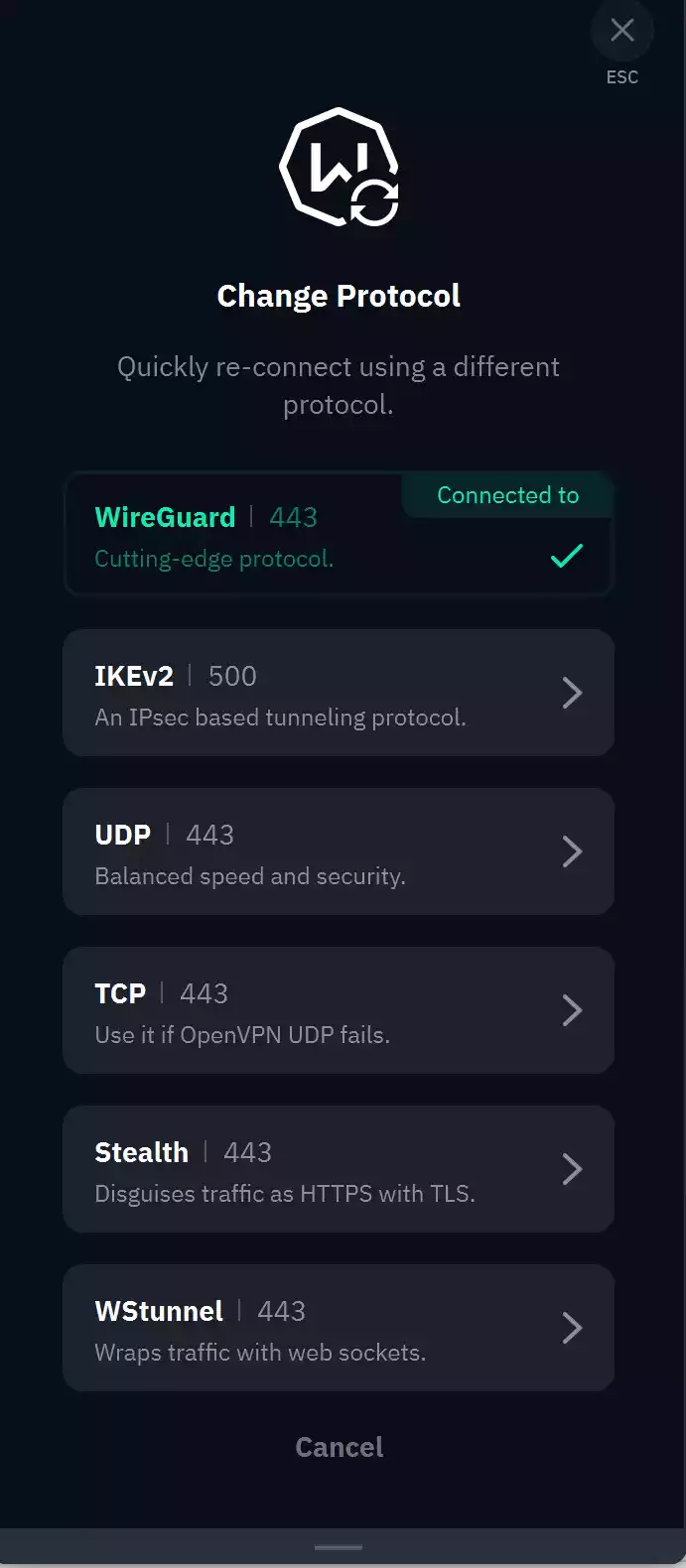
Free VPN servers can sometimes be crowded, which affects performance. Here are a few tips to help you get the best out of Windscribe Free:
- Switch Protocols: In Preferences, try using WireGuard or IKEv2 for faster speeds.
- Choose Nearby Servers: Connect to locations closest to your real location to reduce latency.
- Restart the App: Sometimes a simple restart can fix connection hiccups.
- Limit Background Apps: Close bandwidth-heavy applications to free up resources.
- Use Split Tunneling: Route only certain apps through the VPN, reducing load.
Final Verdict
Windscribe Free VPN is one of the best free VPN options for Windows 11 and 10. It offers strong privacy protections, easy-to-use apps, and a generous 10GB data allowance. While it’s not suitable for heavy streaming or torrenting, it’s perfect for beginners, everyday browsing, and casual VPN users.
Frequently Asked Questions (FAQ)
Is Windscribe Free really free?
Yes, Windscribe Free provides a genuine free VPN service with 10GB of data per month. You can use it without paying, though certain advanced features are limited to paid users.
Can I use Windscribe Free on multiple devices?
Absolutely. Windscribe Free allows unlimited device connections, so you can secure all your Windows, mobile, and other devices under one account.
How do I increase my monthly data on Windscribe Free?
You can increase your data by verifying your email (adds 10GB), tweeting about Windscribe (5GB), or referring friends (1GB each). Sometimes, Windscribe runs promotions with bonus data.
Is Windscribe Free safe to use?
Yes, Windscribe uses strong AES-256 encryption and maintains a strict no-logs policy. It also supports anonymous sign-up, making it a safe choice even on the free plan.
Can I stream Netflix with Windscribe Free?
Generally, no. The free servers don’t reliably unblock Netflix. For Netflix and other premium streaming services, you need the Windflix servers available only with Windscribe Pro.
Does Windscribe Free have ads?
No, Windscribe Free offers an ad-free experience. You won’t see ads in the app or while connected.
What platforms support Windscribe Free?
Windscribe Free works on Windows, macOS, Android, iOS, Linux, and browser extensions for Chrome, Firefox, and Edge.
Can I use Windscribe Free on Windows 11?
Yes, Windscribe Free supports both Windows 11 and Windows 10 with the same features and performance.