

Managing copied items efficiently is one of the easiest ways to speed up daily computer work. If you’ve ever lost important copied text because you overwrote your clipboard, then CopyQ is the solution you need. This open-source clipboard manager goes beyond the basics, letting you save, search, and organize everything you copy — from plain text to images and even custom formats.
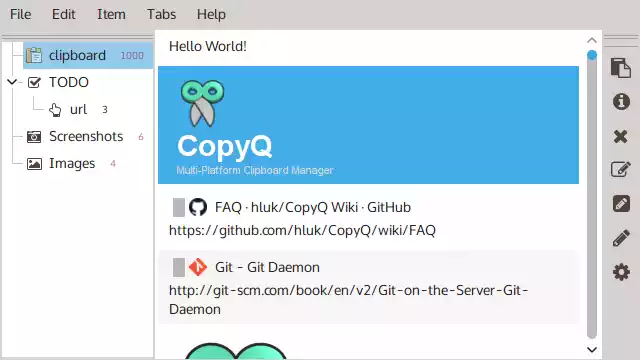
What is CopyQ?
CopyQ is a free and open-source clipboard manager that enhances the standard clipboard on Windows, Linux, and macOS. Unlike the default system clipboard that only stores one item at a time, CopyQ keeps a history of everything you copy so you can quickly reuse it. It also supports powerful features like tabbed organization, advanced search, scripting, and clipboard synchronization.
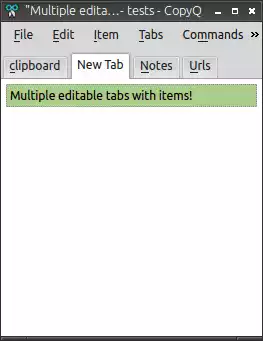
Why Would a Beginner Use CopyQ?
Beginners often struggle when they lose copied text or images by accidentally copying something new. With CopyQ, this frustration disappears. The app saves all clipboard items, so you can retrieve them anytime. Its simple interface makes it easy for new users to find previously copied content, while more advanced users can explore features like automation and custom commands.
Main Features of CopyQ
Here are some of the standout features that make CopyQ one of the best free clipboard managers available today:
- Stores text, HTML, images, and other custom formats.
- Tabbed interface for organizing different types of clipboard items.
- Advanced search and filter options.
- Customizable shortcuts for faster access.
- Supports scripting and command-line control for automation.
- Cross-platform support on Windows, Linux, and macOS.
- Option to encrypt clipboard items for better security.
How to Use CopyQ
Using CopyQ is straightforward. After installation, it runs quietly in the background, recording all copied items. You can open the CopyQ window with a simple shortcut to browse, edit, or delete entries. Double-clicking an item pastes it directly into the active window. You can also organize items into tabs — for example, one tab for work snippets and another for personal notes.
For quick tasks like trimming or cleaning text before pasting, you might also find Text Cleaner Formatter handy, which complements CopyQ nicely.
Safe Use Tips for Beginners
While CopyQ is safe and secure, beginners should follow a few tips:
- Enable encryption for sensitive data like passwords.
- Regularly clear history tabs you don’t need.
- Customize shortcuts to avoid conflicts with other apps.
When CopyQ Can Help You
CopyQ is useful for anyone who copies and pastes frequently. Writers can reuse research snippets, developers can store code fragments, and students can organize study notes. If you often need to paste previously used text or images, CopyQ will save you a lot of time. Pairing it with simple utilities like the Clipboard History Manager can create an even smoother workflow.
Download CopyQ
You can download the latest version of CopyQ from the official website: https://hluk.github.io/CopyQ/. It’s free, open-source, and available for Windows, Linux, and macOS.
Frequently Asked Questions About CopyQ
Is CopyQ free to use?
Yes, CopyQ is completely free and open-source, with no hidden costs.
Can CopyQ handle images as well as text?
Absolutely. CopyQ supports text, images, HTML, and custom data formats.
Does CopyQ work offline?
Yes, CopyQ runs locally on your device and does not require an internet connection to function.
Can I sync my clipboard between devices with CopyQ?
Yes, with some configuration, CopyQ allows synchronization across devices, making it great for multi-device workflows.
Is CopyQ safe for storing passwords?
While CopyQ supports encryption, it’s generally recommended to use a dedicated password manager for sensitive information. CopyQ is best used for general text and content snippets.
Conclusion
CopyQ is an essential tool for anyone who wants to boost productivity and take control of their clipboard history. With features like tabbed organization, scripting, and cross-platform support, it’s far more powerful than the built-in clipboard. Whether you’re a beginner or an advanced user, CopyQ can make your daily copy-paste tasks faster and smarter.