

GIFs are everywhere—from memes and social media reactions to tutorials and quick product highlights. They are short, looping animations that capture attention instantly. If you’ve ever wanted to create your own GIFs without complicated software, you’re in the right place. Our free Image to GIF Maker tool allows you to upload multiple images, arrange them in sequence, set timing, and download a professional-quality GIF in seconds. All directly in your browser, without installing anything.
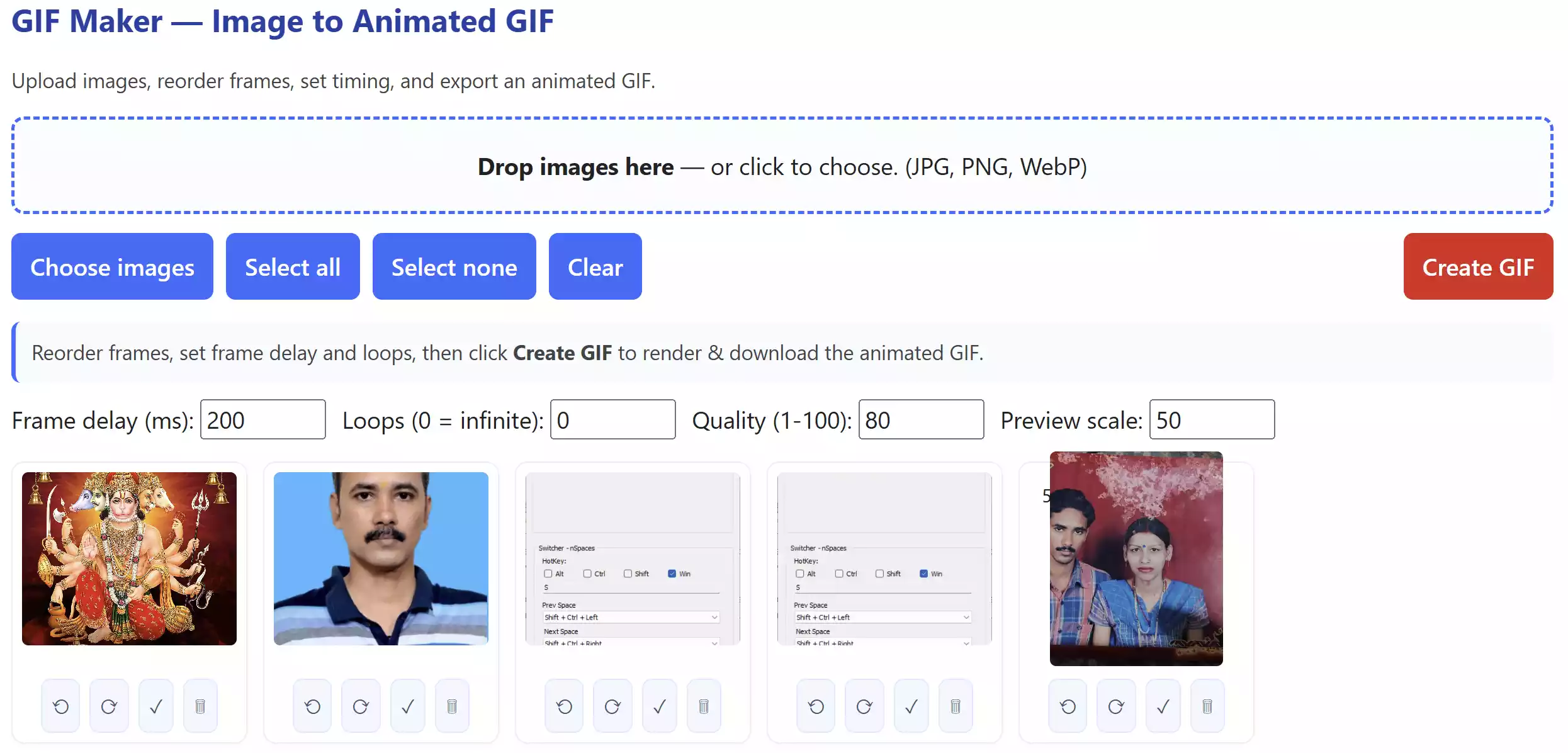
Why Choose Our Online GIF Maker?
Unlike bulky software such as Photoshop or GIMP, our GIF Maker is designed for simplicity. It is:
- Completely free – no hidden charges, watermarks, or trials.
- Fast & lightweight – runs entirely in your browser.
- User-friendly – drag, drop, reorder, and create in minutes.
- Flexible – supports JPG, PNG, and WebP images.
- Customizable – adjust frame delay, loop count, and scale to control file size and quality.
How to Use the GIF Maker Tool
Here’s a step-by-step guide for beginners:
Step 1. Open the GIF Maker online tool.
Step 2. Click on the “Choose images” button or drag and drop your photos into the tool.
Step 3. Arrange the frames in the order you want. You can drag thumbnails to reorder easily.
Step 4. Set the frame delay (speed) in milliseconds. A lower delay means faster animation.
Step 5. Choose how many times the GIF should loop. Set to 0 for infinite loops.
Step 6. Adjust the Scale option if you want to reduce the output size and file weight.
Step 7. Click “Create GIF” and wait a few seconds for the tool to process.
Step 8. Preview your animated GIF and hit “Download” to save it instantly.
Understanding the Scale Option
One unique feature of this tool is the Scale option. Scale determines the output resolution relative to the original images:
- 100% – Full size (sharpest quality, but larger file size).
- 50% – Half size (default, balances quality and performance).
- 25% – Quarter size (useful for lightweight GIFs).
- 10% – Very small GIFs for web chats or previews.
This flexibility allows you to optimize GIFs depending on whether you want high detail or fast-loading animations for websites and social media.
Where Can You Use GIFs?
GIFs are versatile and can be used almost anywhere:
- Social Media – Facebook, Twitter (X), Instagram, and WhatsApp love short looping GIFs.
- Blog Posts – Break text-heavy content with eye-catching visuals.
- Tutorials – Demonstrate steps quickly without long videos.
- Email Marketing – A subtle animation can improve engagement.
Pros and Considerations
Pros:
- Works directly in your browser, no installation.
- 100% free, no signup required.
- No watermarks on downloads.
- Customizable speed, scale, and looping.
- Supports popular formats (JPG, PNG, WebP).
Considerations:
- Large image sets can take longer to render.
- At 100% scale, GIF file sizes may become heavy.
- Currently supports images only (we have made a separate video-to-GIF tool).
GIF Maker vs Desktop Software
While software like Photoshop and GIMP provide advanced editing, they come with steep learning curves and licensing costs. Our tool is free, quick, and focuses on just one task: creating GIFs from images. For most everyday users—bloggers, students, marketers—this tool is more than enough.
Best Practices for Creating GIFs
- Keep file size under 5 MB for smooth sharing.
- Use fewer frames for faster rendering.
- Use a 50% scale for a good balance of quality and file size.
- Set frame delays around 200–300 ms for readability.
FAQ – GIF Maker Online
What image formats are supported?
Currently, the tool supports JPG, PNG, and WebP images.
Can I create an infinite loop GIF?
Yes. Set the “Loops” option to 0, and your GIF will repeat endlessly.
Is there a watermark?
No, all GIFs created are completely watermark-free.
How big can my GIF be?
There is no hard limit, but larger images and many frames will increase rendering time and file size. Scaling down helps reduce this.
Can I edit GIFs after creation?
No, this tool focuses on creating GIFs from images. If you want to compress or optimize GIFs, try our Image Compressor & Resizer tool first.
Conclusion
GIFs are an exciting way to share moments, ideas, and humor online. With this free GIF Maker, you can transform your images into fun looping animations without hassle. Whether it’s for memes, tutorials, or marketing, this tool makes it simple. Try it now and create your first animated GIF within seconds!