

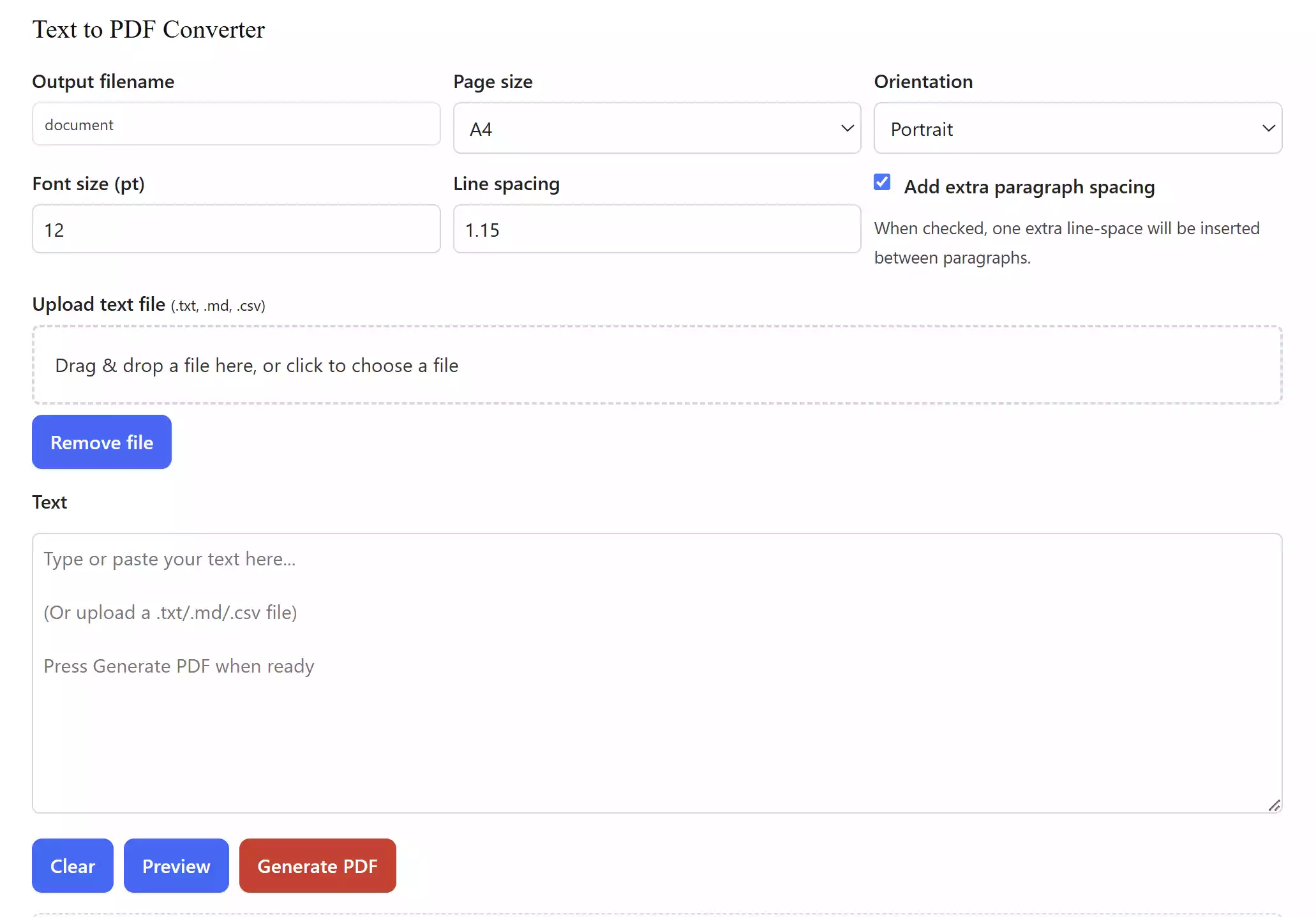
What is the Text to PDF Converter? The Text to PDF Converter is a free online tool that allows you to type or paste text and instantly generate a clean PDF file. It also supports uploading .txt, .md, and .csv files, making it versatile for students, bloggers, office users, and developers who work with plain text formats.
Why Would a Beginner Use the Text to PDF Converter?
Many beginners struggle when they need to save text notes, assignments, or documents as PDFs. Instead of installing bulky software, this simple converter helps them create a professional PDF in seconds. No technical knowledge is required — type, paste, or upload, and click Generate PDF.
Main Features of the Text to PDF Converter
- Type or paste any text directly into the editor.
- Upload text files (
.txt,.md,.csv) for quick conversion. - Customize page size (A4, Letter, A5) and orientation (Portrait, Landscape).
- Adjust font size and line spacing for better readability.
- Option to add or remove extra paragraph spacing.
- Preview content before generating the PDF.
- Works online — no installation, no registration required.
How to Use the Text to PDF Converter
Using this tool is extremely simple:
Step 1. Visit the Text to PDF Converter page.
Step 2. Type or paste your text into the editor, or upload a .txt, .md, or .csv file.
Step 3. Adjust page size, font size, line spacing, and orientation if needed.
Step 4. Click on Preview to review your content.
Step 5. Press the red Generate PDF button to instantly download your PDF.
Safe Use Tips for Beginners
- Keep filenames simple — avoid using special characters like
?,:, or*when saving PDFs. - If you are converting a large text file, preview before generating to ensure formatting looks correct.
- Always save your final PDF in a secure folder, especially if it contains personal information.
When the Text to PDF Converter Can Help You
This tool can be a lifesaver in many situations:
- Students creating quick project reports or assignments.
- Office users converting notes into shareable PDFs.
- Developers who need to quickly turn markdown (.md) or CSV files into a PDF format.
- Writers and bloggers who draft text and want a printable PDF copy.
Sometimes, instead of plain text, you may have a full Word document that needs to be turned into a PDF. In that case, our Word to PDF Converter will help you quickly transform DOC or DOCX files into polished PDFs.
Download Text to PDF Converter
You don’t need to download any software. Just use our Free Text to PDF Converter directly in your browser. It’s fast, free, and works on Windows, macOS, Linux, Android, and iOS devices.
Frequently Asked Questions About Text to PDF Converter
Q1. Can I convert text into PDF without installing software?
Yes, this online tool works directly in your browser — no installation needed.
Q2. What file formats does it support?
You can type text directly or upload .txt, .md, and .csv files.
Q3. Is this tool free to use?
Yes, it’s completely free and requires no registration.
Q4. Will my uploaded files be saved?
No, everything is processed in your browser. Your text stays private and never leaves your device.
Q5. Can I use it on mobile?
Yes, it works on smartphones and tablets just like on a computer.
Conclusion
The Text to PDF Converter is a must-have utility for anyone who regularly works with text. Whether you’re a beginner or an advanced user, it saves time and effort by instantly creating polished PDFs without installing additional software.
If you end up creating multiple PDFs and want to combine them into a single file, you can use our free Merge PDF Tool. It allows you to join several PDFs together without installing any software.