

Need a quick way to check exact age, total days, or when the next birthday falls? Our Age Calculator does all of that in your browser — no signups, no data sent to servers. It gives a clean years–months–days breakdown, totals (days/weeks/hours/minutes/seconds), next-birthday countdown, and zodiac sign. You can also export the results as polished PNG mini-cards ready to share or drop into slides.
What is the Age Calculator?
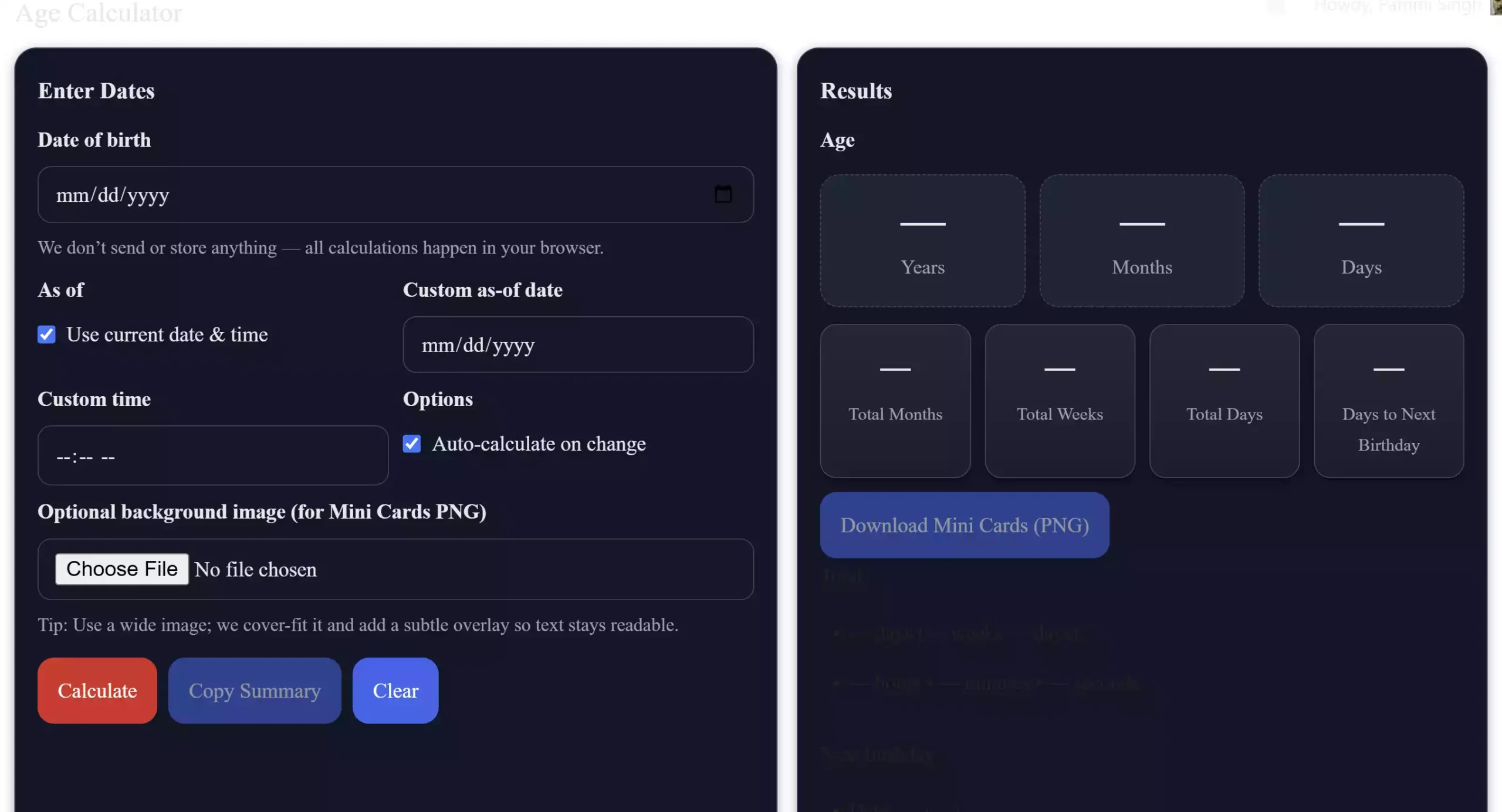
The Age Calculator is a client-side tool that calculates a person’s age from a date of birth to an “as-of” date (default: now). It shows:
- Years, months, and days (Y·M·D breakdown)
- Total days, weeks, hours, minutes, and seconds lived
- Next birthday date, weekda,y and countdown (days left)
- Zodiac sign (Western)
- Shareable mini-cards (PNG) — export-ready images with built-in safe margins and crisp integer-snapped rendering
Why a beginner would use this tool
This is ideal for quick checks (age verification, greetings planning, creating personal stats) and for content creators who want a shareable visual of age stats. Because everything runs in your browser, it’s private and works offline once loaded. The exported PNGs are great to attach to emails, social posts, or slide decks — and you can quickly edit or resize those images with tools like our Image Compressor & Resizer after download.
Main features
- Private & Secure: All calculations happen client-side; nothing is uploaded.
- Flexible “As of” date: Use current time or set a custom date/time for historical/future checks.
- Auto-calc: Optional auto-calc on input change for instant feedback.
- Mini-cards export: Download a 2× raster PNG with integer-snapped draws to avoid clipping and keep text sharp.
- Accessible UI: Keyboard-friendly controls and visible focus outlines for screen-keyboard users.
How to use the Age Calculator
Simple, beginner-friendly steps:
Step 1. Open the Age Calculator page and enter the date of birth (DOB).
Step 2. Leave “Use current date & time” checked to compute the age as of now, or uncheck it and set a custom “As of” date/time.
Step 3. Click the Calculate button (or enable Auto-calculate) to see the Y·M·D breakdown and totals.
Step 4. To share, click Download Mini Cards (PNG) — the tool creates a neatly formatted image you can save.
Step 5. (Optional) If you want to resize or optimize the exported image for web or slides, use our Image Compressor & Resizer to adjust dimensions and file size quickly.
Safe use tips for beginners
- The tool stores nothing on servers — if you close the tab, any unsaved background image selection is lost. Download images immediately if you want to keep them.
- For best-looking PNG exports, choose a wide background image (if using one) and avoid extremely small or very large images — the tool previews the chosen image and reports dimensions.
- If you share images publicly, remember they contain the date label shown in the exported card — remove or edit that if you want to keep the as-of date private.
When this tool can help you
- Planning birthday posts or messages (know the exact countdown)
- Creating a visual stat for a profile or resume (download mini-card and attach to a slide)
- Teaching date arithmetic or demonstrating age differences in a classroom
- Quick age checks without installing any software
Download & try
Open the live tool at: https://gearupwindows.com/age-calculator/
Related tools you might find useful
If you plan to edit or optimize the PNG export, try our Image Compressor & Resizer to reduce file size or resize the image for social platforms. To place the mini-card into slides or presentations, the Slideshow Maker is a fast way to create a simple slide deck with your exported image.
Pros / Considerations
Pros
- Completely client-side — strong privacy guarantees (no uploads).
- Accessible and keyboard-friendly UI with visible focus outlines.
- High-quality PNG export with integer-snapped rendering to avoid clipping.
- No signups, free to use in any modern browser on desktop or mobile.
Considerations
- PNG export uses a fixed 2× raster — excellent for most uses, but not a vector format.
- If you add very large background images, decoding may be slower on low-end devices.
- Because calculations are client-side, shareable images are the easiest way to persist results; the tool does not save histories.
Frequently Asked Questions
Is my data uploaded to a server?
No — all calculations and PNG generation are performed in your browser. Nothing is sent to the server.
Can I change the as-of date to see ages at a past or future date?
Yes. Uncheck “Use current date & time”, set a custom date (and time if needed), then calculate.
How accurate is the next-birthday calculation for leap-year births (Feb 29)?
For people born on Feb 29, the tool treats the birthday as Feb 28 in non-leap years (this is shown with a helper note when relevant).
What format is the PNG export, and how big is the image?
The export is a PNG image (export filename: age-mini-cards.png). The tool uses a fixed internal layout and a 2× raster for crisp text. You can resize or compress the PNG afterward with our Free Image Compressor & Resizer.
Can I copy a textual summary instead of downloading an image?
Yes — use the Copy Summary button to copy a readable text summary to your clipboard for pasting into messages or documents.
Conclusion
The Age Calculator on GearUpWindows is a fast, private, and accessible way to compute exact age details and produce shareable graphics without leaving your browser. Try it now and export a mini-card to use in your posts, slide,s or messages.