

Have you ever felt frustrated waiting for Windows Search to find a file? Whether you are a power user, IT admin, or just someone with thousands of documents, the built-in Windows search can often feel slow and unreliable. This is where Everything, a small and free search utility by Voidtools, comes in. It indexes all your files in seconds and lets you find anything instantly — no lag, no clutter, and no waiting.
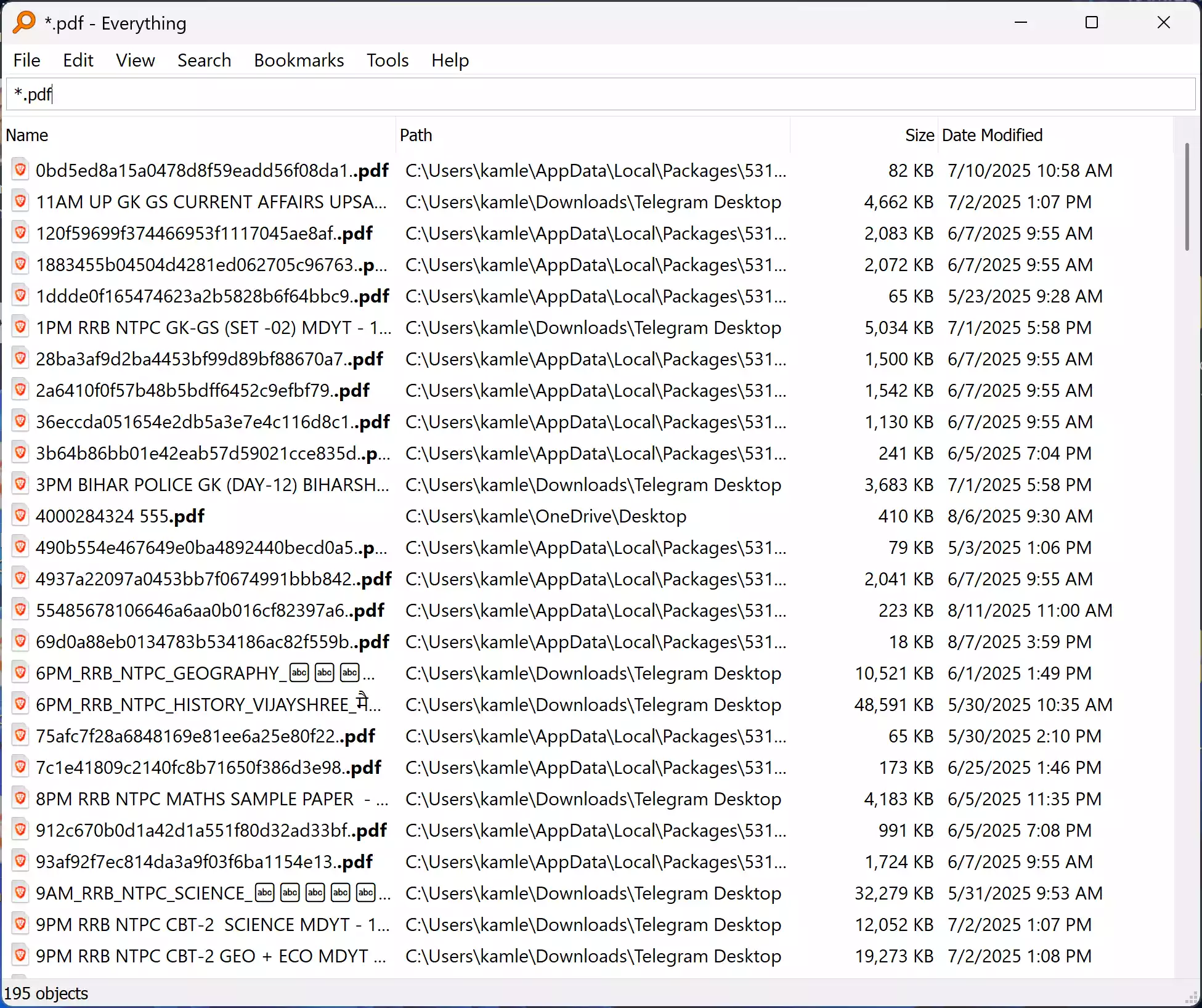
Unlike Windows Search, which relies on indexing service and often misses files or takes forever to update, Everything builds its own ultra-light database from the NTFS file table. The result? Lightning-fast searches that show results as you type. The tool is free, beginner-friendly, and works across all modern versions of Windows.
In this post, we’ll show you how to download, install, and use Everything effectively, along with tips, pros, and considerations, and answers to common FAQs.
Key Features of Everything
- Instant Results: Search results appear as you type, even across drives with millions of files.
- Tiny Footprint: Uses minimal RAM and CPU, runs quietly in the background.
- Live Updates: Automatically indexes new files and folders as they appear.
- Advanced Filters: Supports wildcards, regular expressions, and search operators.
- File Actions: Double-click results to open files, or right-click for context menu operations.
- Portable Version: Available without installation, perfect for technicians on USB drives.
How to Install and Use Everything
Getting started with Everything is very simple. Follow these steps:
- Download Everything: Visit the official Voidtools website and download the latest version (installer or portable).
- Install or Run: For the installer, run the setup wizard. For portable, just extract and launch
Everything.exe. - Allow Permissions: The first launch may request admin permissions to build the file index. Grant permission for the best results.
- Initial Indexing: Everything quickly scans the NTFS file table and builds its index (usually takes seconds).
- Start Searching: Type any part of the filename — results appear instantly as you type.
Tips for Power Users
- Use
*.pdfto list only PDF files,*.mp3for audio, or combine terms likereport *.docx. - Exclude system folders by going to Tools > Options > Exclude to keep searches clean.
- Assign a hotkey so you can launch Everything with a single shortcut.
- Use Bookmarks inside Everything to save frequent searches.
- Enable Service Mode for indexing non-admin drives seamlessly.
Pros and Considerations
- Pros: Free, lightning-fast, tiny footprint, portable version available.
- Pros: Updates in real-time when files are added or removed.
- Considerations: Searches filenames only (not file contents).
- Considerations: Requires admin rights for best indexing of all drives.
FAQs about Everything
Q: Does Everything search inside file contents?
A: No, Everything indexes only file names. For full content search, pair it with other tools like DocFetcher. However, for filename search, Everything is unmatched in speed.
Q: Is Everything safe to use?
A: Yes, Everything is safe and does not modify files. It only reads the file table for indexing.
Q: Can I use Everything without installing?
A: Yes, the portable version works directly from a USB drive — perfect for tech support or field work.
Q: Does it support FAT or exFAT drives?
A: Everything is optimized for NTFS, but you can manually include other drives (with slower indexing).
Why GearUpWindows Recommends Everything
Everything is one of those must-have freeware tools that makes Windows feel fast and efficient. For anyone frustrated with Windows Search, it is a lifesaver. It’s lightweight, works out-of-the-box, and has no unnecessary bloat. Whether you’re a casual user looking for lost documents or a professional managing large file libraries, Everything is the right choice.
Related Freeware Tools
On GearUpWindows, we cover several other lightweight and useful tools for Windows users. Check out our Online Free Web Tools hub for more recommendations. You may also find our guide on Best Free Screen Recorders useful if you often manage large media files.
Conclusion
Everything by Voidtools lives up to its name — it finds everything, instantly. With its blazing-fast search, tiny footprint, and free price tag, it deserves a spot on every Windows PC. Install it once, and you’ll never wait for a file search again.