

Looking for a reliable and free tool to convert NTFS to FAT32 or FAT32 to NTFS on your Windows PC? IM-Magic Partition Resizer Free Edition is a user-friendly partition management tool that does more than just resizing. It also allows safe and lossless file system conversion between NTFS and FAT32.
Why Choose IM-Magic Partition Resizer?
IM-Magic Partition Resizer Free is more than just a disk partition tool. It provides users with the ability to resize, move, copy, format, delete, and explore partitions without data loss. One of its hidden gems is the ability to convert file systems between NTFS and FAT32, both ways — something not all free tools offer.
How to Convert NTFS to FAT32 Using IM-Magic Partition Resizer?
Follow these steps to safely convert an NTFS partition to FAT32:
Step 1. Download and install IM-Magic Partition Resizer Free from the official website.
Step 2. Launch the software and let it detect your drives automatically.
Step 3. Right-click on the NTFS partition you want to convert.
Step 4. Select the “Convert NTFS to FAT32” option from the context menu.
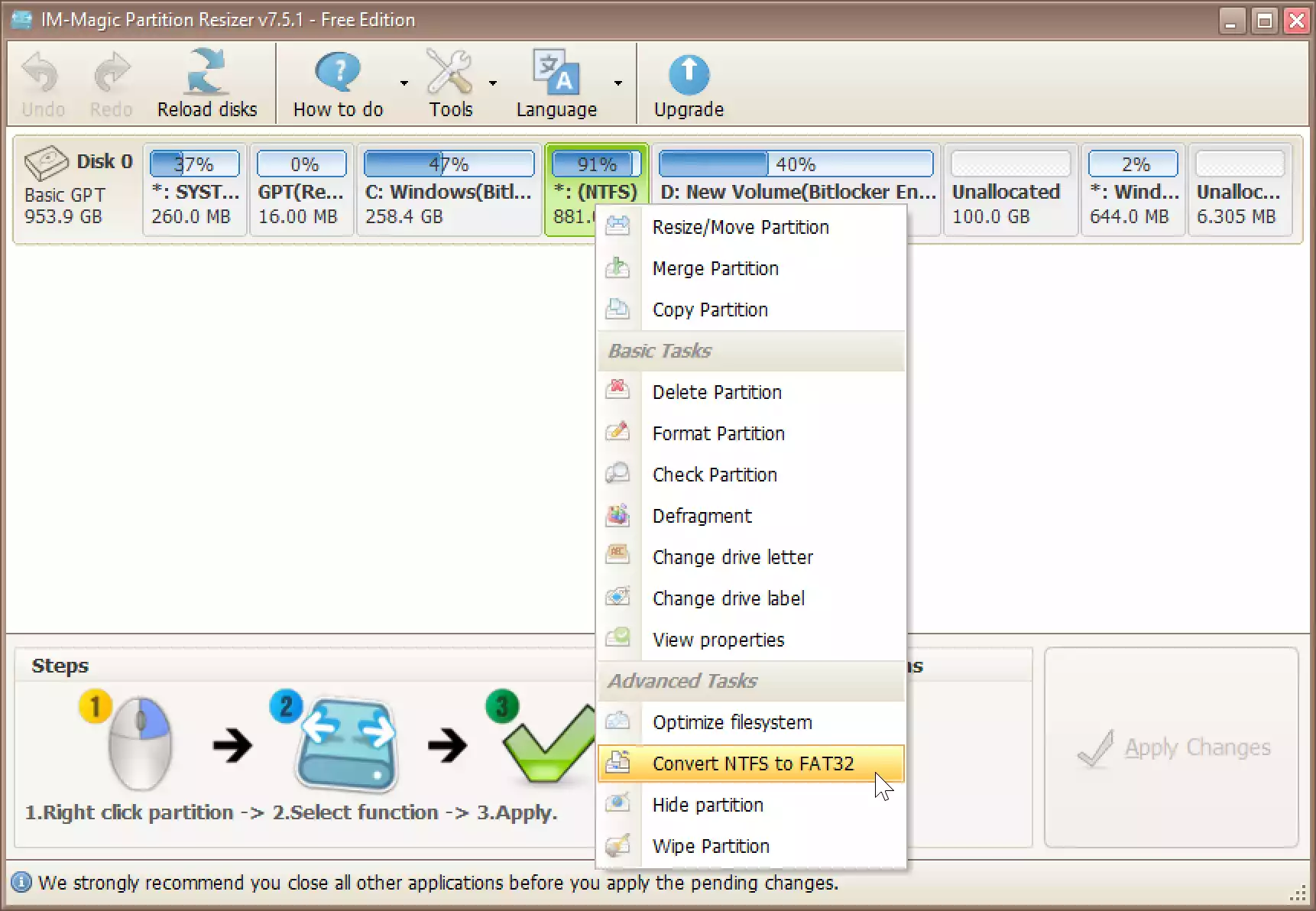
Step 5. Click “OK” to start the conversion process.
The process completes without formatting or losing any files, making it a safe alternative to the format command.
How to Convert FAT32 to NTFS?
The tool also allows reverse conversion, from FAT32 to NTFS:
Step 1. Open the application and right-click the FAT32 drive.
Step 2. Choose the “Convert FAT32 to NTFS” option.
Step 3. Confirm and apply the changes.
Other Features
- Resize/move partitions without data loss
- Explore disk contents without opening File Explorer
- Convert disk formats without reinstalling Windows
- Supports Windows 11, 10, 8, and 7 (32-bit and 64-bit)
Looking for Alternatives?
If you’re interested in more options, check out our article on NIUBI Partition Editor, another excellent free tool that also supports bidirectional file system conversion. Or, explore our in-depth guide on how to convert NTFS to FAT32 using AOMEI Partition Assistant.
Conclusion
IM-Magic Partition Resizer Free is a safe, easy, and effective tool for converting between NTFS and FAT32 file systems without data loss. Whether you’re preparing a drive for compatibility with certain devices or optimizing storage, this free tool makes the process seamless on Windows 11 and 10.
Give it a try and manage your partitions with confidence.