

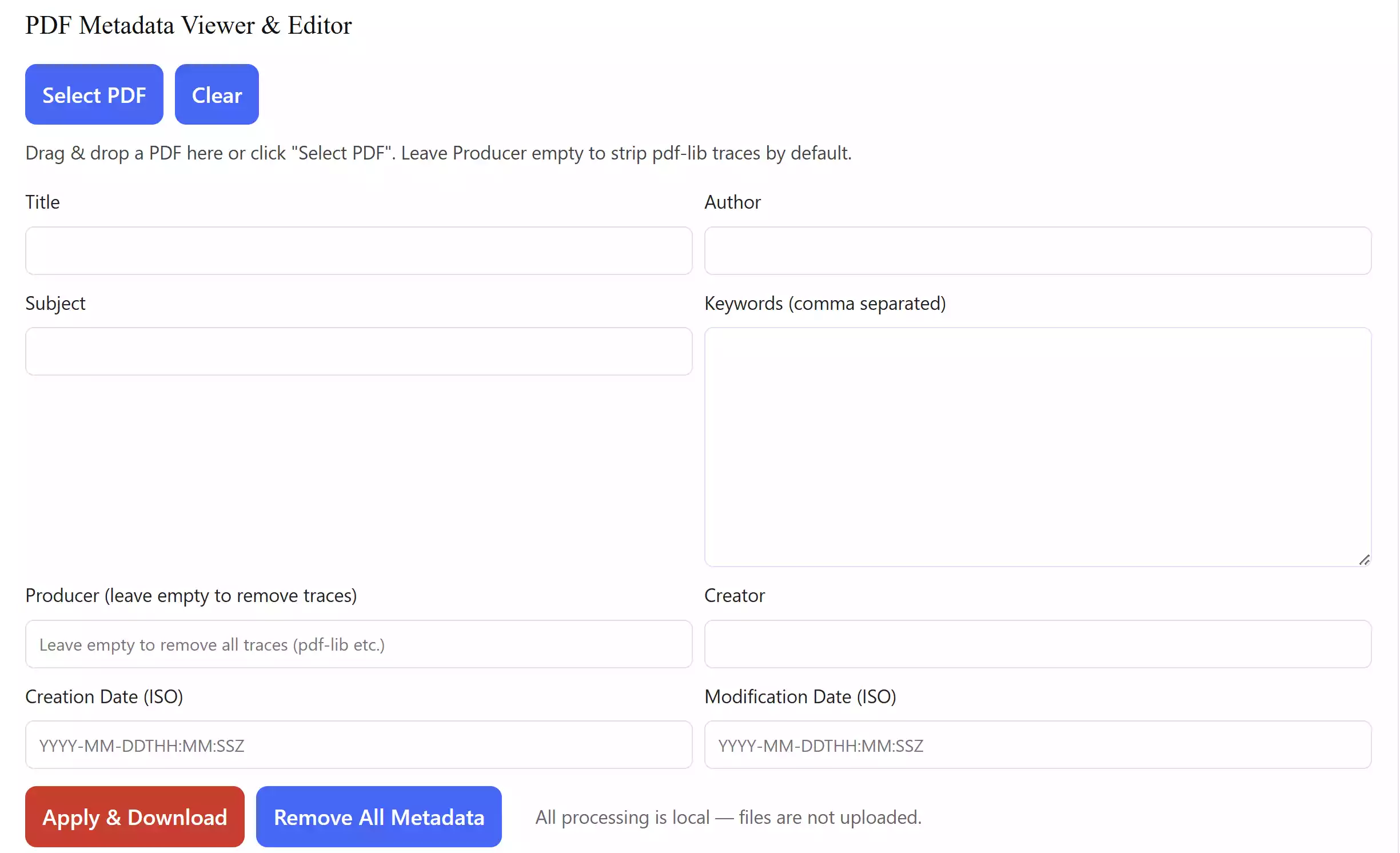
When you share a PDF online, it may contain hidden information called metadata. This can include the document title, author, subject, keywords, creation date, modification date, and even the software used to create it. Our free PDF Metadata Viewer & Editor lets you inspect and clean this data quickly without leaving your browser. If you prefer an offline option, you can try the PDF Metadata Viewer & Editor for Windows developed by GearUpWindows.
Why Use a PDF Metadata Editor?
Metadata can reveal more about your document than you want others to see. For example, the PDF might list the software used to generate it or an author name you never intended to publish. Removing or editing this information improves your privacy and makes your files look more professional.
Main Features
- View PDF metadata instantly — title, author, subject, keywords, producer, creator, and more.
- Edit fields and apply changes with a single click.
- Remove all metadata in one step for a completely clean file.
- All processing happens locally in your browser — no uploads, no server storage.
- Works on Windows, macOS, Linux, and even mobile browsers.
How to Use the PDF Metadata Tool
Using this tool is simple. Just follow these steps:
Step 1. Visit the PDF Metadata Viewer & Editor tool.
Step 2. Drag and drop your PDF file into the drop zone or click the “Select PDF” button.
Step 3. The tool will display existing metadata fields. You can edit them or leave them blank.
Step 4. Click “Apply & Download” to save changes, or “Remove All Metadata” to strip everything.
Step 5. Download the updated PDF. Your file is ready to share without hidden details.
Safe Use Tips
- Always keep a backup of your original PDF in case you want to restore the metadata later.
- Do not share sensitive files online unless necessary. Since this tool is browser-based, nothing is uploaded, but being cautious is always wise.
- If you want to manage multiple PDFs at once, consider using a desktop utility. You can check our guide on merging PDF files for free advanced batch processing.
When This Tool Can Help
This tool is perfect when you:
- Need to remove the default “pdf-lib” producer tag added by editing libraries.
- Plan to share PDFs online and want to hide personal or technical details.
- Work with client documents where professional presentation is important.
- Simply want to check what metadata is stored inside a file before distribution.
Download PDF Metadata Viewer & Editor
You don’t need to download anything. The tool runs directly in your browser. Just go to the PDF Metadata Viewer & Editor page and start editing immediately.
Frequently Asked Questions About PDF Metadata
Q1. What is PDF metadata?
PDF metadata is hidden information stored inside a file, such as the author, creation date, and software used. It helps identify documents but may also reveal private data.
Q2. Can I remove all metadata from a PDF?
Yes. This tool includes a “Remove All Metadata” button that wipes hidden fields like author, producer, and keywords, giving you a clean file.
Q3. Is this tool safe?
Yes. All processing happens in your web browser. Your files are not uploaded to any server.
Q4. Does this work on mobile?
Yes. The PDF Metadata Viewer & Editor runs in modern mobile browsers as well as on desktop platforms.
Conclusion
Managing metadata is often overlooked, but it can reveal unwanted information. With our free online PDF Metadata Viewer & Editor, you can easily inspect, edit, or remove hidden details. It’s fast, secure, and requires no installation.