

The Image to Text OCR tool lets you convert images into editable and selectable text directly in your browser. It supports JPG, PNG, and WEBP files, and uses Tesseract.js to process everything on your device — meaning your data stays private and never leaves your computer. Whether you’re extracting text from a scanned page, a screenshot, or a photo, this free online OCR makes the process quick and simple.
What is Image to Text OCR?
Optical Character Recognition (OCR) is a technology that converts printed or handwritten text inside images into machine-readable text. Our tool performs OCR directly in your browser without requiring installation or cloud uploads, so it’s safe, fast, and platform-independent.
Why Use Image to Text OCR?
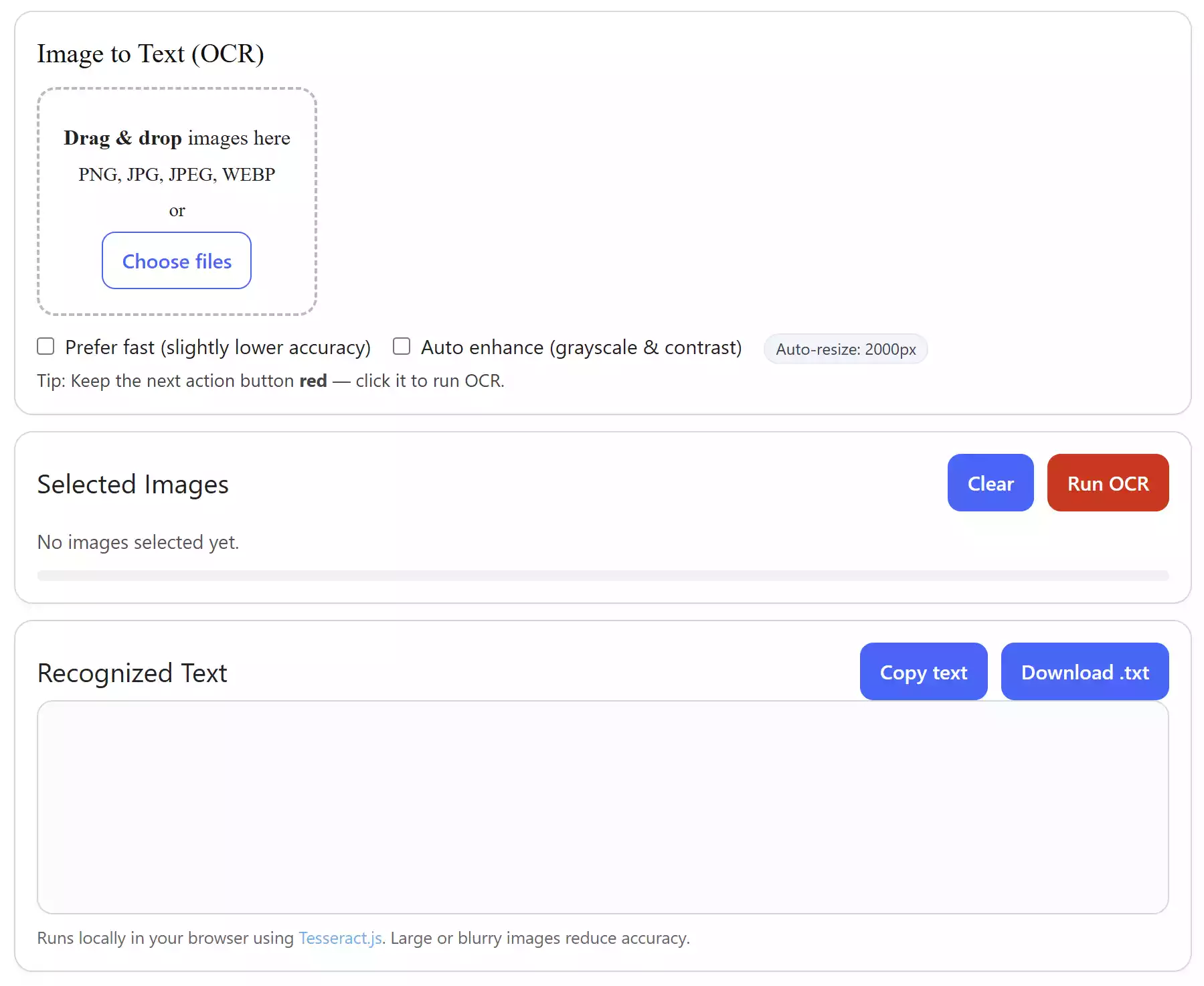
If you’ve ever tried to copy text from an image or scanned PDF page, you know it’s impossible without OCR. This tool solves that instantly. Beginners will appreciate its drag-and-drop simplicity, while advanced users can fine-tune recognition with options like Fast Mode and Auto Enhance.
Main Features of Image to Text OCR
- Works on all major platforms – Windows, macOS, Linux, Android, and iOS
- Supports JPG, PNG, and WEBP formats
- Drag & Drop or File Picker input
- Fast Mode for quicker recognition
- Auto Enhance improves low-quality or faded images
- Copy to Clipboard or Download as .TXT instantly
- Runs entirely in your browser, with no server uploads
- Free and unlimited to use
How to Use Image to Text OCR
Step 1. Open Image to Text (OCR) tool.
Step 2. Drag & drop your image file (JPG, PNG, or WEBP) into the tool or click “Choose files.”
Step 3. Optionally enable Fast Mode for quicker processing or Auto Enhance to improve clarity.
Step 4. Click the red Run OCR button.
Step 5. The extracted text will appear in the output box. You can copy it or download it as a .TXT file.
Safe Use Tips
- Use clear, high-contrast images for the best accuracy.
- Disable Fast Mode if you need maximum precision.
- Enable Auto Enhance when working with blurry or scanned images.
- Processing large files may take longer on older devices, but all work is local and private.
When Image to Text OCR Can Help You
- Extracting text from scanned documents
- Copying text from screenshots or photos
- Digitizing handwritten notes (accuracy depends on handwriting clarity)
- Making images searchable and editable
Image OCR vs PDF OCR
If you want to extract text from image files, this tool is perfect. But if you’re working with multi-page PDFs, you may prefer our PDF OCR tool, which is optimized for scanned PDF documents.
Frequently Asked Questions About Image to Text OCR
Is the tool free?
Yes, it’s completely free with no usage limits.
Does it upload my images to a server?
No. Everything runs in your browser with Tesseract.js, so your files never leave your device.
Can it recognize handwriting?
It works best with printed text. Handwriting recognition is possible, but accuracy depends on clarity and style.
Which devices are supported?
Any modern browser on Windows, macOS, Linux, Android, or iOS. No installation required.
Conclusion
The Image to Text OCR tool is a safe, free, and cross-platform way to convert images into editable text. Whether you’re extracting text from photos, screenshots, or scanned pages, this browser-based solution makes OCR fast, private, and reliable. Try it now and make your images useful in just a few clicks.