

Have you ever accidentally deleted important files or experienced data loss due to a system mishap? It can be a frustrating and distressing situation. However, there’s good news. With IObit Undelete, a user-friendly free file recovery software, you can restore deleted and lost files effortlessly without needing technical expertise.
In this gearupwindows guide, we’ll show you how IObit Undelete can help you recover your valuable data with ease and confidence. Whether you’re dealing with accidental deletion or a system error, this tool is designed to simplify the recovery process.
Why IObit Undelete?
IObit Undelete makes recovering accidentally deleted or lost files simple and secure. Whether the loss occurred due to formatting errors, virus attacks, or human mistakes, this tool provides a reliable solution.
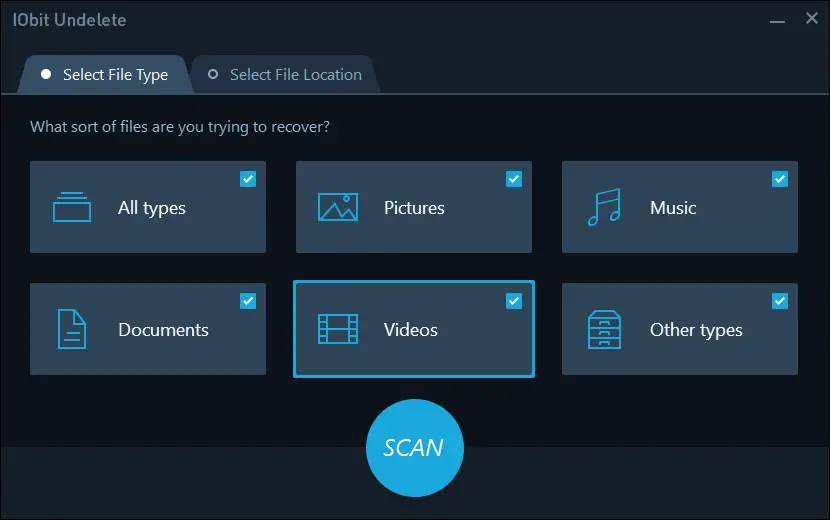
It supports all major file types like documents, images, videos, emails, and music. You can recover data from internal drives, external hard disks, USB flash drives, SD cards, and more. With support for NTFS, FAT32, exFAT, and other file systems, the tool is versatile and efficient.
If you’ve already tried tools like WinfrGUI and are looking for a simpler and more visual interface, IObit Undelete is worth considering.
Key Features
- One-click recovery for deleted or lost files from multiple storage types.
- Non-destructive recovery process that protects existing data.
- Targeted scan lets you choose specific drives or folders for faster results.
- Deep scan helps locate hidden or long-lost files from formatted partitions.
- Built-in file preview ensures you restore exactly what you need.
- Frequent updates for better compatibility and improved recovery rates.
- Simple interface designed for both beginners and advanced users.
How to Use IObit Undelete?
IObit Undelete is designed for ease of use. Here’s how you can recover your files in just a few steps:
Step 1. Download and install IObit Undelete from the official website.
Step 2. Open the software and choose the location where the files were lost.
Step 3. Select Quick Scan or Deep Scan based on your needs.
Step 4. Once the scan completes, preview the recoverable files.
Step 5. Select the files you want and click Recover.
Step 6. Save the recovered files to a different location to avoid overwriting.
That’s it! Your lost files are now safely recovered.
Best Use Cases
IObit Undelete is suitable for a wide range of recovery situations, such as:
- Files deleted with Shift + Delete or from an emptied Recycle Bin.
- Data lost due to virus attacks or software crashes.
- Files removed by accident during disk cleanup or optimization.
- Corrupted or formatted USB drives and SD cards.
- Unexpected shutdowns causing unsaved work or missing files.
The sooner you act, the higher your chances of full recovery. Avoid using the affected drive before scanning to prevent overwriting lost data.
Download IObit Undelete
You can download IObit Undelete from its official website. The installation is lightweight, free from bloatware, and doesn’t require advanced setup. It works well on both Windows 10 and Windows 11 systems.
Conclusion
Accidental file deletion or data loss doesn’t have to be the end of the road. With IObit Undelete, recovering lost files becomes quick, easy, and safe. Whether it’s personal photos, work documents, or multimedia files, this tool can bring them back in just a few clicks.
Thanks to its user-friendly interface, support for multiple file types, and advanced scanning options, IObit Undelete is an excellent choice for anyone looking to recover data efficiently.
If you’re exploring other free solutions, also check out Recuva for Windows, which is another trusted tool for basic file recovery.
Don’t panic when data goes missing—download IObit Undelete and take control of your file recovery needs today.