

JDiskReport is a free and open-source disk analysis tool that provides detailed information about the storage space usage of your computer. It is available for Windows, Mac OS X, and Linux, and is developed by JGoodies, a software development company based in Karlsruhe, Germany.
In this gearupwindows article, we’ll take a closer look at JDiskReport and explore some of its key features.
What is JDiskReport?
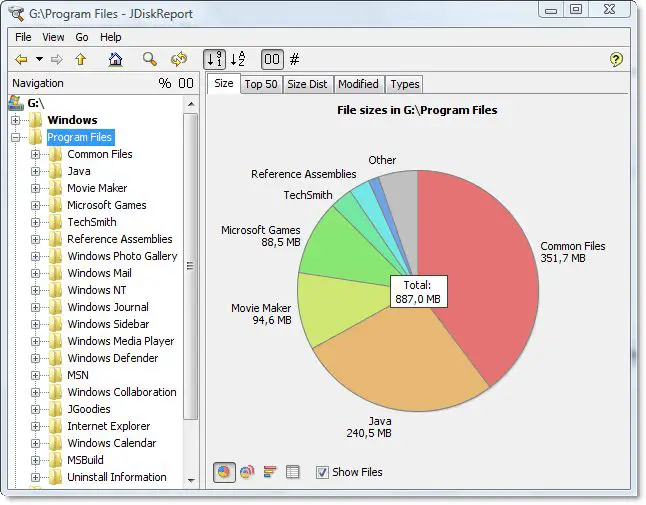
JDiskReport is a cross-platform disk analysis tool that offers a clear and detailed view of your storage usage through an intuitive interface. After installation, users are greeted with a dual-pane layout featuring a file system tree and visual reports like pie charts, bar graphs, and treemaps that make it easy to spot space-hogging files and folders. It supports advanced filtering by file type, size, and date, along with a built-in file search feature for locating specific files. With options to export reports in formats like CSV, HTML, and XML, and compatibility with Windows, macOS, and Linux (with Java), JDiskReport is a versatile and lightweight tool for efficient disk management.
Key Features
- Dual-pane interface with visual disk usage reports
- Scans entire drives or specific folders
- Graphical display options: pie charts, bar graphs, treemaps
- Filters by file type, size, and modification date
- Built-in file search by name, size, and attributes
- Export reports to CSV, HTML, and XML formats
- Lightweight and cross-platform (Windows, macOS, Linux)
- Requires Java Runtime Environment (JRE) to run
Download JDiskReport
You can get this free application from its official website.
Conclusion
In summary, JDiskReport is a useful tool for analyzing the storage space usage of your computer. Its ability to display the information in various graphical formats makes it easy to identify large files and folders that are taking up too much space. Its file search functionality and ability to export reports to different file formats are also useful features. Overall, if you’re looking for a free and easy-to-use disk analysis tool, JDiskReport is definitely worth checking out.