

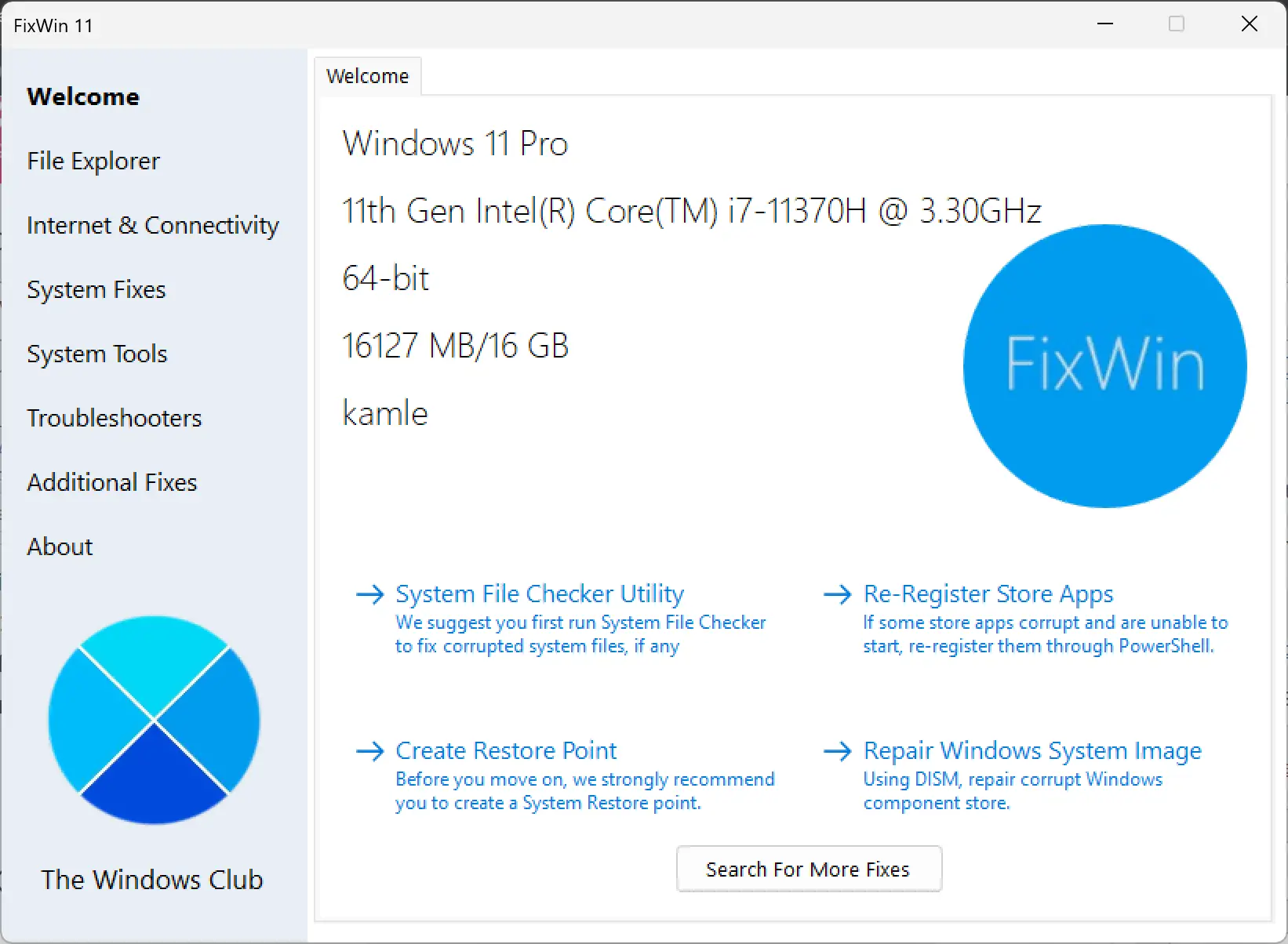
FixWin 11 is a powerful and reliable PC repair software designed specifically for Windows 11 and Windows 10 operating systems. With its user-friendly interface and extensive range of fixes, FixWin 11 is the ultimate solution for resolving various Windows issues and problems with just a single click.
What is FixWin 11?
FixWin 11 is a compact, portable troubleshooting utility originally developed to make common Windows repairs easy and accessible. It groups a wide range of fixes into logical categories and lets users apply tested solutions without digging through registry keys or advanced settings.
If you’re looking for a similar lightweight Windows repair tool, you can also explore Tweaking.com Windows Repair.
Key Features of FixWin 11
- Comprehensive Fixes: Fixes are organized under tabs such as File Explorer, Internet & Connectivity, System Fixes, System Tools, Troubleshooters, and Additional Fixes. It covers tasks like restoring missing icons, resolving connectivity problems, repairing Start Menu issues, and addressing Windows Update errors.
- Enhanced Compatibility: Optimized for Windows 11 and Windows 10 to maintain compatibility with the latest OS changes.
- User-Friendly Interface: Clean, straightforward UI that lets users select and apply fixes with minimal fuss.
- System Optimization: Includes basic system information and quick access to diagnostic tools for reviewing specs and health.
- Troubleshooters and Additional Fixes: Direct access to built-in Windows troubleshooters and extra fixes for edge-case problems.
- Portable and Free: No installation required — run it from a USB drive or a local folder.
Supported Systems & Requirements
Supported OS: Windows 11, Windows 10.
Hardware: Typical Windows PC (no special hardware required). Since FixWin 11 is portable, keep it on local storage or a USB stick.
How to Use FixWin 11
Using FixWin 11 is intentionally simple:
Step 1. Download the FixWin 11 package from a trusted source (note: this post does not host the external download link).
Step 2. Extract the portable tool to a folder, run the executable as administrator, choose the appropriate tab and apply the fixes you need.
Troubleshooters & Complementary Tools
FixWin 11 is great for quick fixes, but sometimes you’ll want deeper system information or registry-level repairs:
- For in-depth hardware and sensor monitoring, check HWiNFO to get real-time diagnostics and detailed system reports.
- For focused registry repairs that complement FixWin’s quick fixes, consider Free Window Registry Repair.
Why Choose FixWin 11?
- One-Click Solutions: Select the appropriate fix and let the tool automate the repair.
- Reliable and Safe: Built on tested routines to avoid reckless system changes.
- Wide Compatibility: Tailored for both Windows 11 and Windows 10 systems.
- Portable: No installation — great for technicians and power users who move between systems.
You can also pair FixWin 11 with configuration and tuning utilities like Ultimate Windows Tweaker 5 to fine-tune system settings after repairs.
Common Use Cases
- Restore missing desktop icons or thumbnails
- Repair Start Menu or taskbar misbehavior
- Fix broken Windows Update entries or rollback issues
- Troubleshoot network and connectivity errors
FAQs
Is FixWin 11 safe to use?
Yes — FixWin 11 is designed to apply specific, tested fixes. Always run it as an administrator and review the fix description before applying. Backing up important data or creating a system restore point is recommended before major repairs.
Do I need to install FixWin 11?
No — FixWin 11 is portable. Extract and run the executable directly from a folder or a USB drive.
Will FixWin 11 remove my personal files?
No. FixWin 11 targets system and configuration issues. It does not delete personal documents, but it’s always a good idea to keep backups.
What if FixWin 11 doesn’t fix my issue?
If a problem persists after using FixWin 11, try more specialized repair utilities — for instance, use Windows Update Doctor for stubborn update problems, or consult detailed diagnostics with HWiNFO.
Conclusion
FixWin 11 is a handy, no-frills utility that speeds up common Windows repairs and reduces the hassle of troubleshooting. Its portability and one-click fixes make it especially useful for technicians and advanced users who want fast, reliable solutions. Combine FixWin 11 with system-monitoring and registry tools (linked above) for a fuller maintenance workflow.