

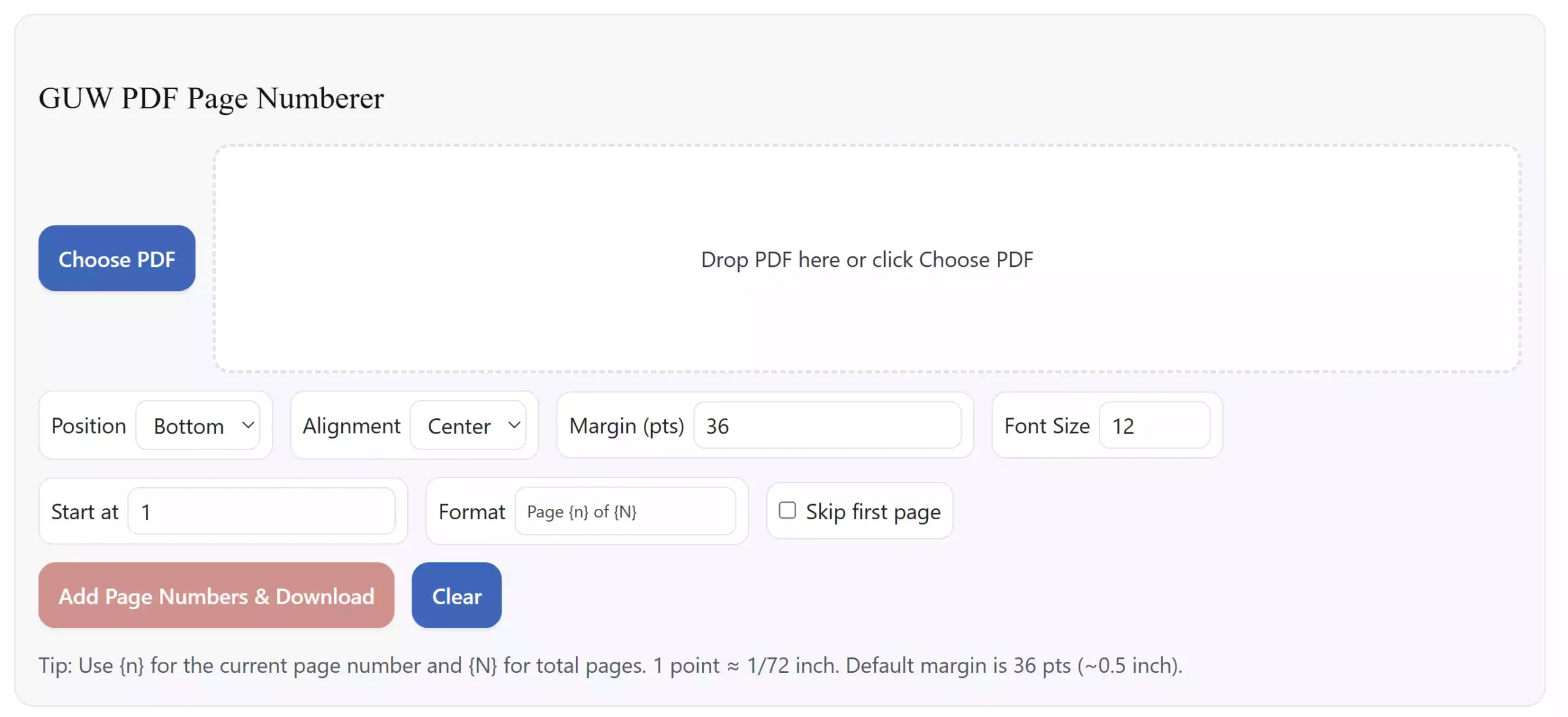
Need page numbers on a PDF fast? The GUW PDF Page Numberer runs entirely in your browser—no installs, no uploads, and no watermarks. Choose top or bottom placement, left/center/right alignment, custom margins and font size, a starting number, and a flexible format like Page {n} of {N}. It’s private, simple, and free.
What you can do
- Add page numbers to any PDF in seconds.
- Pick position (top or bottom) and alignment (left, center, right).
- Customize margins, font size, and start number.
- Use dynamic format codes: {n} = current page, {N} = total pages.
- Optionally skip the first page (great for covers).
- All processing is local on your device for maximum privacy.
How to use it (step-by-step)
- Click Choose PDF or drop a file into the box.
- Select Position (Top/Bottom) and Alignment (Left/Center/Right).
- Set Margin (in points; 72 pts ≈ 1 inch) and Font Size.
- Enter Start at (for numbering that begins at 1, 2, etc.).
- Customize the Format (example:
Page {n} of {N}). - Tick Skip first page if your cover shouldn’t be numbered.
- Click Add Page Numbers & Download to get your new PDF.
Tips & good practices
- For formal documents, use a consistent margin (e.g., 36–54 pts) and center alignment.
- Long reports often use bottom-center numbering for readability.
- When you need to combine files, first merge them, then number once at the end to keep counts correct. Try our Free Online PDF Merger.
- Securing the final PDF? Apply a password with our Free Online PDF Encryptor.
Pros
- Private: everything runs locally in your browser.
- Free & fast: no watermarks, no upload delays.
- Flexible formatting: “{n}”, “{N}”, custom start number, and alignment.
- Beginner-friendly: clean interface and clear options.
Considerations
- Very large PDFs depend on your browser’s memory. If it’s huge, try processing section by section or optimizing images first with our Free Image Compressor & Resizer.
- If your file is password-protected, unlock it first using Online Free PDF Password Remover (use only on files you’re authorized to open).
Common numbering formats you can use
{n}→ 1, 2, 3 …Page {n} of {N}→ Page 1 of 12{n}/{N}→ 1/12Sec {n}→ Sec 1 (for informal sections)
Frequently Asked Questions
Does this upload my PDF?
No. The tool works 100% locally in your browser.
Can I skip numbering on the first page?
Yes. Enable Skip first page before exporting.
How do I add “Page 1 of 20” style numbers?
Use the format Page {n} of {N}. The tool replaces the placeholders automatically.
Can I start numbering from 3 (or any number)?
Yes. Set Start at to your desired beginning value.
My PDF is large. Any tips?
Close other heavy tabs before processing. If the file is image-heavy, compress images first with the Image Compressor & Resizer. If the PDF is locked, unlock it with PDF Password Remover and try again.
Can I merge PDFs and then number them?
Yes. Combine files with the PDF Merger, then run the Page Numberer once for correct totals.
Wrap-up
The GUW PDF Page Numberer gives you clean, customizable numbering in seconds—free, private, and beginner-friendly. Add page numbers now and finish polished PDFs without installing anything.