

Struggling with eye strain while reading PDFs at night? The GUW PDF Dark Mode Viewer is a free, browser-based tool that lets you instantly switch your PDF documents to dark mode. You can view, zoom, navigate pages, and even download a converted dark-themed PDF or save individual pages as PNG images — all without installing any software.
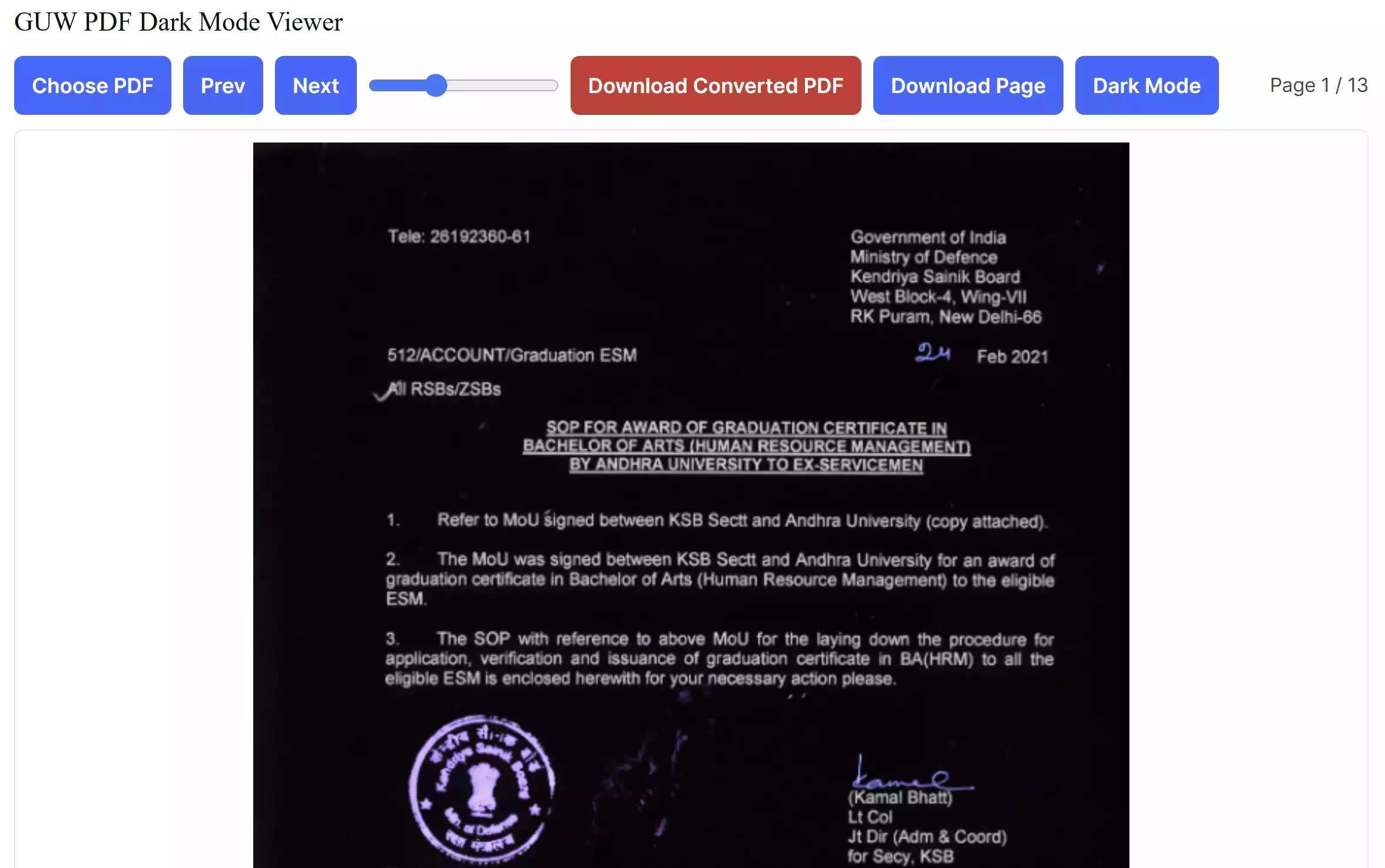
What is GUW PDF Dark Mode Viewer?
This online tool provides a simple way to toggle between normal and dark mode when reading PDF files. Dark mode inverts the colors, giving you light text on a dark background, which is easier on the eyes during night-time or low-light usage.
Why Would You Use It?
- Reduce eye strain when reading for long hours.
- Get a distraction-free, dark-themed PDF export.
- No need to install heavy PDF software.
- Free and works directly in your web browser.
Main Features
- Dark Mode Toggle: Switch instantly between light and dark mode.
- Page Navigation: Move easily between previous and next pages.
- Zoom Control: Adjust text and image size for better readability.
- Export Options: Download a full dark-themed PDF or save individual pages as PNG files.
- Drag & Drop: Quickly load your PDFs by dragging them into the tool.
- Progress Indicator: See the progress while converting full PDFs.
- Mobile-Friendly: Automatically scales large pages to prevent crashes.
How to Use GUW PDF Dark Mode Viewer
Follow these steps to start using the tool:
Step 1. Open the GUW PDF Dark Mode Viewer in your browser.
Step 2. Click on “Choose PDF” or drag a PDF file into the tool.
Step 3. Use the navigation buttons or slider to zoom and switch pages.
Step 4. Toggle “Dark Mode” to enable night-friendly viewing.
Step 5. Click “Download Converted PDF” to save the full dark version, or “Download Page” to save a single page as PNG.
Safe Use Tips
- Always check your final export before sharing sensitive PDFs.
- Large files may take longer — the tool shows progress to keep you updated.
- Dark mode may slightly increase file size if many images are inverted.
When This Tool Can Help You
The GUW PDF Dark Mode Viewer is perfect for students, professionals, or anyone who spends long hours reading PDFs. It is especially helpful when:
- You want to avoid eye fatigue during night study sessions.
- You prefer a dark theme for better focus.
- You need to export a PDF that matches your dark UI environment.
Try the Tool
Start using the tool now: GUW PDF Dark Mode Viewer.
Frequently Asked Questions
1. Is the GUW PDF Dark Mode Viewer free?
Yes, it’s 100% free and runs in your browser.
2. Can I export the entire PDF in dark mode?
Yes, the tool lets you download the whole document as a dark-themed PDF.
3. Does it work on mobile?
Yes, it works on modern mobile browsers and automatically scales large pages to prevent memory issues.
4. Is my data safe?
All processing happens in your browser. Your PDFs are never uploaded to a server.
Conclusion
The GUW PDF Dark Mode Viewer is a free and lightweight solution to read and convert PDFs in dark mode directly from your browser. With its export features and progress tracking, it’s an excellent choice for both casual and power users.