

The Dynamic Wallpaper feature was introduced in the Mojave update of macOS, and it quickly became one of its most noticeable functionalities. This feature automatically rotates the desktop wallpaper at specified time intervals, offering a visually appealing experience. Any macOS wallpaper enthusiast would find this feature irresistible. The good news is, you don’t need to switch platforms to use Dynamic Wallpaper in Windows 10.
What is Dynamic Wallpaper?
WinDynamicDesktop is an excellent app available on the Microsoft Store that allows you to apply macOS Dynamic Wallpapers on Windows 11 and 10. Simply download and install this free application to enjoy macOS-style wallpapers on your PC.
Once WinDynamicDesktop is installed, it will prompt you to “Configure Schedule.” During the configuration, make sure to enter your current location. The application also allows you to set specific sunrise and sunset times by selecting the “Use specific sunrise and sunset times” option.
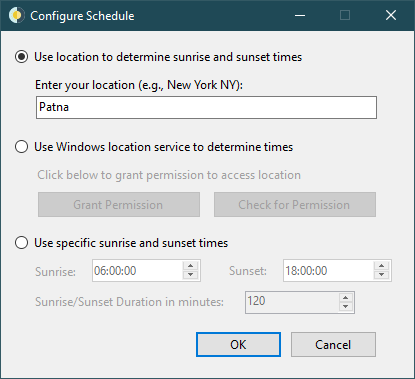
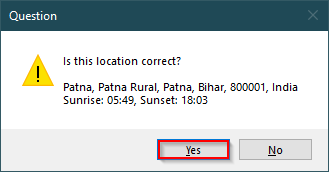
After setting your location to determine the sunrise and sunset schedule, click the OK button. A prompt will ask if the location is correct—click Yes to proceed.
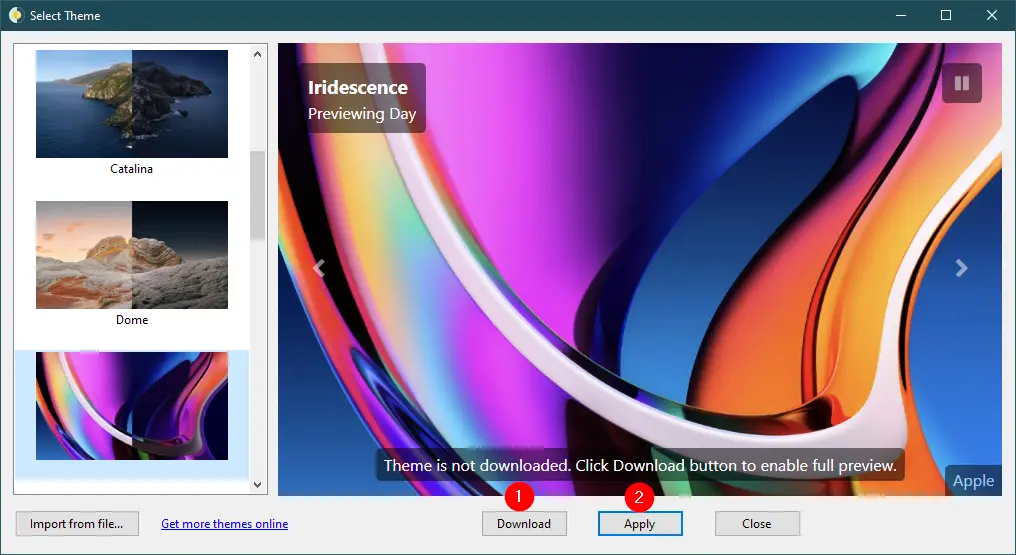
The application then presents you with a variety of stunning, dynamic wallpapers. These include Big Sur, Big Sur Abstract, Catalina, Dome, Iridescence, Mojave Desert, Monterey Abstract, Peak, Solar Gradients, The Beach, The Cliffs, The Desert, The Lake, Tree, and Ventura Abstract.
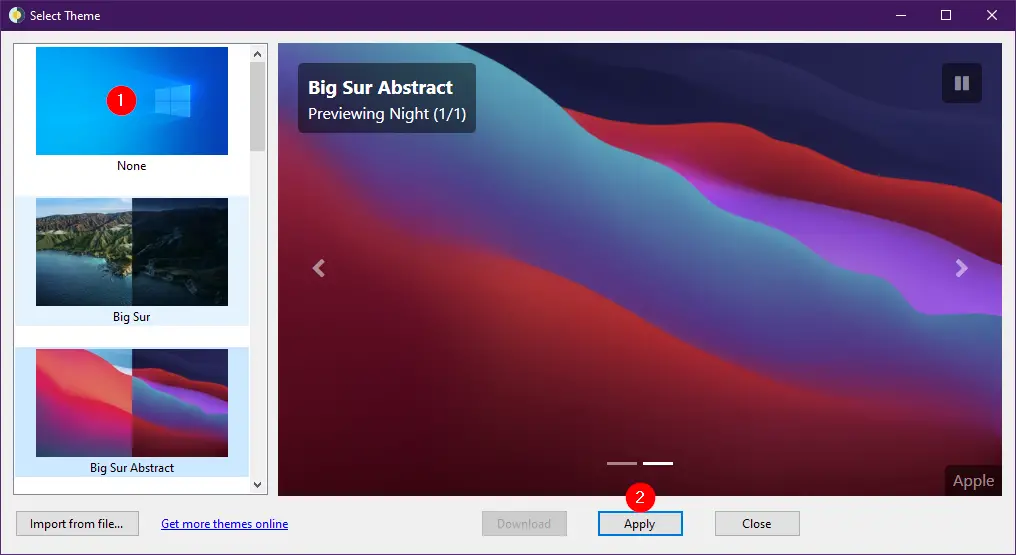
Choose your preferred theme and click the Download button (file sizes range from 15 MB to 200 MB). Once downloaded, click the Apply button to set the macOS Dynamic Wallpaper on your Windows 11 or 10 PC.
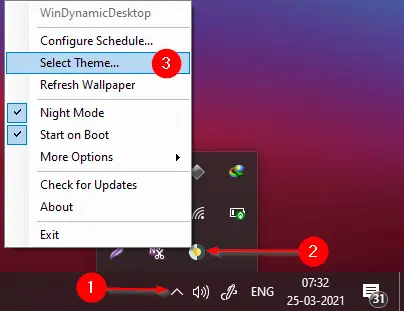
If you wish to return to the default Windows theme, there’s no need to uninstall the app. Just right-click the WinDynamicWallpaper icon in the taskbar, click Select Theme, choose None, and then click Apply.
Download WinDynamicDesktop
WinDynamicDesktop can be downloaded from the Microsoft Store. It is also available on GitHub and supports Windows 11, 10, 8, and even Windows 7 operating systems.
Conclusion
In conclusion, the Dynamic Wallpaper feature from macOS Mojave is a visually engaging function that lets users automatically rotate their desktop backgrounds at specific intervals. Thanks to the WinDynamicDesktop app, Windows 11 and 10 users can enjoy this same feature without switching to macOS. With its easy-to-use interface, customizable schedule, and a wide selection of high-quality themes, the app brings the macOS experience to your Windows PC. It is free, lightweight, and does not affect system performance. If you’re a fan of dynamic wallpapers and use a Windows machine, WinDynamicDesktop is a must-try solution.
You might also be interested in getting real-time Earth Wallpaper on Windows and extracting wallpapers from Windows 1/10/8/7 themes.