

If you want a fast, distraction-free way to convert images in bulk, the new Image Format Changer is a simple, portable app that runs fully offline in your web browser. It converts to JPG/PNG/WEBP/AVIF/BMP, supports optional resizing, and has an advanced rename pattern ({name}, {n}, {ext}), and can optionally keep EXIF for JPEG→JPEG (when not resizing) — all without any installation or logins.
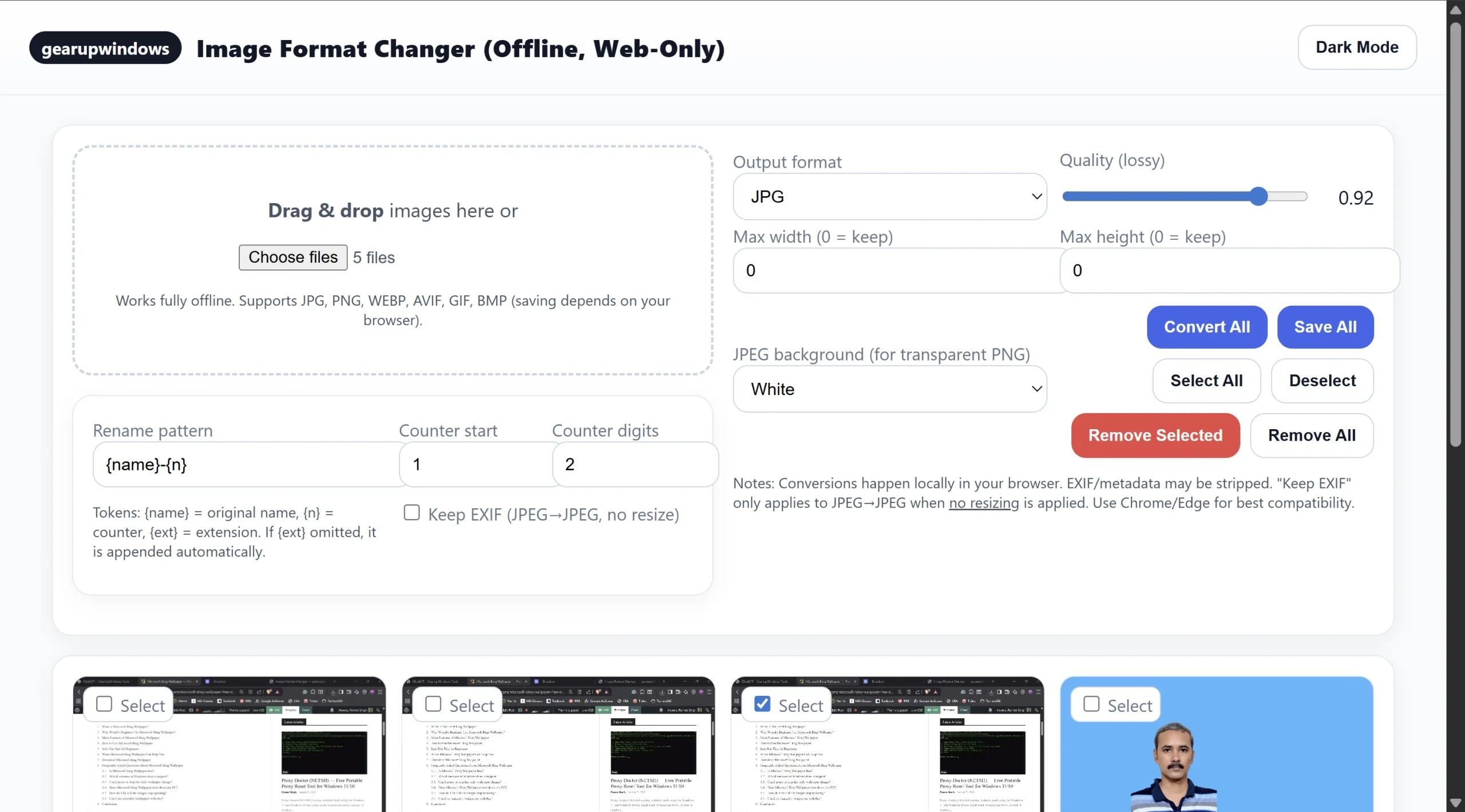
What is Image Format Changer?
Image Format Changer is a lightweight, browser-based utility that opens from a single HTML file. It works on Windows, macOS, and Linux in Chrome or Edge. The interface is clean and beginner-friendly, and everything — conversions, settings, and file operations — stays on your device for privacy.
Why would you use it?
Because it’s private, portable, and fast. You can drag & drop a folder of photos, pick a target format (JPG/PNG/WEBP/AVIF/BMP), set an optional size cap, choose a background for transparent PNG → JPG, and convert everything at once. The rename pattern lets you standardize file names (great for sharing or archiving), and the optional EXIF keep (JPEG→JPEG, no resize) preserves important metadata.
Main Features of Image Format Changer
- Works fully offline: open the HTML, convert — no internet needed.
- Bulk Convert: convert all loaded images in one click.
- Save All to a Folder: export everything at once (File System Access API).
- Per-file Download: grab individual outputs if you prefer.
- Rename Pattern:
{name}(original),{n}(counter),{ext}(output ext) with configurable start & padding. - Optional Keep EXIF: JPEG→JPEG (when not resizing) re-inserts original EXIF.
- Resize if needed: set Max Width/Height — aspect ratio is preserved.
- Background for JPEG: choose White/Black when converting transparent images to JPG.
- Dark Mode: easy on the eyes.
- Formats: JPG, PNG, WEBP, AVIF, BMP (encode support depends on your browser).
How to Use Image Format Changer
- Download & Extract the ZIP (link below).
- Open
Image-Format-Changer.htmlin Chrome or Edge. - Drag & Drop images (or use Choose Files).
- Pick an Output Format (JPG/PNG/WEBP/AVIF/BMP) and Quality (for lossy formats).
- (Optional) Set Max Width/Height to resize; leave
0to keep original size. - (Optional) Toggle Keep EXIF (only JPEG→JPEG when not resizing).
- (Optional) Set a Rename Pattern:
{name}= original filename (without extension){n}= running counter (start & digits are configurable){ext}= output extension (add it explicitly or it’s appended automatically)
- Click Convert All.
- Click Save All to choose a folder, or use per-file Download.
Safe Use Tips
- Transparent → JPEG? Pick a White or Black background to avoid checkerboard patterns.
- Quality vs Size: lower quality reduces file size; start at ~0.85 for WEBP/JPG, then adjust.
- Resizing: set either Max Width or Max Height (or both). The tool maintains the aspect ratio.
- Browser support: Chrome/Edge have the best encoding support for WEBP/AVIF.
When This Tool Helps
- Batch sharing: convert huge camera PNGs/HEIC to lightweight JPG or WEBP.
- Uploads: meet format or size limits for portals and forms.
- Archiving: standardize names and formats for long-term storage.
- Privacy: do everything locally without uploading photos anywhere.
Pros and Considerations
Pros: fully offline; bulk convert; folder save; flexible rename pattern; optional EXIF keep; dark mode.
Considerations: metadata is typically stripped during re-encode (except JPEG→JPEG with EXIF keep and no resize); encode support for AVIF/WEBP depends on the browser.
Download Image Format Changer
Direct Download (ZIP):
- File name: Image-Format-Changer-WebOnly-Final.zip
- Version: 1.0
- Size: 6.6 KB
- OS: Windows 11/10, macOS, Linux (Chrome/Edge recommended)
- License: Freeware
- Last updated: August 26, 2025
- SHA-256: e6f602b693786fb48d6451587d1a60f21840d12858ab9e585ddf690f16816a39
Frequently Asked Questions
Does it need installation?
No. It’s a portable HTML app. Extract the ZIP and open the HTML file in your browser.
Will it work without internet?
Yes. The entire app runs offline; conversions happen locally in your browser.
Where are my images processed?
Locally, via the browser’s Canvas and File APIs. Nothing is uploaded.
Can it keep EXIF?
Yes, when converting JPEG→JPEG without resizing. Other conversions typically strip metadata.
Which browsers are supported?
Chrome and Edge are recommended for best encoding support (WEBP/AVIF). Most features also work in other Chromium-based browsers.
Related Posts (You may also like)
- WiFi Profile Tool — Export, Import, Show & Delete Wi-Fi Profiles on Windows 11/10
- DNS Switcher NETSH — One-Click Public DNS Changer for Windows 11/10
- ShareX: Free Screen capture, Video converting, and Productivity Tool for Windows 11/10
- FreeOCR: Scans from Twain scanners and converts image to Text
- How to Convert an Image to PDF Using Microsoft Word
Conclusion
Image Format Changer (Web-Only) gives you a clean, fast, and private way to convert images in bulk. With offline operation, flexible rename rules, optional EXIF keep, and folder-save, it’s ideal for photographers, students, and anyone who needs quick, trustworthy conversions without installing anything. Keep it on a USB drive, use it anywhere, and standardize your image libraries in minutes.