

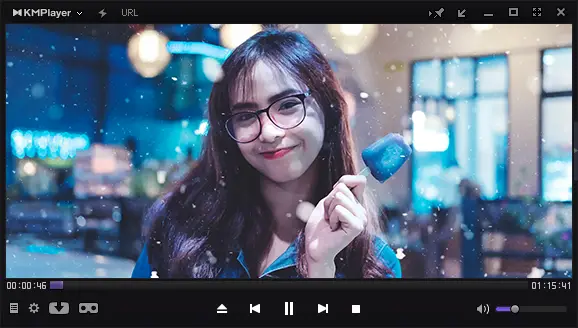
KMPlayer is a free media player for Windows developed by Pandora TV, a South Korean internet broadcasting company. First released in 2002, KMPlayer has evolved through numerous updates to become a versatile tool for playing almost every type of audio and video format, including 3D, 4K, and UHD. Its rich feature set and sleek design make it a popular choice for users seeking a reliable and customizable media player.
Why Would a Beginner Use KMPlayer?
Beginners appreciate KMPlayer for its balance of simplicity and advanced options. The interface is easy to navigate, so you can start watching videos without a steep learning curve. At the same time, it offers deep customization for those who like to fine-tune playback, appearance, and audio settings. With built-in codecs, you can play most files without installing extra software.
Main Features of KMPlayer
- Sleek, modern interface with a customizable dark theme and multiple skins.
- Extensive format support for MP4, AVI, MKV, FLV, 3D, 4K, and UHD videos.
- Advanced subtitle compatibility for SRT, ASS, SSA, and more.
- Playback controls, including speed adjustment, aspect ratio changes, and bookmarking.
- Screenshot capture to grab stills from your videos for thumbnails or sharing.
- Audio and video recording for capturing content directly from your computer.
- Built-in equalizer to adjust audio output for different genres or preferences.
- 360-degree video playback for immersive viewing experiences.
How to Use KMPlayer?
After installing KMPlayer, simply drag and drop a media file into the player or open it through the menu. You can adjust playback speed, zoom in or out, change the aspect ratio, and customize subtitle appearance. Right-click anywhere on the interface to access advanced options like recording, screen capture, and video effects. While beginners can stick to the basics, advanced users will enjoy exploring its wide range of settings.
KMPlayer vs VLC vs PotPlayer – Key Differences
KMPlayer vs VLC
VLC is known for being lightweight, stable, and available across all major platforms, including Windows, macOS, and Linux. KMPlayer, on the other hand, offers a more visually polished interface, 3D/4K/UHD playback, and features like 360-degree video. If cross-platform support matters, VLC wins. If you want a rich feature set and more customization on Windows, KMPlayer is worth considering.
KMPlayer vs PotPlayer
Both KMPlayer and PotPlayer originate from South Korea, but they cater to slightly different audiences. PotPlayer is faster, lighter on system resources, and offers extremely deep customization for playback and visuals. KMPlayer is more beginner-friendly in its default layout but still powerful. If you want speed and advanced settings, go for PotPlayer. If you prefer a balance of simplicity and features, KMPlayer is a great option.
Bottom Line
VLC is ideal for cross-platform use, PotPlayer for advanced Windows playback control, and KMPlayer for an all-in-one, visually polished media player that supports nearly every file type.
Safe Use Tips for Beginners
Always download KMPlayer from the official website to avoid bundled malware or unwanted software. Stick to the standard installation unless you understand what each extra option does. Keep your player updated for the best performance and latest features.
When KMPlayer Can Help You
KMPlayer is ideal for anyone who regularly plays high-definition media, works with subtitles, or enjoys experimenting with video and audio adjustments. It’s also a good choice for users who want immersive 360-degree content or need built-in screen capture and recording tools without extra software.
Download KMPlayer
You can download KMPlayer for free from its official website. Installation is quick, and you can start playing videos immediately after setup.
Conclusion
KMPlayer is a feature-packed media player for Windows that combines a modern design with powerful playback capabilities. Its ability to handle nearly any file type, from standard videos to 3D and 4K content, makes it a versatile choice for both casual viewers and advanced users. Download KMPlayer today and experience high-quality, customizable media playback on your Windows PC.
Frequently Asked Questions About KMPlayer
Is KMPlayer free?
Yes, KMPlayer is completely free for personal use.
Can KMPlayer play 4K and 3D videos?
Yes, KMPlayer supports 3D, 4K, and UHD video playback for a high-quality viewing experience.
Does KMPlayer work on Mac or Linux?
No, KMPlayer is primarily designed for Windows, though there is a mobile version for Android and iOS.
Is KMPlayer better than VLC?
It depends on your needs—KMPlayer offers more features and a more modern interface, while VLC is lighter and works on more platforms.
Is KMPlayer better than PotPlayer?
PotPlayer is faster and more customizable, but KMPlayer is easier for beginners and offers built-in features like 360-degree playback.