

GUW Free Archiver lets you create ZIP archives and unzip ZIP files directly in your browser. Everything runs 100% client-side for privacy—there are no uploads, no watermarks, and no sign-ups. It’s a simple, lightweight tool designed for quick everyday archiving without installing anything on your PC.
What is GUW Free Archiver?
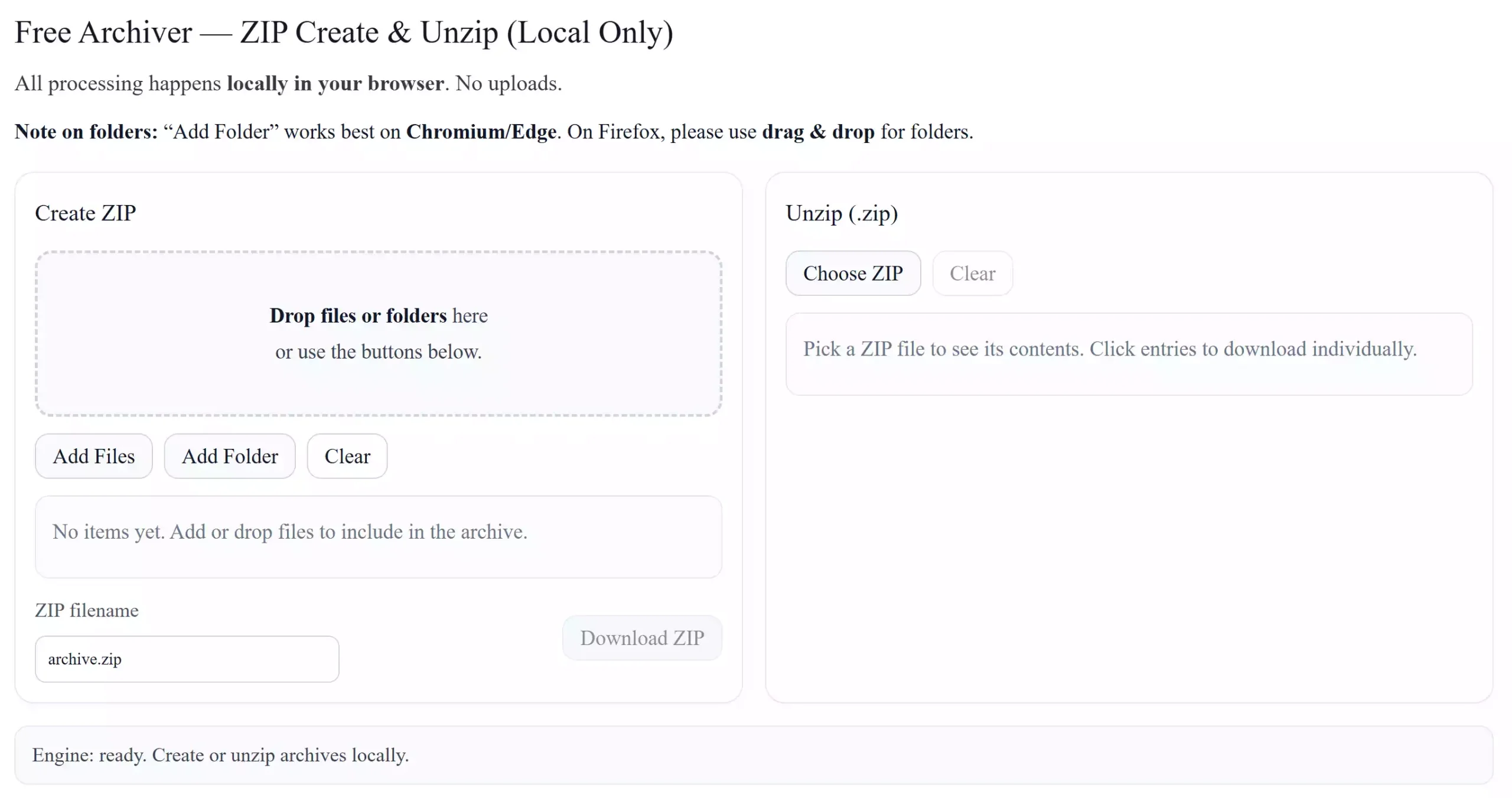
GUW Free Archiver is a web-based utility that handles everyday archive tasks with a clean, distraction-free interface. You can add files or entire folders, generate a compressed .zip, and download it instantly. You can also open an existing .zip and download individual items you need—perfect for quickly grabbing one file from a large archive.
Why use a browser-based archiver?
Because it’s private, fast, and effortless. Your files never leave your device, so it’s ideal for documents you don’t want to upload anywhere. It also saves time on shared or limited PCs where installing full desktop software isn’t convenient.
Main Features
- 100% client-side processing—no server uploads.
- Create ZIP from files and folders, preserving structure where available.
- Unzip ZIP in the browser and download items individually.
- Drag & drop support with live status updates.
- Folder selection on Chromium/Edge; Firefox users can drag & drop folders.
- Keyboard-friendly controls and accessible focus outlines.
How to Use GUW Free Archiver
Step 1. Open the GUW Free Archiver tool page and wait for the engine to show it’s ready.
Step 2. To create a ZIP, drop files or folders into the box, or click Add Files / Add Folder. Your selection appears in a list with size and type.
Step 3. Optionally change the ZIP filename. When ready, click Download ZIP to get your archive instantly.
Step 4. To unzip, click Choose ZIP and pick a .zip. The tool lists all items; click the small download control next to any file to save it locally.
Step 5. Use Clear to reset selections if you want to start over.
Safe Use Tips
- Keep worksets reasonable for smoother performance; extremely large batches can consume browser memory.
- On Firefox, use drag & drop for folders; on Chromium/Edge, the Add Folder button is supported.
- Close the page when finished to release any in-memory data and object URLs.
When GUW Free Archiver Helps You
- Sharing project files — bundle documents, images, and notes into one .zip.
- Picking one file from a big ZIP — preview contents and download only what you need.
- Preparing PDFs for email — compress a folder of PDFs into a single archive for easier sending. If you need to merge PDFs beforehand, see the Free Online PDF Merger.
- Securing documents — protect PDFs before zipping with the Free Online PDF Encryptor, or remove passwords when appropriate using the Online Free PDF Password Remover. For scanned PDFs, extract text via Online Free PDF OCR.
- Working with disk images — if you also need ISO/IMG conversions, try the Universal Disk Image Tool.
Pros and Considerations
- Pros: Private (no uploads), fast for everyday tasks, folder support on Chromium/Edge, per-file downloads when unzipping, no installation needed.
- Considerations: Very large archives can be memory-heavy in a browser; Firefox doesn’t support the folder picker button (use drag & drop).
Frequently Asked Questions
Does this tool upload my files to a server?
No. Processing is 100% client-side. Your files stay on your device.
Which browsers work best?
Chromium-based browsers (like Chrome and Edge) support the Add Folder button. Firefox users can drag & drop folders into the drop zone.
Is folder structure preserved inside the ZIP?
Yes, when folders are selected or dropped, the tool preserves the directory structure in the resulting archive.
How large a ZIP can I create?
It depends on your system memory and browser. For smoother performance, keep batches reasonable instead of zipping extremely large datasets in one go.
Can I preview files before downloading from an opened ZIP?
You can view names, sizes, and download specific files you need. For privacy and performance, previews are minimal and downloads are direct.
Conclusion
GUW Free Archiver makes everyday archiving simple: create ZIP files, unzip existing archives, and keep everything private because it runs entirely in your browser. Open it now and streamline your file-sharing workflow without installing a thing: GUW Free Archiver.