

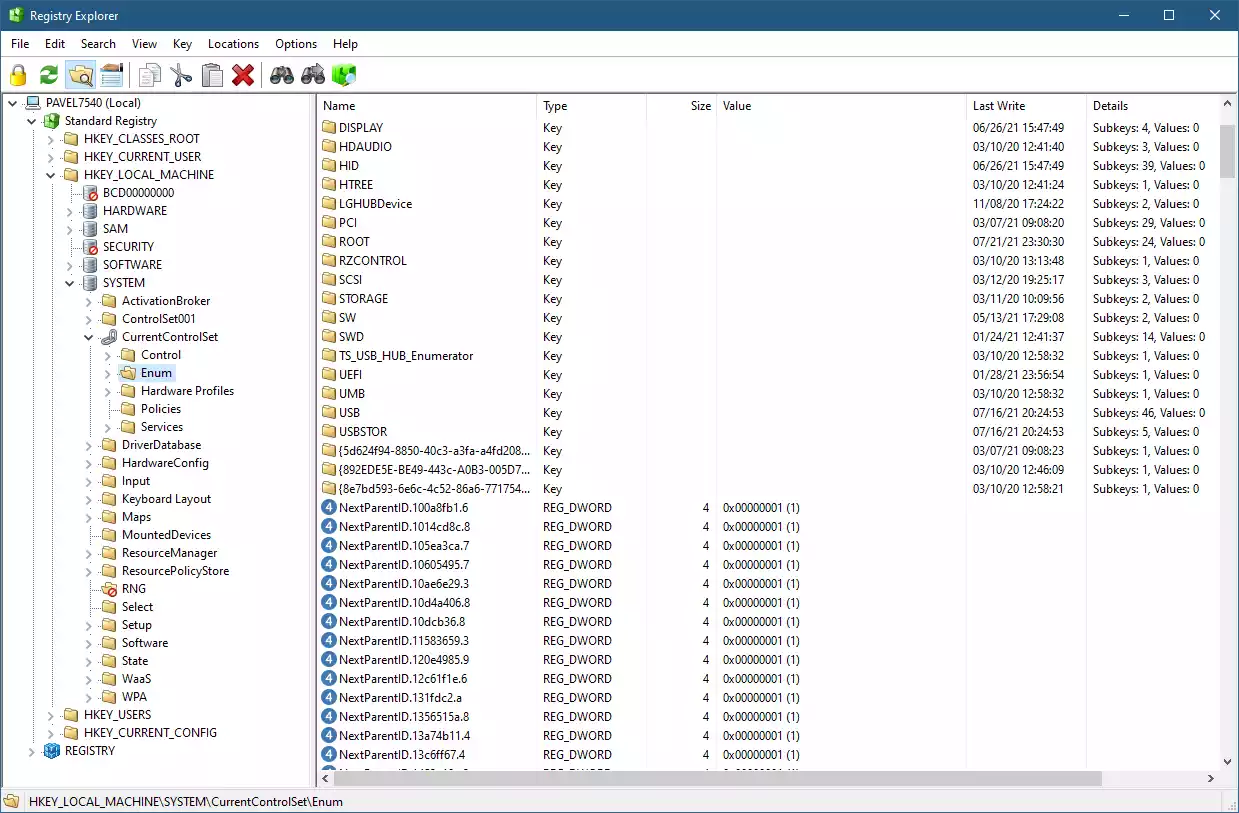
In this gearupwindows guide, we’ll show you how to use Total Registry, a modern replacement for the classic Windows Registry Editor. Previously known as Registry Explorer, this open-source tool provides more advanced features and a better user experience than the built-in RegEdit.
The Windows Registry is a database where system and application settings are stored. The built-in Registry Editor (RegEdit) allows users to view and edit these settings. However, it lacks several advanced features. That’s where Total Registry comes in — a modern, powerful alternative.
What Is Total Registry?
Total Registry is a portable, feature-rich Registry Editor alternative for Windows 11 and 10. It was developed to overcome the limitations of the default Registry Editor by offering enhanced tools for viewing, editing, and searching Windows Registry data. You don’t need to install it — just download and run.
Key Features of Total Registry
Total Registry brings several improvements over the standard RegEdit, including:
- View the real Registry (not just the standard hives)
- Sort columns in list view for better organization
- Visual indicators like icons for hives, inaccessible keys, and symbolic links
- Display key metadata such as last write time and number of subkeys/values
- Support for MUI and REG_EXPAND_SZ expanded values
- Powerful full search with Ctrl+Shift+F support
- Enhanced hex editor for binary data
- Undo/redo functionality
- Copy and paste keys or values
- Optionally replace RegEdit as the default Registry Editor
- Connect to remote registries
- View open key handles
How to Use Total Registry?
After downloading Total Registry from GitHub, run the executable. You’ll see an organized view of all registry hives, similar to Windows RegEdit. You can expand keys and view subkeys or values instantly.
By default, the app opens in Read Only mode. This helps protect your system from accidental changes. To make edits, you must disable Read Only mode. Before editing, it’s wise to back up the registry or create a system restore point.
Advanced Search Capabilities
Total Registry’s search feature is far superior to the default RegEdit. Press Ctrl + Shift + F to bring up the full search box. All matching results are displayed in one dialog. You can double-click any entry to open it directly in the editor.
Replace Default Registry Editor
If you prefer Total Registry over RegEdit, you can set it as the default tool for .reg files. To do this, go to the Options menu and select Replace RegEdit.exe.
Conclusion
Total Registry offers a modern, safer, and more powerful experience for managing the Windows Registry. Whether you’re a tech-savvy user or an IT professional, this tool can help you work faster and smarter.
You can download Total Registry from its official GitHub page and explore its features yourself.