

Windows 11, while a significant upgrade in many ways, has introduced ads and recommendations that appear in various parts of the operating system, such as the lock screen, start menu, Windows Explorer, and system settings. These ads can be intrusive and detract from the user experience. Enter Ashampoo Windows 11 AdBlock, a free and user-friendly solution designed to help you regain control of your desktop environment by eliminating these ads with minimal effort. For even deeper privacy control, you can also explore DoNotSpy11, another excellent tool for blocking unwanted Windows features and telemetry.
Why Ads in Windows 11?
Microsoft includes ads and recommendations in Windows 11 as part of its strategy to promote its own services and products. While some users might find these suggestions helpful, many see them as unnecessary distractions that clutter the interface. To further enhance your system’s performance and reduce clutter, consider using Wintoys, a free utility that optimizes and repairs Windows 11 effortlessly.
The Solution: Ashampoo Windows 11 AdBlock
Ashampoo Windows 11 AdBlock is a handy software tool that targets and disables ads across Windows 11. It is designed for users who prefer a clean and distraction-free computing environment without having to delve into complex system settings or risky Registry edits.
Key Features and Benefits
- User-Friendly Interface: The standout feature of Ashampoo Windows 11 AdBlock is its simplicity. The tool has a straightforward, intuitive interface that anyone can use. There’s no need to be a tech expert; a single switch is all it takes to disable ads.
- No Major System Modifications: Unlike some ad-blocking methods that require modifying system files or Registry entries, Ashampoo Windows 11 AdBlock works without making significant changes to your operating system. This ensures that your system remains stable and secure.
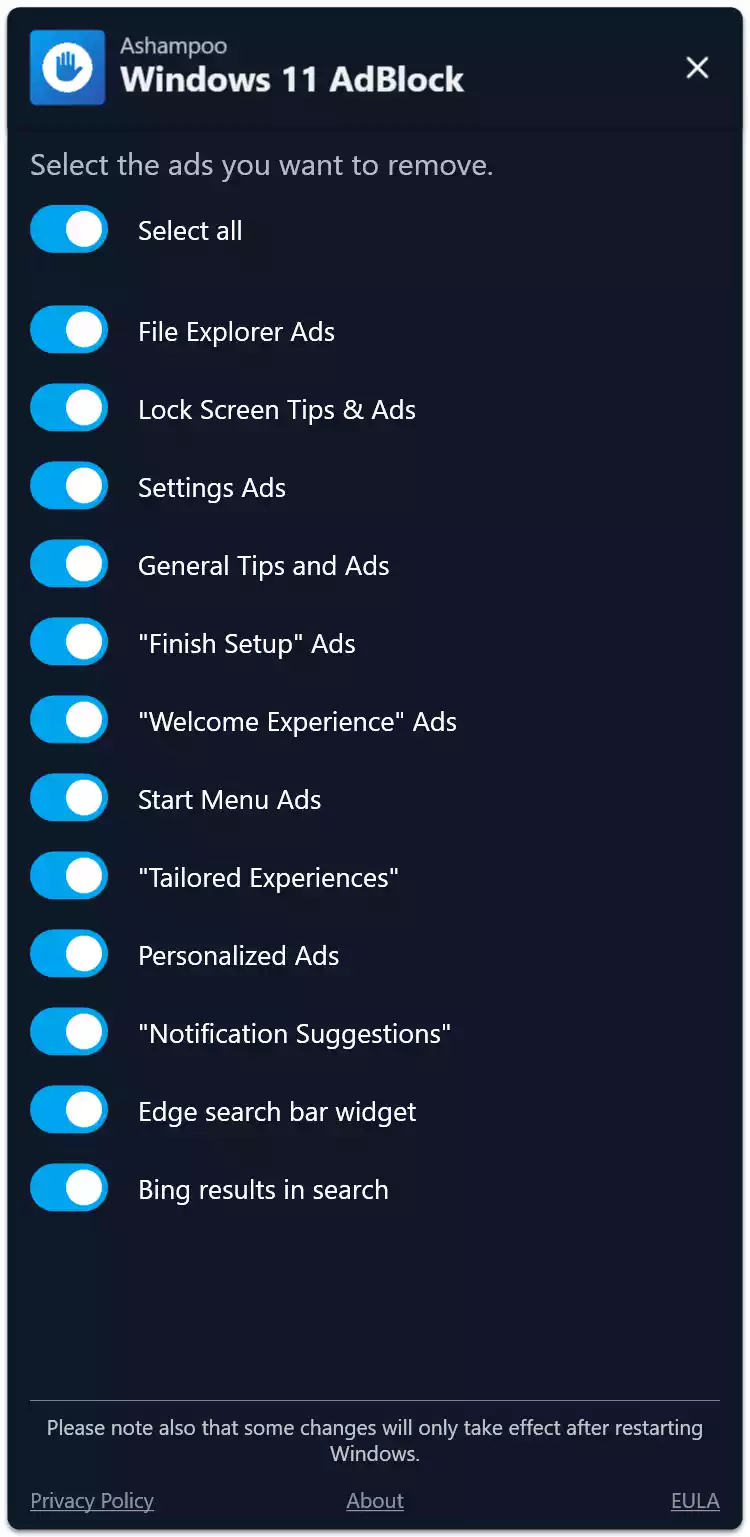
- Comprehensive Ad Blocking: Ashampoo Windows 11 AdBlock works with all versions of Windows 11. It effectively blocks ads in several locations:
- Lock Screen: Say goodbye to those unwanted lock screen ads and enjoy your chosen background without interruptions.
- Start Menu: Remove recommended apps and other promotional content from your start menu for a cleaner look.
- Windows Explorer: Eliminate ads that appear when you browse files and folders.
- System Settings: Get rid of suggestions and ads within the settings menu.
- Free of Charge: Ashampoo Windows 11 AdBlock is completely free. There are no hidden costs or subscription fees, making it accessible to everyone.
For users looking to further enhance their system’s performance, Ashampoo WinOptimizer 2022 is another powerful companion utility for cleaning, tuning, and improving Windows performance.
How to Install and Use Ashampoo Windows 11 AdBlock?
Follow these simple steps:
Step 1. Visit the official Ashampoo website and download the Windows 11 AdBlock tool.
Step 2. Run the downloaded installer and follow the on-screen instructions to install Windows 11 AdBlock on your computer.
Step 3. Once installed, open the software. You’ll be greeted with a simple interface featuring a switch. Flip the switch to disable ads across Windows 11. It’s that easy!
Additional Tips for a Cleaner Windows 11 Experience
- Customize Your Start Menu and Taskbar: Remove unnecessary icons and apps from your start menu and taskbar to create a more streamlined workspace.
- Manage Notifications: Adjust your notification settings to prevent unwanted pop-ups and alerts from disrupting your workflow.
- Use a Third-Party Browser: Consider using a browser with built-in ad-blocking features for a more ad-free browsing experience.
For those who want to completely declutter their Windows setup, the Free Bloatware Removal Utility can help you remove unnecessary pre-installed apps safely and quickly.
Conclusion
Ashampoo Windows 11 AdBlock is an excellent tool for anyone looking to remove ads from Windows 11 quickly and effortlessly. Its user-friendly design, comprehensive ad-blocking capabilities, and free availability make it a must-have for enhancing your Windows 11 experience. By eliminating distractions, you can enjoy a cleaner, more focused desktop environment that allows you to work and play without interruptions. Give Ashampoo Windows 11 AdBlock a try today and reclaim your Windows 11 experience. You can also pair it with Ashampoo Privacy Inspector for even greater privacy and system control.