

Sometimes you receive an important PDF but wish you could present it as a slideshow. That’s exactly where our PDF to PowerPoint Converter comes in. With just a few clicks, you can transform each page of your PDF into a high-quality slide inside a PPTX file. The process is simple, fast, and takes place entirely in your browser — no software installation or account required.
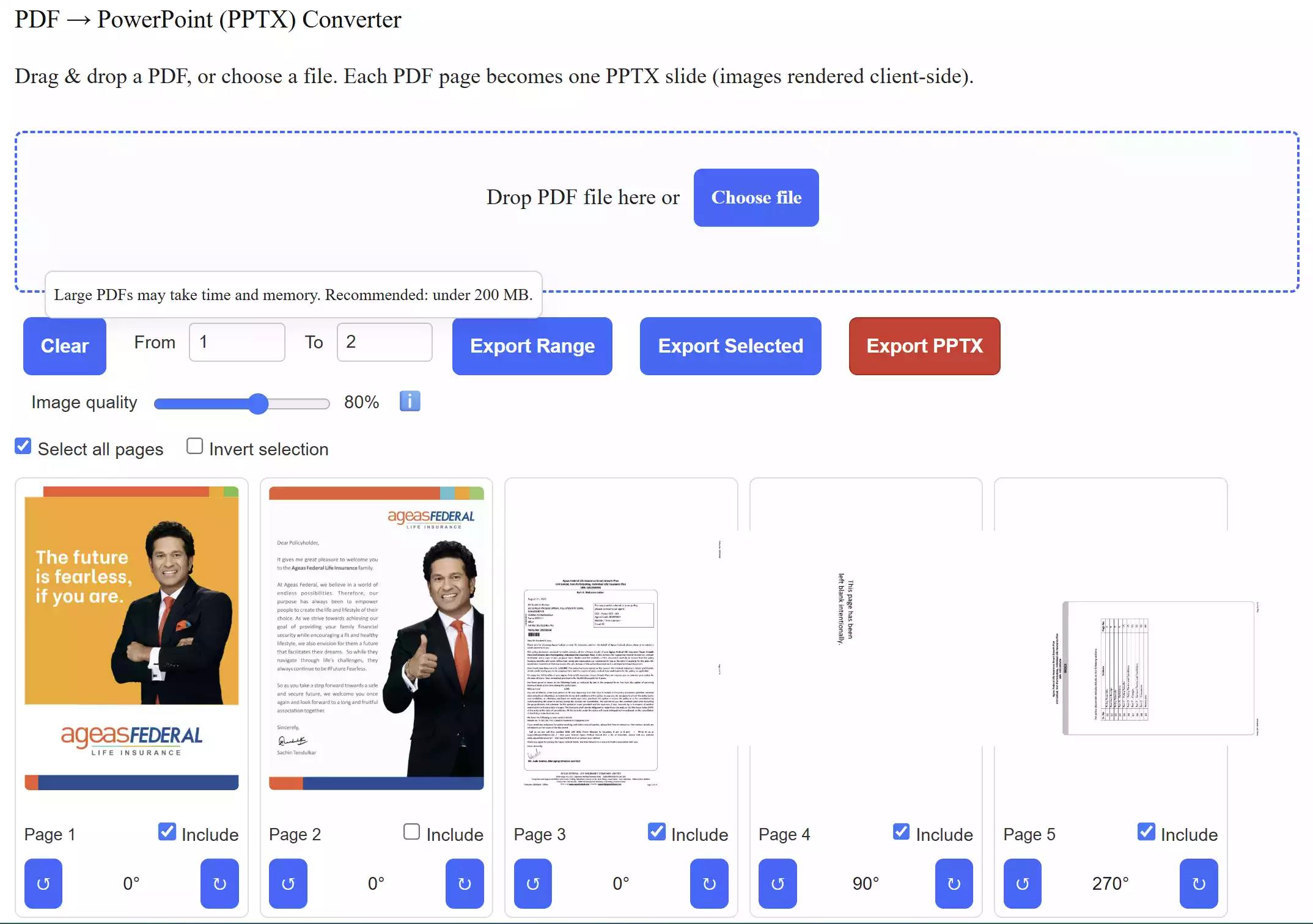
Whether you are a student preparing for class, a professional getting ready for a meeting, or simply someone who wants to showcase content in a slideshow format, this tool saves you time. You can rotate pages, choose specific ranges, or export only selected slides. Plus, the built-in image quality slider gives you control over clarity and file size, making it easy to balance between sharp visuals and smaller downloads.
Main Features of the PDF to PPTX Converter
- Quick & Free: Upload a PDF and convert it into a PPTX presentation instantly.
- Custom Export: Rotate pages, export by range, or include only selected slides.
- File Size Control: Adjust image quality for sharper slides or smaller file sizes.
- Secure & Private: 100% client-side processing — your PDF never leaves your computer.
How to Use the Tool
Step 1. Open our free PDF to PowerPoint (PPTX) converter online tool.
Step 2. Drag and drop your PDF file into the converter or use the “Choose File” button.
Step 3. Preview the pages, rotate slides, or select a specific range.
Step 4. Adjust the image quality slider if you want a smaller or sharper output.
Step 5. Click “Export PPTX” to download your presentation instantly.
Related Tools
If you need to extract spreadsheets instead of slides, try our PDF to Excel Converter for accurate table conversions. You can also optimize your files with our PDF Compressor to reduce file size before converting.
Frequently Asked Questions
Q: Will my PDF text remain editable in PowerPoint?
No. Each PDF page is converted into a slide image, so the content looks exactly the same but isn’t text-editable. This ensures your formatting remains intact.
Q: Can I export only a few pages?
Yes. You can set a From–To page range or check only the slides you want before exporting.
Q: Is my file safe with this converter?
Yes. All conversions happen directly in your browser, and your file never uploads to any server.
Conclusion
Our free PDF to PowerPoint Converter is the easiest way to turn static PDFs into presentation-ready slides. With built-in customization, secure processing, and no hidden costs, it’s a must-have tool for students, educators, and professionals. Try it today and simplify your workflow.