

WinDirStat is a free and open-source utility tool for Windows that helps you analyze and visualize disk usage on your computer. It presents the information in a way that is easy to understand, allowing you to identify large or unnecessary files and folders and free up valuable disk space.
Why WinDirStat?
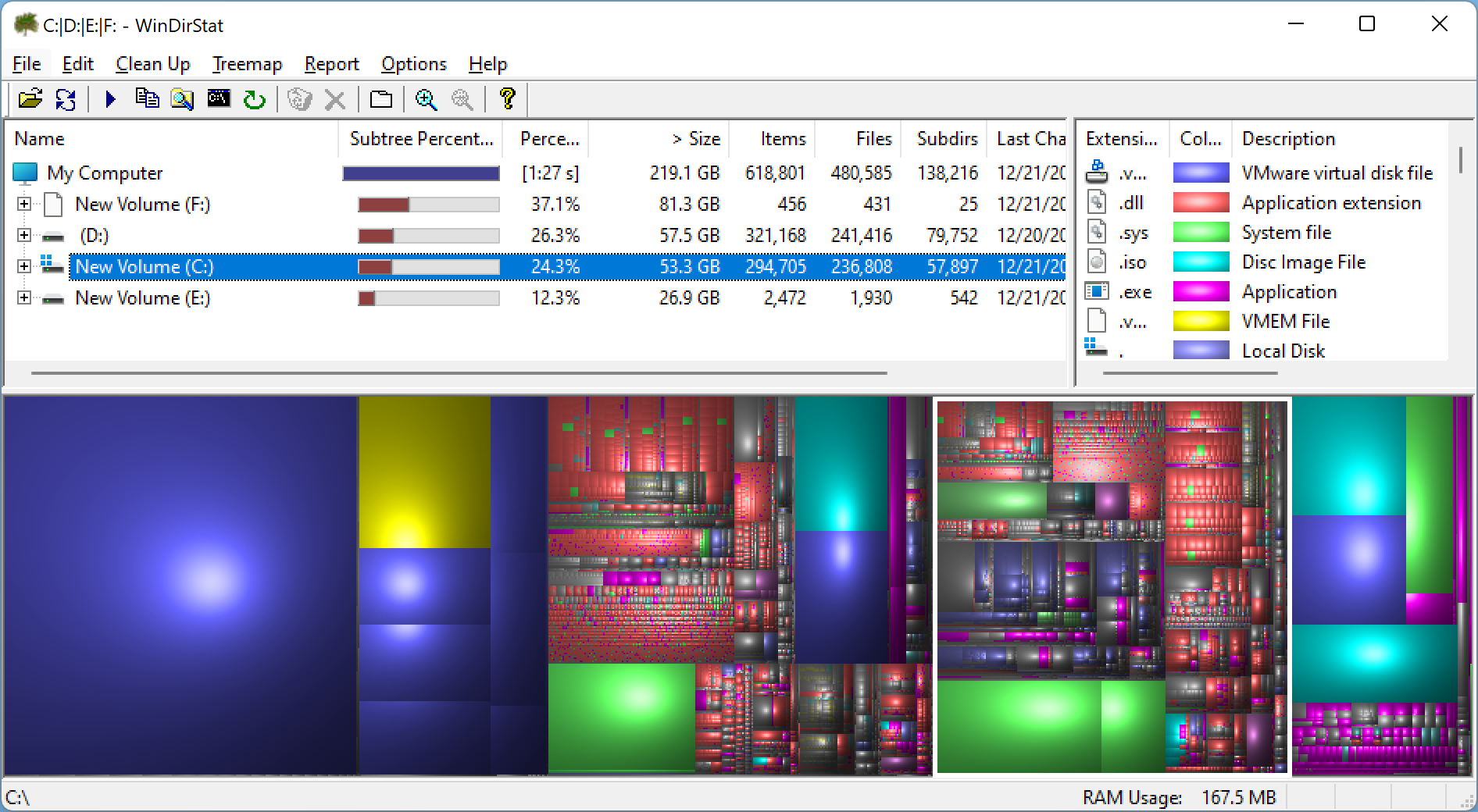
WinDirStat is a popular disk usage analyzer designed specifically for Windows users. It provides a comprehensive, real-time visual breakdown of how storage is used on your system. After scanning a selected drive or folder, WinDirStat presents the results using three powerful views: a directory list similar to Windows Explorer, a colorful treemap showing file sizes and types, and an extension list to help you spot space-hogging formats like videos or ISOs.
The treemap uses color-coded rectangles to represent different file types and their relative sizes. Clicking on any block immediately takes you to the file, where you can view, delete, or move it. This makes WinDirStat an excellent tool for quickly locating large or obsolete files that are hidden deep in folder hierarchies. The interface is lightweight, fast, and customizable to fit both novice and advanced users.
Key Features
- Scans local drives and directories to display detailed disk usage statistics.
- Visual treemap with color-coded rectangles representing different file types.
- Extension list shows file types sorted by size and frequency.
- Ability to open, delete, or move files and folders directly from the interface.
- Real-time file analysis with progress indicators during scan.
- Supports manual cleanup as well as automation through command-line options.
- Lightweight and fast — ideal for older or low-spec Windows PCs.
- Free to use and frequently updated by the open-source community.
- Compatible with Windows 11, Windows 10, Windows 8.1, and Windows 7.
Use Cases
WinDirStat is not just for advanced users or system administrators. Home users can benefit from its intuitive design to locate unnecessary videos, backups, old software installers, and temporary files that take up gigabytes of disk space. For tech enthusiasts, it can also be integrated into batch scripts or used alongside cleanup tools to automate space-saving routines.
Whether you’re managing a single laptop or multiple systems, WinDirStat provides clarity and control over disk consumption. It’s especially useful after a major Windows update or when dealing with limited SSD storage.
Download WinDirStat
You can download the latest version of WinDirStat from its official website. The tool is portable and doesn’t require heavy installation, making it easy to run directly from a USB drive if needed.
Conclusion
In conclusion, if you are looking for a free, powerful, and user-friendly utility to analyze and manage your disk space, WinDirStat is a must-have. Its visual representation of file distribution, combined with interactive features, makes it easier than ever to identify and remove clutter. From casual users to IT professionals, WinDirStat offers practical tools to help clean up your drives and reclaim precious space. Download it today and take control of your storage.
WinDirStat is slow.
Directory Report is faster and has more features