

As we use our computers daily, performance can gradually decrease due to accumulated junk files, leftover registry entries, startup bloat, and other small issues. The web can also expose us to security threats like viruses, malware, and spyware. A handy, free utility that tries to tackle both sides—speed and safety—is Kingsoft PC Doctor.
What is Kingsoft PC Doctor?
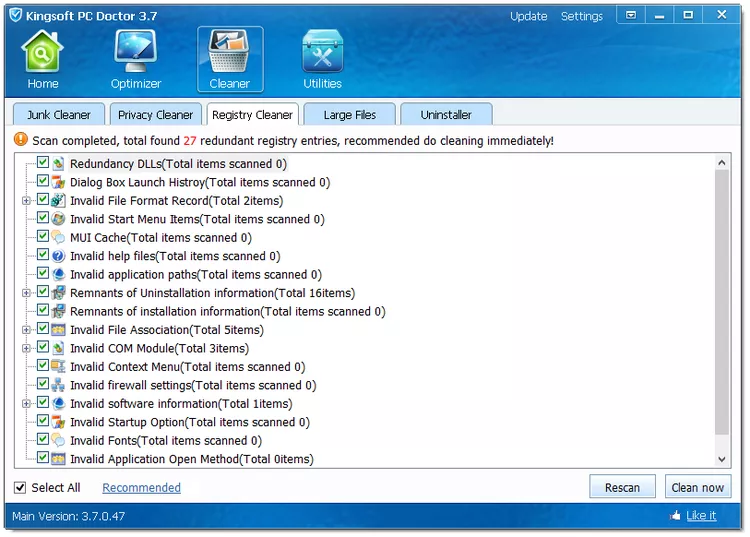
Kingsoft PC Doctor is a free Windows utility that bundles several tools to help optimize performance and improve security. It can scan for junk, tidy up registry leftovers, harden some settings, and offer basic protections. While it’s not a full antivirus, it’s a convenient “checkup” app for quick cleanups and light tuning. If you want a broader toolkit roundup, see our guide to free PC optimization and maintenance tools for Windows 11/10.
Why Would a Beginner Use Kingsoft PC Doctor?
Beginners often want a simple dashboard that explains what’s slowing things down and how to fix it safely. Kingsoft PC Doctor points to common issues (cache buildup, startup clutter, minor settings) and offers one-click actions. If you prefer focused cleaners, a lightweight option like BleachBit is great for removing temporary files, while PrivaZer focuses on privacy traces.
Main Features of Kingsoft PC Doctor
- Comprehensive System Scan: Detects junk files, registry leftovers, and basic vulnerabilities to give you a quick health snapshot.
- System Optimization: Tools to clean disk clutter, tidy up the registry, review startup items, and tweak common settings.
- Security Helpers: Light protections and quick checks that complement your main antivirus. For deeper on-demand scans, try our picks of free one-time malware scanners.
- User-Friendly Interface: Clear layout with straightforward buttons so you can run scans and cleanups without digging through menus.
- Multi-Language Support: Available in several languages, making it accessible worldwide.
How to Use Kingsoft PC Doctor
Getting started is simple, and you don’t need advanced knowledge. Follow these quick steps:
Step 1. Download and install Kingsoft PC Doctor from the official page below, then open the app.
Step 2. On the main screen, run a Full Scan to analyze junk files, registry leftovers, and common system issues.
Step 3. Review results. Uncheck anything you’re unsure about—especially aggressive registry items—then click to Fix or Clean.
Step 4. Open the Startup or Optimization panel to disable non-essential apps that start with Windows. If you need smarter CPU balancing, consider Process Lasso.
Step 5. Reboot to apply changes and confirm your PC feels smoother.
Step 6. Use it periodically to keep clutter in check; pair it with your main antivirus for security.
Safe Use Tips for Beginners
- Create a Restore Point: Before cleaning, make a system restore point (Windows can do this in a few clicks).
- Avoid Over-Cleaning the Registry: Registry “errors” often have little performance impact. Only remove clear leftovers.
- One Cleaner at a Time: Don’t stack multiple registry cleaners in one session.
- Back Up Important Files: Keep a backup of personal data before major changes.
- Use a Real Antivirus: Kingsoft PC Doctor is not a replacement for a full security suite. Complement it with trusted protection and occasional second-opinion scans.
When Kingsoft PC Doctor Can Help You
- Your PC feels sluggish due to cache and temp files.
- Too many apps start with Windows and slow down boot time.
- You want an easy “quick tune-up” without jumping across many settings.
- You’re doing light maintenance between deeper cleanups with tools like BleachBit or privacy cleanups via PrivaZer.
Pros and Considerations
- Pros: Simple interface, quick system snapshot, basic optimization in one place, beginner-friendly.
- Considerations: Not a full antivirus; registry cleaning offers limited real-world speed gains; always review items before deleting.
Frequently Asked Questions About Kingsoft PC Doctor
Is Kingsoft PC Doctor safe to use?
Yes—if used carefully. Always create a restore point first and avoid aggressive registry deletions. Stick to junk cleanup and obvious leftovers when unsure.
Does it replace antivirus software?
No. It’s an optimization and light-security helper. Keep your main antivirus active and consider occasional second-opinion scans.
Will registry cleaning make my PC much faster?
Usually not. Modern Windows rarely get big speed boosts from registry edits. Focus on removing junk files and trimming startup items instead.
What else should I use alongside it?
Pair it with a trusted antivirus, periodic junk cleanups (e.g., BleachBit), and smart performance management using Process Lasso if you need CPU responsiveness improvements.
Download Kingsoft PC Doctor
You can download the latest installer from the official website. Always verify the download source and check the file’s digital signature where possible.
Conclusion
Kingsoft PC Doctor is a convenient, beginner-friendly tool for quick cleanups and basic optimization on Windows 11/10. Use it for light maintenance, combine it with a reliable antivirus, and follow safe-use habits. For a broader toolkit, explore our curated list of free optimization utilities and keep your PC running smoothly.