

Losing product keys or serial numbers for software installed on your Windows computer can be a frustrating experience. Reinstalling the software becomes impossible without these important codes. Fortunately, there is a solution: LicenseCrawler, a free utility software that can help you retrieve the product keys and serial numbers of installed software on your Windows computer. If you’re looking for an alternative, you can also try Gearupwindows Product Key Finder for Windows and Office, which performs a similar task of locating your lost product keys easily.
What is LicenseCrawler?
LicenseCrawler is a free utility software that allows you to scan your entire Windows computer to find and display license keys and serial numbers for programs installed on your system. It can retrieve product keys for software programs installed on your computer, including Windows operating systems, Microsoft Office, Adobe Creative Suite, and many more. Another similar tool you can explore is Magical Jelly Bean Keyfinder, which also helps recover lost software license keys effortlessly.
How does LicenseCrawler work?
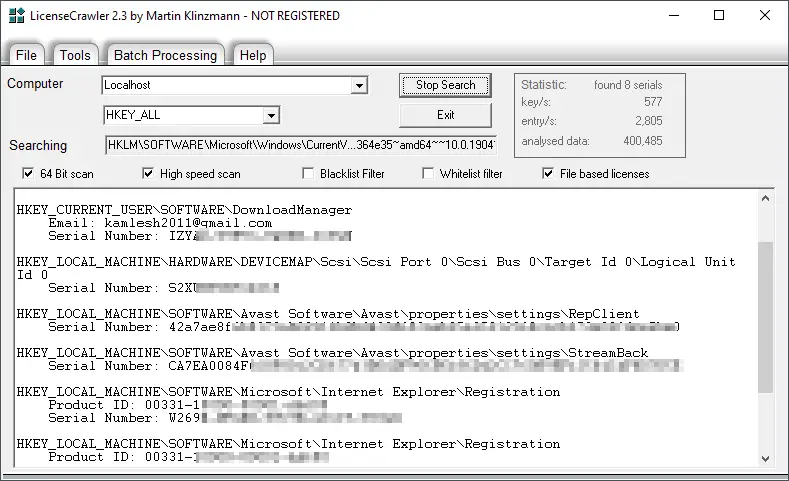
LicenseCrawler works by scanning your computer’s Windows registry, as well as various system files, to find and display license keys and serial numbers for installed software. Once the scanning process is complete, it generates a report that shows all the license keys and serial numbers found on your computer. The report can be saved as a text file or printed for future reference.
If you’re interested in exploring the registry safely, you may find RegScanner a useful utility. It helps users search through the Windows Registry efficiently and locate data entries quickly — making it a great complement to LicenseCrawler.
Using LicenseCrawler is easy. Simply download and install the software on your computer, launch the program, and let it scan your system. The scanning process can take a few minutes, depending on the size of your hard drive and the number of software programs installed on your computer.
Is LicenseCrawler safe to use?
LicenseCrawler is a safe and reliable utility software that does not contain any malware or viruses. However, it’s important to note that using LicenseCrawler to retrieve license keys for commercial software programs without permission from the software vendor may be illegal and considered software piracy. Always use LicenseCrawler ethically and responsibly.
Conclusion
LicenseCrawler is a free and useful utility software that can help you retrieve product keys and serial numbers for software programs installed on your Windows computer. It’s easy to use and can save you time and frustration when you need to reinstall a software program but have lost the original license key or serial number. However, always use LicenseCrawler ethically and responsibly, and remember that using it to retrieve license keys for commercial software programs without permission from the software vendor may be illegal and considered software piracy.
For users who like keeping a record of all installed software for maintenance or backup purposes, you may also try the Installed Programs List Generator for Windows, a freeware that automatically generates a list of all installed applications on your PC.