

Are you in search of a user-friendly screen capture and image editing tool? If yes, then PicPick is definitely worth checking out. PicPick is a free portable image editor software that offers some unique and advanced features to streamline your workflow and increase productivity. It is an all-in-one screen capture and image editing tool that can help you capture, edit, and share screenshots with ease.
Why PicPick?
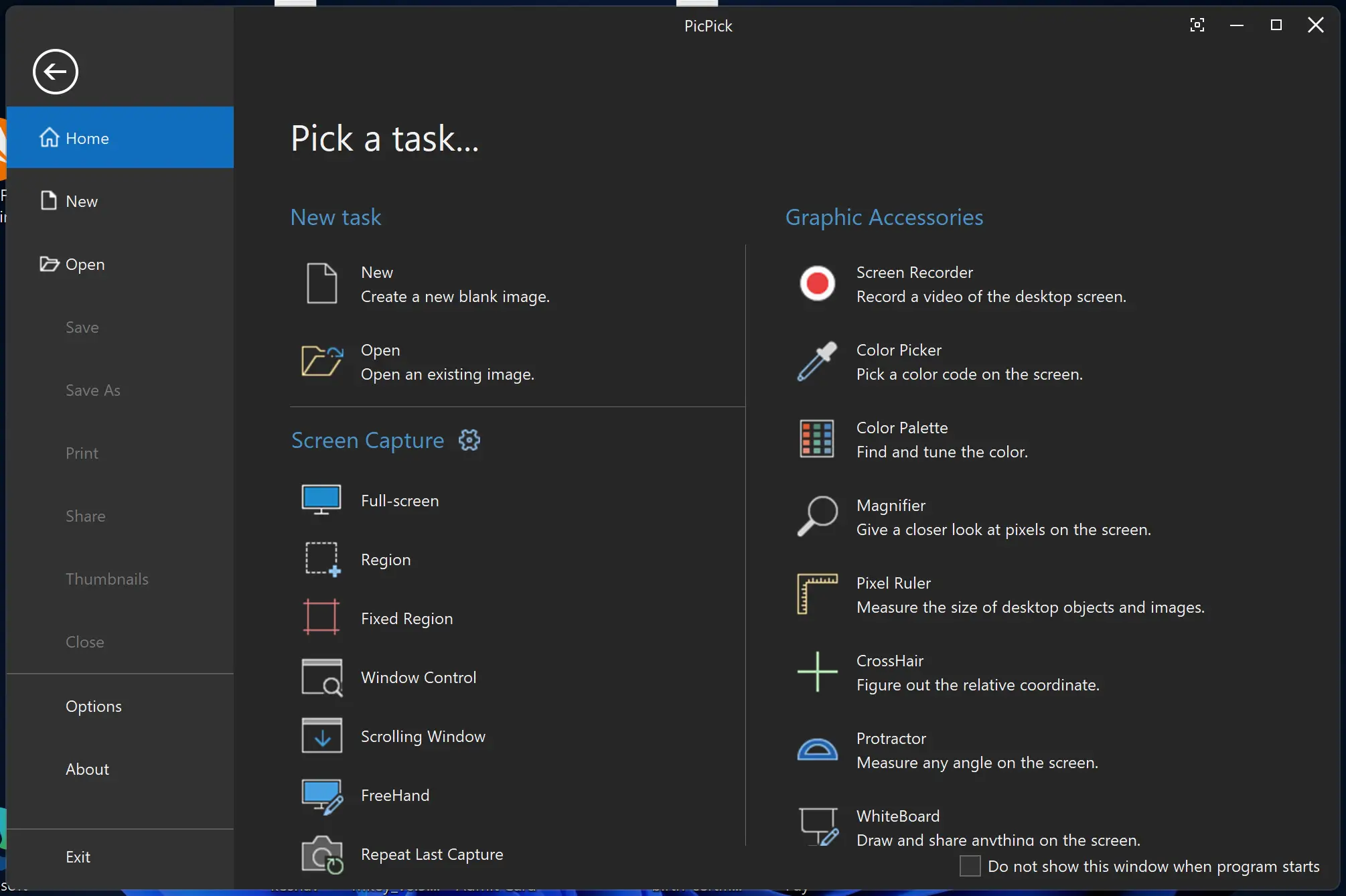
One of the main benefits of using PicPick is its user-friendly interface, which makes it easy for beginners and professionals alike. PicPick offers a variety of features, including screen capture, image editing, graphic design, and sharing options. With PicPick, you can capture your entire screen, an active window, or a specific region. You can also capture scrolling windows, web pages, and videos with just a few clicks.
Once you have captured your screenshot or image, you can edit it using a variety of tools such as a color picker, pixel ruler, protractor, magnifier, and more. PicPick also includes design tools for creating graphics, such as arrows, lines, shapes, and text boxes. Moreover, PicPick offers different methods to share your image, including email, social media, or FTP.
PicPick offers an advanced and unique feature of screen capture that lets you capture a full screen, an active window, a scrolling window, a region, a fixed region, and more. After capturing, it opens the image in the canvas, where you can edit it instantly. PicPick also offers graphic accessories such as a screen recorder, color palette, whiteboard, and other useful tools.
You can also select a canvas size from the available list and choose a background color for your canvas. PicPick allows you to share your image using services like Dropbox, Google Drive, and OneDrive. Additionally, you can open the edited image in applications like Microsoft Word, Excel, PowerPoint, or Paint with just a single click. You can also generate a URL for your image by clicking the Internet URL option in the Share tab and easily share it wherever you want.
Key Features of PicPick
- Screen Capture: Capture full screen, active window, scrolling window, or custom region.
- Image Editor: Built-in editor with support for annotations, arrows, text, and shapes.
- Graphic Tools: Includes color picker, pixel ruler, crosshair, protractor, and magnifier.
- Advanced Sharing: Easily share via Email, Dropbox, Google Drive, OneDrive, FTP, or social media.
- Portable Version: Run PicPick without installation, perfect for USB drives and portability.
- Multi-App Integration: Open images directly in Microsoft Office apps or Paint.
- Free for Personal Use: Use all core features without cost for personal projects.
- Multilingual Support: Available in multiple languages for global accessibility.
Download PicPick
PicPick is free for personal use and can be downloaded from its official website.
Conclusion
In conclusion, if you’re tired of switching between multiple tools for capturing screenshots and editing images, PicPick is the perfect solution for you. With its user-friendly interface, wide range of features, and flexible sharing options, PicPick can help streamline your workflow and increase your productivity.
You may also want to explore other helpful tools like ASCOMP Image Former Pro for batch image editing or PhotoScape for a free and easy-to-use photo editor.