

Have you ever wanted a hassle-free way to create bootable USB drives for installing your favorite operating systems? Look no further than Ventoy2Disk, the ultimate tool that simplifies the process and saves you time and effort. Whether you’re a tech enthusiast, system administrator, or simply someone who loves to tinker with different operating systems, Ventoy2Disk is a must-have utility in your toolkit.
👉 Related: How to make a bootable Windows 10 USB flash drive without formatting — learn an alternate method before trying Ventoy.
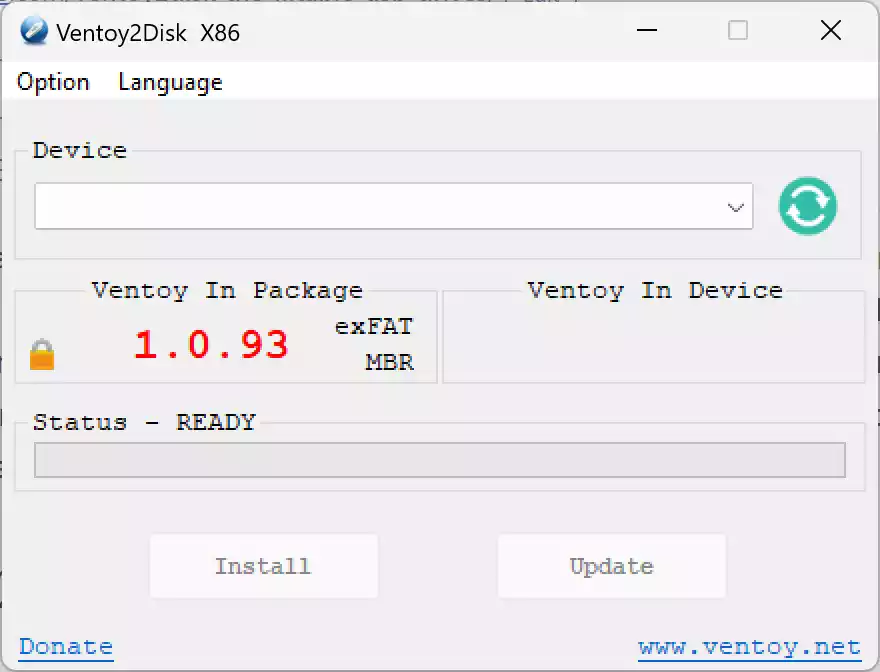
What is Ventoy2Disk?
Ventoy2Disk is an open-source tool specifically designed to create bootable USB drives for ISO, WIM, IMG, VHD(x), and EFI files. Unlike traditional methods that require formatting the USB drive and dealing with complex procedures, Ventoy2Disk streamlines the process by allowing you to copy the desired files directly to the USB drive. No more repetitive formatting or struggling with complicated commands!
👉 Also read: Universal USB Installer — another great option for multi-OS USB creation.
Key Features
- No Reformatting Required: Simply copy ISO, WIM, IMG, VHD(x), or EFI files directly to your USB—no need to format repeatedly.
- Multi-Boot Support: Boot multiple OS files from a single USB drive using the built-in boot menu.
- Wide Format Compatibility: Supports ISO, WIM, IMG, VHD, VHDX, and EFI file types for maximum flexibility.
- Cross-Platform OS Support: Compatible with Windows, Linux, Unix, ChromeOS, VMware, Xen, and more.
- UEFI & Legacy BIOS Ready: Works with x86 Legacy BIOS, IA32 UEFI, x86_64 UEFI, ARM64 UEFI, and MIPS64EL UEFI systems.
- Ventoy Browser: Boot ISO/WIM/IMG/VHD(x)/EFI files directly from local disks using the included file browser.
- VentoyPlugson: Customize your USB with plugin configuration using an easy-to-use graphical interface.
- Over 1100 ISOs Tested: Verified support for 90%+ of distributions listed on distrowatch.com.
- Persistent Storage Support: Save data and settings across reboots for supported Linux distros.
- Open-Source & Actively Maintained: Free to use with continuous updates from the developer community.
👉 You might also like: SARDU Multiboot Creator — an excellent alternative for advanced users.
How Does Ventoy2Disk Work?
Once installed on your USB drive, Ventoy2Disk creates two partitions — one for the Ventoy boot files and another where you can copy your ISO or other supported files. When you boot from that USB, a menu appears showing all the images you copied, allowing you to choose which OS or tool to start. No extraction or special setup needed — just copy and boot!
Why Choose Ventoy2Disk?
Unlike other bootable USB creators that require you to rewrite the drive for every new ISO, Ventoy2Disk provides a persistent environment that simplifies OS testing and system recovery. It’s a must-have tool for tech professionals, repair technicians, and anyone managing multiple operating systems or bootable utilities.
Download Ventoy2Disk
You can download Ventoy2Disk from its official website. The installation process is straightforward and available for both Windows and Linux systems.
👉 Want to try something similar? Check out Hasleo WinToUSB Free — ideal for creating portable Windows installations.
Additional Tools for ISO and Boot Management
If you work frequently with ISO files, you may also find the following helpful:
- Passcape ISO Burner — burn ISO images quickly and reliably.
- iTopsoft ISO Burner — another user-friendly option for burning bootable discs.
FAQs
Q1: Is Ventoy2Disk free?
Yes, it is completely free and open-source under the GNU General Public License (GPL).
Q2: Can I use Ventoy2Disk on Linux?
Yes, Ventoy2Disk supports both Windows and Linux operating systems.
Q3: Does Ventoy2Disk support Secure Boot?
Yes, Ventoy supports Secure Boot with its own custom certificate option.
Q4: How large should my USB drive be?
A minimum of 8GB is recommended, but larger drives are better if you want to store multiple ISO files.
Q5: Can I store other files alongside my ISOs?
Yes, Ventoy allows you to keep personal files and bootable ISOs together on the same USB drive.
Summary
Ventoy2Disk is the go-to tool for creating bootable USB drives with ease. Its user-friendly interface, versatile compatibility, and convenient file management make it a standout utility for tech enthusiasts and professionals alike. Say goodbye to complex formatting and hello to a streamlined bootable USB creation process. Whether you’re installing a new operating system, performing a system recovery, or exploring different distros, Ventoy2Disk has you covered. So, why wait? Give Ventoy2Disk a try and unlock the power of hassle-free bootable USB drives today!