

Managing the boot configuration of your computer can be a daunting task, especially when you have multiple operating systems installed or need to troubleshoot boot-related issues. Fortunately, there is a user-friendly tool available called EasyBCD that simplifies the process and empowers you to take full control over your system’s boot settings.
In this guide, we’ll explore EasyBCD and how it can make managing your boot configuration a breeze.
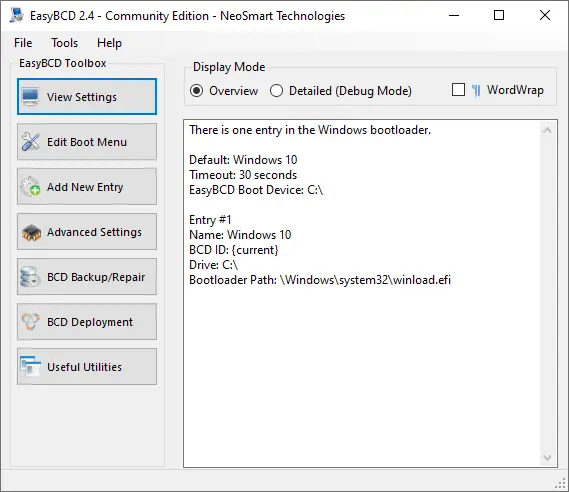
What is EasyBCD?
EasyBCD is a powerful boot management tool designed specifically for Windows operating systems, including Windows 11 and 10. It allows you to customize and manage various aspects of your computer’s boot process, such as adding, removing, or modifying boot entries, repairing the bootloader, and configuring advanced boot options. Whether you want to set up a dual-boot system, create a bootable USB drive, or recover from boot-related issues, EasyBCD has got you covered.
Why Use EasyBCD?
- Easy-to-Use Interface: EasyBCD boasts a user-friendly interface that makes managing boot settings a breeze, even for novice users. The intuitive layout and step-by-step wizards guide you through the process, eliminating any confusion or guesswork.
- Dual-Boot Made Simple: If you want to install multiple operating systems on your computer and switch between them seamlessly, EasyBCD is the ideal tool. It simplifies the process of setting up a dual-boot configuration, allowing you to choose which operating system to boot into every time you start your computer.
- Bootloader Repair: When your bootloader gets corrupted or encounters issues, it can prevent your system from booting properly. EasyBCD comes to the rescue with its powerful bootloader repair capabilities. With just a few clicks, you can repair the bootloader and get your system up and running again.
- Advanced Boot Options: EasyBCD provides advanced boot options that allow you to customize the boot process according to your preferences. You can set the default operating system, change the timeout duration for boot selection, enable or disable various boot parameters, and more.
- Bootable Media Creation: Need to create a bootable USB drive or CD/DVD for troubleshooting purposes or installing an operating system? EasyBCD simplifies the process, enabling you to create bootable media effortlessly. Just follow the straightforward instructions, and you’ll have your bootable media ready in no time.
How to Use EasyBCD?
Follow these steps to use EasyBCD:-
Step 1. Download EasyBCD from the official website and install it on your Windows 11/10 computer.
Step 2. Once installed, launch EasyBCD. You’ll be greeted with a clean and intuitive interface.
Step 3. To set up a dual-boot configuration, click on the “Add New Entry” button and select the operating system you want to add. EasyBCD will automatically detect the installed operating systems and guide you through the process.
Step 4. EasyBCD allows you to customize various boot settings. You can set the default operating system, change the boot timeout duration, modify boot parameters, and more.
Step 5. If you encounter boot issues, EasyBCD’s bootloader repair feature can help. Navigate to the “BCD Backup/Repair” section and choose the appropriate repair option based on your specific needs.
Need to create bootable media? EasyBCD offers a simple tool for creating bootable USB drives or CDs/DVDs. Follow the instructions, select the source ISO file, and create your bootable media hassle-free.
Download EasyBCD
You can download the latest version of EasyBCD from its official website.
Conclusion
EasyBCD is a must-have tool for anyone looking to manage their computer’s boot configuration effortlessly. With its user-friendly interface, powerful features, and intuitive wizards, EasyBCD simplifies the process of setting up dual-boot systems, repairing bootloaders, and customizing boot settings. Whether you’re a beginner or an advanced user, EasyBCD empowers you to take control of your system’s boot process with ease. Download EasyBCD today and unlock the full potential of your Windows 11/10 computer.