

Managing and optimizing your Windows operating system can sometimes be a daunting task. However, with the help of powerful third-party tools like Dism++, you can gain more control over your system’s performance, cleanliness, and customization.
If you’re looking for a simpler optimization solution, you might also want to try Wintoys — a beginner-friendly tool that helps repair and optimize Windows 11 safely.
In this article, we’ll dive into the world of Dism++ and explore its user-friendly features that make Windows management a breeze.
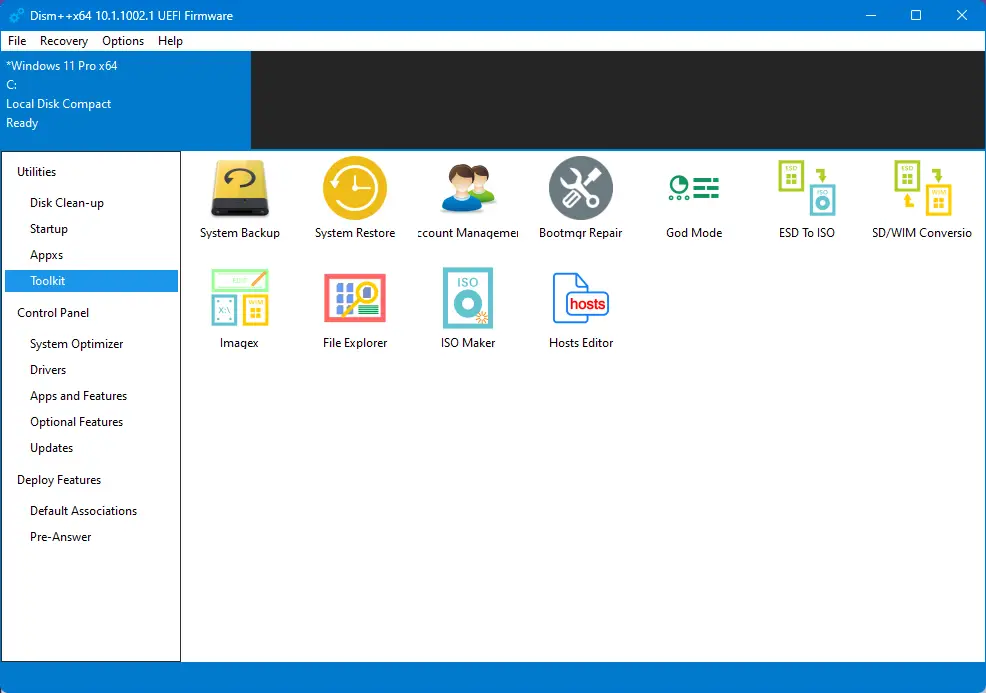
What is Dism++?
Dism++, short for Deployment Image Servicing and Management, is a utility software designed specifically for Windows operating systems. It provides a graphical user interface (GUI) that simplifies the process of managing and customizing various aspects of your Windows installation.
Key Features
- System Cleanup: Dism++ allows you to effortlessly clean up unnecessary files, temporary data, system caches, and log files that accumulate over time, helping you regain valuable disk space and improve system performance. You can also explore BleachBit — a trusted alternative for deep system cleaning and privacy protection.
- Windows Component Management: With Dism++, you have the power to enable or disable specific Windows features and components according to your preferences. This enables you to streamline your system and remove unnecessary bloatware.
- Driver Management: Dism++ offers a user-friendly driver management tool that allows you to install, uninstall, or export drivers on your system. This feature comes in handy when you need to update or troubleshoot driver-related issues.
- Windows Update Management: Taking control of Windows updates becomes hassle-free with Dism++. You can easily manage and control the installation, uninstallation, or hiding of specific updates, ensuring that you have control over your system’s update process. For fixing update-related issues automatically, check out Windows Update Doctor.
- App Management: Dism++ provides tools to remove built-in Windows apps or pre-installed manufacturer-specific software that you may not need, helping you declutter your system and optimize its performance.
- System Optimization: Dism++ includes a range of optimization options to fine-tune your system settings and enhance its performance. From startup management to services optimization, you can customize your system to suit your specific needs. You can also try Ashampoo WinOptimizer 2022 for automated performance tuning.
- Backup and Recovery: Dism++ offers a comprehensive toolkit that includes system backup and restore functionality, allowing you to create restore points and safeguard your system against potential issues.
Using Dism++ Safely
While Dism++ provides powerful features for Windows management, it’s important to exercise caution to avoid unintended consequences. Here are a few tips for using Dism++ safely:
- Create System Backups: Before making any major changes using Dism++, create a system backup to ensure you have a restore point in case anything goes wrong.
- Research and Understand: Familiarize yourself with the features and options within Dism++ before making any modifications. Research their implications and ensure you understand the potential effects on your system.
- Proceed with Caution: Always double-check the actions you’re about to take in Dism++. Be mindful of the changes you make, especially when removing Windows components or modifying critical system settings.
For those who prefer a more traditional and automated cleanup tool, consider CCleaner — an all-in-one optimization solution trusted by millions of users.
Download Dism++
You can download Dism++ from GitHub.
Conclusion
Dism++ is a powerful utility that empowers Windows users to take control of their system management. With its user-friendly interface and a plethora of features like system cleanup, Windows component management, driver management, Windows update management, app management, and more, Dism++ simplifies the process of optimizing and customizing your Windows experience.
Remember, while Dism++ is a versatile tool, it’s crucial to approach it with care and caution. Understanding its features, creating backups, and proceeding thoughtfully will help you unlock the full potential of Dism++ while keeping your system safe and stable.