

As the name suggests, the Free PDF to Word Doc Converter is a freeware tool built for Windows operating systems. It is compatible with all versions of Windows, including Windows 11, 10, 8, and 7.
Why Free PDF to Word Doc Converter?
If you deal with many Portable Document Format (PDF) files, you might need specialized software to edit them. Using the Free PDF to Word Doc Converter tool, you can not only extract text from a PDF file, but it also allows you to extract images from a PDF.
If you prefer converting directly in your browser without installing software, you can use the Free PDF to Word Converter (Online Tool) for fast, private, and upload-free conversion.
Key Features
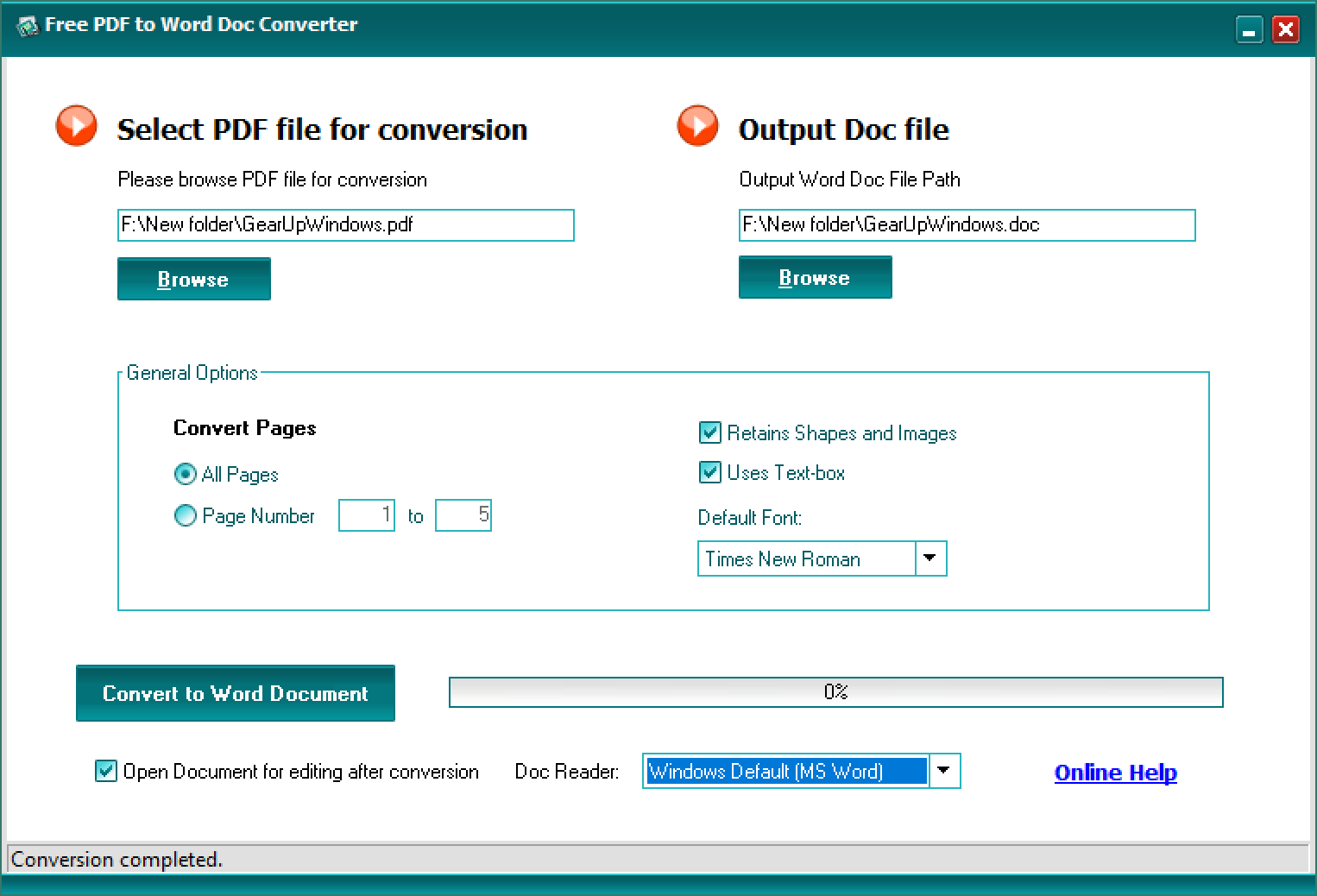
- Single-window interface — all options and settings are available from one neat window, making the tool very easy to use.
- Text & image extraction — export text and images from PDFs into editable Word documents.
- Page selection — convert all pages or choose specific pages to convert.
- Formatting options — enable “retains shapes and images” or “use text-box” and pick a default font like Times New Roman or Arial.
- Output — the application saves the converted file with a .doc extension by default, so you can open it in MS Word or any word processor.
For converting PDFs into editable spreadsheets, you may also try the PDF to Spreadsheet Converter, which supports XLSX and CSV formats.
How to Use Free PDF to Word Doc Converter
The conversion process is straightforward:
- Launch the app and choose your PDF file using the left Browse button.
- Choose whether to convert all pages or a specific range.
- Toggle options like retains shapes and images, or use text-box, and choose your default font.
- Click Convert to Word Document. The time required depends on the PDF size and complexity.
- Open the resulting .doc file in your preferred word processor to edit.
If you want to clean or remove unwanted metadata before conversion, check out the Free PDF Metadata Viewer & Editor tool.
Download Free PDF to Word Doc Converter
If you need a free and good-looking PDF to Word converter, you can get the “Free PDF to Word Doc Converter” application from Softpedia:
Download Free PDF to Word Doc Converter from Softpedia
Note: After downloading, run the installer and follow on-screen instructions. Always scan downloaded installers with your preferred antivirus and keep backups of important documents before batch operations.
For merging multiple PDFs before converting, the Merge PDFs Online tool can simplify your workflow.
Supported Formats & System Requirements
Input: PDF files (text-based and some image-based PDFs).
Output: .doc (Microsoft Word / compatible word processors).
OS: Windows 11, Windows 10, Windows 8, Windows 7 (32-bit & 64-bit where supported).
Conclusion
The Free PDF to Word Doc Converter is a useful, no-frills utility for users who frequently handle PDFs and need editable Word documents or extracted images. Its single-window design keeps the learning curve shallow while offering useful options for preserving layout and images. Download it from Softpedia and, when needed, use the linked online tools for preprocessing (merge or metadata cleanup) or web-based conversion.
For a full offline PDF suite with editing, merging, and conversion features, consider PDF24 Creator.