

Greenshot is a highly regarded, free, and open-source screen capture tool that has earned popularity among users for its powerful features and ease of use. Much like Lightshot, Greenshot enables you to capture high-quality screenshots effortlessly. However, what sets it apart is its unique ability to capture scrolling screenshots, making it possible to take full-page captures of documents or web pages in one go.
Another great feature of Greenshot is its built-in image editor, allowing you to add annotations, highlight areas, blur sensitive content, and apply various effects to your screenshots without needing external tools.
What’s more, Greenshot supports direct uploads to cloud-based platforms like Dropbox, Google Drive, and Imgur. This makes sharing screenshots simple and fast, especially for professionals who frequently collaborate or store files online.
Overall, Greenshot is a powerful and feature-rich screen capture solution, making it an excellent alternative to Lightshot—particularly for users seeking advanced editing and sharing capabilities.
Why Greenshot?
Designed for productivity, Greenshot is an open-source tool that runs smoothly on Windows 11, 10, 8, and 7. Despite being lightweight, it comes packed with features suitable for a wide range of users—from developers and testers to writers and project managers.
Key Features
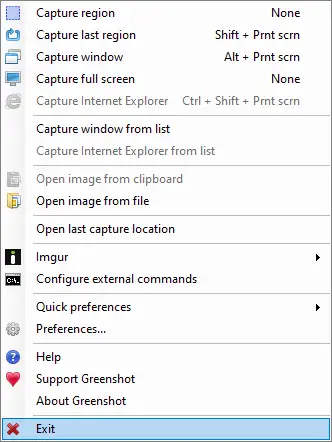
- Capture Options: Take screenshots of a selected region, specific window, or the full screen. It also supports capturing entire scrolling web pages directly from Internet Explorer.
- Built-in Editor: Annotate, highlight, blur, or crop your screenshots with ease using the intuitive editing tools.
- User-Friendly Interface: Simple to use yet highly configurable, making it ideal for both beginners and advanced users.
Once installed, Greenshot quietly runs in the system tray. A quick right-click on the icon lets you choose from multiple screen capture options.
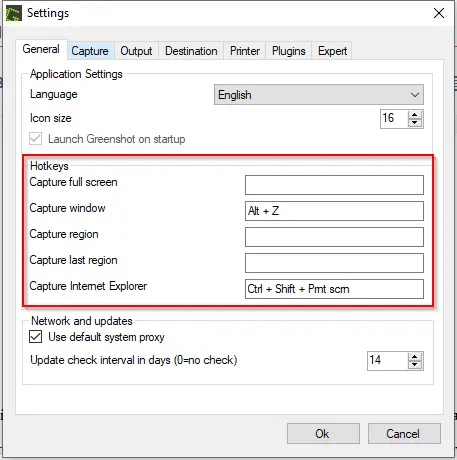
Tip: You can also configure custom keyboard shortcuts for faster access via the Greenshot Settings menu.
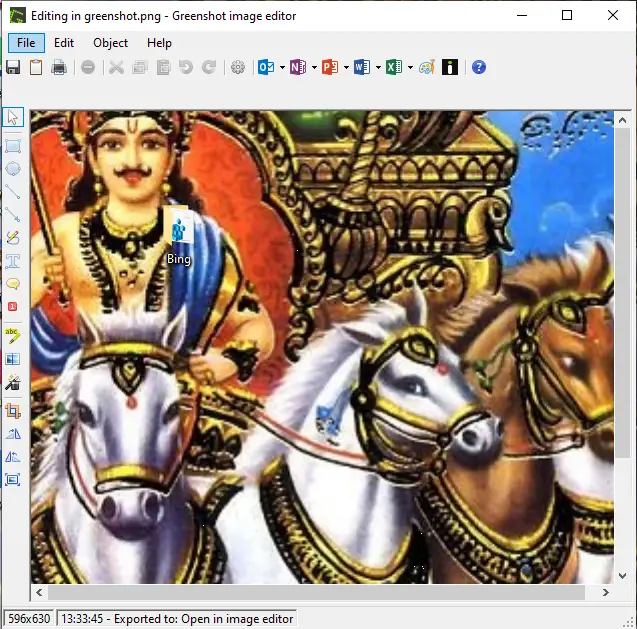
In addition to capturing screens, Greenshot provides an advanced editing tool for refining your images.
Editing Features Include:
- Drawing tools: rectangle, ellipse, line, arrow, and freehand
- Text box and speech bubble additions
- Number counters and text highlighting
- Obfuscation, blur effects, and pixelation for sensitive info
- Image cropping, rotation, and resizing
Despite being completely free, Greenshot offers a comprehensive set of tools that compete with many paid screen capture solutions. Once installed, you’ll continue to discover more features that enhance your workflow.
Download Greenshot
You can download the latest version of Greenshot from the official website.
Conclusion
Greenshot stands out as one of the best free screen capture tools for Windows users. With features like scrolling screenshot support, a powerful built-in editor, and easy cloud sharing, it goes beyond basic screenshot utilities. Its lightweight design and rich functionality make it suitable for both casual users and professionals. Whether you’re documenting a process, reporting bugs, or sharing information visually, Greenshot is a reliable and feature-packed solution that rivals many paid alternatives.
Looking for more options? You might also be interested in ShareX — another free and versatile screen capture and video recording tool for Windows users.