

In today’s digital world, we all rely on USB flash drives to transfer and store data. Whether you’re using a USB drive to share photos with friends or transfer files between devices, you want to be sure that your data is safe and secure. One of the biggest threats to the security of your USB drives is malware infections. That’s where Bitdefender USB Immunizer comes in.
What is Bitdefender USB Immunizer?
Bitdefender USB Immunizer is a free security tool that protects your USB flash drives from malware infections. When you insert a USB drive into your computer, the operating system automatically executes certain files on the drive. These files can include malware, which can infect your computer and compromise your data.
The software creates an “immunized” zone on your USB drive that tricks your computer into thinking that the drive is already infected with malware. This prevents the auto-execution of potentially harmful files and helps protect your PC.
How Does Bitdefender USB Immunizer Work?
The program works by modifying the autorun.inf file on your USB drive. This file is responsible for executing files on the drive when it is inserted into a computer. Bitdefender USB Immunizer adds a special command to the file that prevents the auto-execution of files. Essentially, it tells your computer that the drive is already compromised, even though it is not.
By immunizing your USB drive with Bitdefender USB Immunizer, you can prevent certain malware infections and keep your data safe.
How to Use Bitdefender USB Immunizer
Using Bitdefender USB Immunizer is very straightforward:
Step 1. Download and install Bitdefender USB Immunizer from the official Bitdefender website or a trusted source.
Step 2. Insert your USB drive into your computer.
Step 3. Open Bitdefender USB Immunizer.
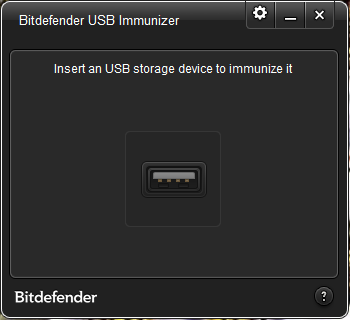
Step 4. Click the “Immunize” button.
Step 5. Wait for the program to complete the immunization process.
Your USB drive is now immunized against autorun-based malware infections. Note that Bitdefender USB Immunizer does not scan the contents of your USB drive and does not protect against all malware. It is designed specifically to block autorun-based threats.
Pros and Considerations
- Pros: Free, lightweight, portable, and effective against autorun-based malware infections.
- Considerations: Does not scan files or provide full malware protection. It should be used alongside a trusted antivirus program.
Download Bitdefender USB Immunizer
You can download Bitdefender USB Immunizer from this trusted source.
Frequently Asked Questions About Bitdefender USB Immunizer
Is Bitdefender USB Immunizer free?
Yes, it is completely free to use on Windows systems.
Does it replace antivirus software?
No. It only protects against autorun-based threats. You should still run a reliable antivirus for full protection.
Will it work on all USB drives?
Yes, it works with most USB flash drives and external storage devices.
Can I remove the immunization later?
You can format the drive to remove the immunized state, but doing so will erase your data.
Conclusion
If you want to keep your USB drives safe from autorun-based malware infections, Bitdefender USB Immunizer is a simple and effective tool worth adding to your security toolkit. Combined with a reliable antivirus solution, it adds an extra layer of defense to keep your data and devices secure.