

Since the release of the Windows 7 operating system, product license keys have been embedded into the BIOS/UEFI by PC manufacturers as a standard practice. As a result, new Windows computers come preloaded with Windows 8, 8.1, 10, or 11 without displaying product key information or Certificate of Authenticity (COA) stickers on the device. This is because the product keys are embedded into the BIOS or UEFI, which can be accessed by entering the computer’s BIOS/UEFI.
While most Windows users never need to retrieve their product keys, as the pre-installed Windows image will automatically retrieve the product key during installation, problems arise when users need to reinstall Windows 7, 8, 8.1, or 10 on their device without a genuine product key. Without a product key, users cannot activate their Windows. However, third-party tools are available to retrieve the product key from the BIOS or UEFI, enabling users to avoid paying for a new product key from Microsoft after purchasing a pre-installed Windows 8, 8.1, 10, or 11.
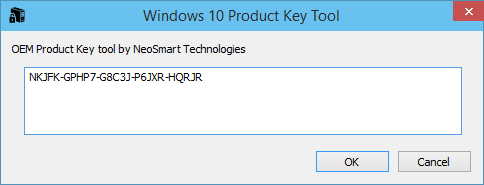
Windows 10 Product Key Tool
The renowned BCD software team has developed a freeware application called the Windows 10 Product Key Tool. It is an efficient tool that allows users to easily retrieve product license keys for Windows 7, 8, 8.1, 10, and 11 from the BIOS or EFI. Once the product key is recovered, users can smoothly reinstall Windows and activate it.
To recover the product key from the BIOS or EFI of Windows 7, 8, 10, or 11, you need to run the OEM Product Key Tool on your computer. This software will automatically scan your BIOS or EFI and retrieve your Windows product key. You can then copy the retrieved key and use it for the reinstallation of Windows.
The Windows 10 Product Key Tool is compatible with both 32-bit and 64-bit versions of Windows 7, 8.1, 10, and 11.
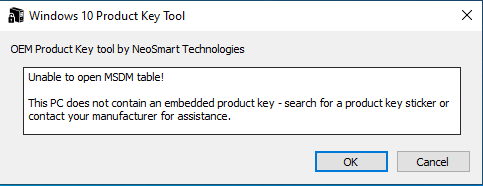
If you receive an error message saying “Unable to open MSDM table!” instead of the product key, it indicates that the product key is not stored in your PC’s BIOS/EFI. In this case, you need to locate the product key sticker on your PC and make a note of it for future use.
Download Windows 10 Product Key Tool
You can download a free copy of the Windows 10 Product Key Tool from here.
You might also be interested in discovering the MS Office Product key and Windows 11/10 Product key. Belarc Advisor is another freeware tool that retrieves the product key from your installed Windows 11/10 operating system.
FAQs
Why don’t modern Windows laptops show product key stickers anymore?
Since Windows 8, manufacturers have embedded the product key directly into the BIOS or UEFI firmware. This eliminates the need for COA stickers and ensures automatic activation during reinstallations.
Can I retrieve the product key of Windows 10 or 11 from BIOS?
Yes, tools like the Windows 10 Product Key Tool can scan your BIOS or EFI and extract the embedded key within seconds.
Will the retrieved product key work for reinstalling Windows?
If the key is genuine and tied to your device, you can use it to reinstall and reactivate the same edition of Windows on that specific PC.
What does “Unable to open MSDM table!” mean?
This message indicates that your system does not have an embedded product key in the BIOS/UEFI. In such cases, the key may be printed on a sticker or provided separately by the manufacturer.
Is it legal to use third-party tools to view my Windows product key?
Yes, retrieving your own product key is completely legal. These tools only read information already stored on your device.
Can this tool find my Microsoft Office product key as well?
No, the Windows 10 Product Key Tool is designed only for Windows OS keys. For MS Office keys, freeware tools like ProduKey or Belarc Advisor can help.
Does this tool work on all editions of Windows?
It works on Windows 7, 8, 8.1, 10, and 11 in both 32-bit and 64-bit versions, as long as the product key is stored in the BIOS/EFI.
Will the tool work if my PC originally came with Windows 7?
Windows 7 systems normally used external COA stickers and did not embed keys in firmware. In many cases, the MSDM table will be empty, and the tool may not show a key.
Can I use the same extracted key on another PC?
No, OEM-embedded keys are locked to the original hardware. They cannot be transferred to another machine.
Do I need an internet connection to retrieve the key?
No, the tool reads the key directly from your device’s firmware, so it does not require internet access.
Conclusion
In conclusion, retrieving the product key from the BIOS or UEFI of your Windows device is crucial when reinstalling Windows without a genuine product key. Fortunately, freeware tools such as Magical Jelly Bean Keyfinder and the Windows 10 Product Key Tool are available to help you retrieve the product key efficiently. The Windows 10 Product Key Tool, in particular, is a reliable and easy-to-use tool that works with a variety of Windows versions. With this tool, you can easily retrieve your Windows product key and reactivate your Windows operating system without any hassle.