

USB flash drives have become an integral part of our digital lives, allowing us to store and transfer data conveniently. However, they can also be a breeding ground for malware and viruses. To protect your USB drives and keep your data safe, Panda USB Vaccine offers an effective solution.
What is Panda USB Vaccine?
Panda USB Vaccine is a free and user-friendly security tool designed to immunize your USB flash drives against malware infections. By preventing the execution of malicious files, it ensures the safety of your data and the devices you connect your USB drives to.
How Does Panda USB Vaccine Work?
Panda USB Vaccine works by creating a protective shield on your USB drive. When you enable the vaccine on your drive, it modifies the autorun.inf file, which is responsible for the automatic execution of files upon connecting the drive to a computer. By adding a special command to this file, Panda USB Vaccine blocks the execution of potentially malicious files, safeguarding your computer and USB drive from malware threats.
How to Use Panda USB Vaccine
Using the Panda USB Vaccine is straightforward. Follow these steps to secure your USB drives:
Step 1. Download and install Panda USB Vaccine from the official Panda Security website.
Step 2. Insert your USB drive into your computer.
Step 3. Open Panda USB Vaccine.
Step 4. Select the USB drive you want to vaccinate from the list of available drives.
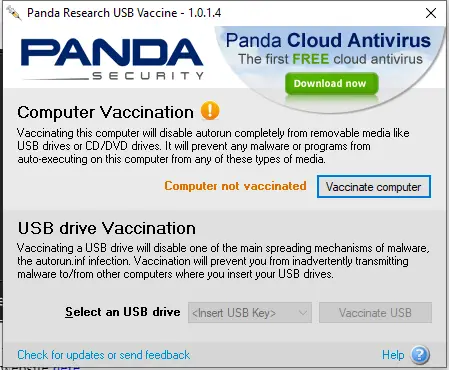
Step 5. Click the “Vaccinate USB” button.
Step 6. Wait for the process to complete.
Once vaccinated, your USB drive is protected from autorun-based malware infections.
Key Benefits
- Enhanced Security: Provides an extra layer of protection, preventing malware from auto-executing on USB drives.
- Ease of Use: The simple interface makes it beginner-friendly, even for non-technical users.
- Compatibility: Works with most Windows operating systems, ensuring wide usability.
- Free of Cost: Offers robust USB protection without any cost.
Pros and Considerations
- Pros: Free, lightweight, simple to use, and effective for blocking autorun-based infections.
- Considerations: It does not scan or remove existing malware. For full protection, pair it with a trusted antivirus program.
Frequently Asked Questions About Panda USB Vaccine
Is Panda USB Vaccine free?
Yes, it is completely free to use and works on most Windows versions.
Does it remove malware from USB drives?
No, it only prevents malware from executing automatically. Use a malware scanner to clean infected files.
Can I use it on multiple USB drives?
Yes, you can vaccinate as many USB drives as you want using the same program.
Does it slow down my USB drive?
No, Panda USB Vaccine works instantly and does not affect transfer speed or performance.
Download Panda USB Vaccine
You can download Panda USB Vaccine from its official website.
Conclusion
Safeguarding your USB drives from malware threats is crucial in today’s digital landscape. With Panda USB Vaccine, you can easily immunize your USB drives, ensuring the safety of your data and devices. Simple, free, and effective — it’s a handy addition to your security toolkit.