

Are you tired of the same old look of your Windows folders? Do you want to make them more personalized and easier to identify? Then, StyleFolder is the perfect solution for you. This lightweight freeware lets you customize folders quickly and easily from the right-click context menu, making your system organized and visually appealing.
Why Use StyleFolder?
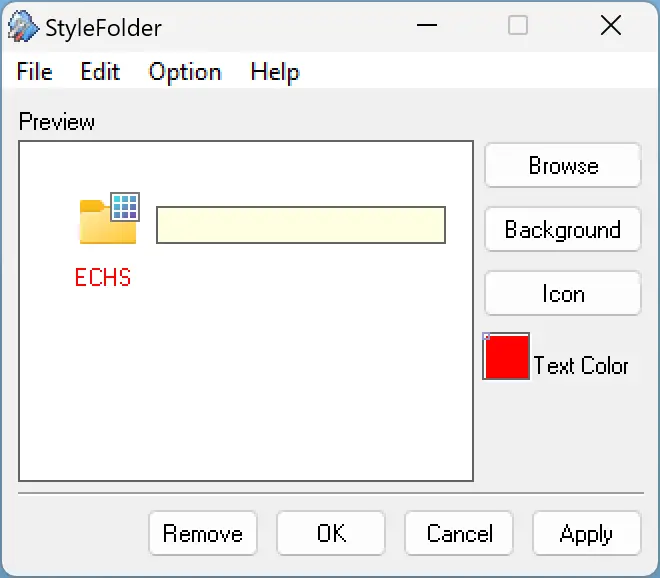
With StyleFolder, you can change the folder icon, background, font, color, and even folder size. It’s an excellent way to make your favorite folders stand out and quickly identify them among dozens of others.
StyleFolder is user-friendly and works seamlessly on Windows 10, 8, 7, and Vista. Installation is simple, and once set up, it integrates directly into the right-click context menu. Best of all, it’s completely free, so you don’t need to spend a penny to customize your folders.
To use StyleFolder, simply right-click on any folder and select the “StyleFolder” option. From there, you can:
- Change the folder icon to built-in or custom icons.
- Set a custom folder background for better visual appearance.
- Modify the folder font style and size for easier readability.
- Apply colors that match your theme or highlight important folders.
- Preview changes before applying them permanently.
Another convenient feature is batch customization. You can select multiple folders, right-click, and apply the same design changes to all of them simultaneously.
Additional Free Tools to Customize Folders
If you want more options for folder customization, here are other popular free tools covered on Gearupwindows:
- CustomFolders – Add emblems, change icons, and colorize folders effortlessly.
- Folder Painter – Assign multiple colors to frequently used folders via context menu.
- Folder Marker – Color-code folders by priority, work status, or category.
- FileMarker.NET Free – Mark both files and folders with labels and colors.
Download StyleFolder
You can download StyleFolder from this link. Once downloaded, extract the zip file, install the software, and start customizing your folders immediately.
Conclusion
StyleFolder is an excellent tool for anyone who wants to personalize their Windows experience. Its wide range of customization features, batch editing, and ease of use make it a perfect choice for both beginners and advanced users. Combine it with other folder icon color changer tools to create a unique and well-organized desktop that stands out.