

Dealing with USB drives, FireWire disks, and memory cards can sometimes be a hassle when it comes to safely removing them from your computer. That’s where the USB Disk Ejector comes in. USB Disk Ejector is a user-friendly program designed to quickly and efficiently eject drives in Windows. For users concerned about protecting their PC from potentially harmful USB devices, you can also check out USB Disk Security, a handy tool that keeps your system safe from USB-based malware threats.
In this article, we’ll explore the features and benefits of USB Disk Ejector and how it simplifies the process of removing your storage devices.
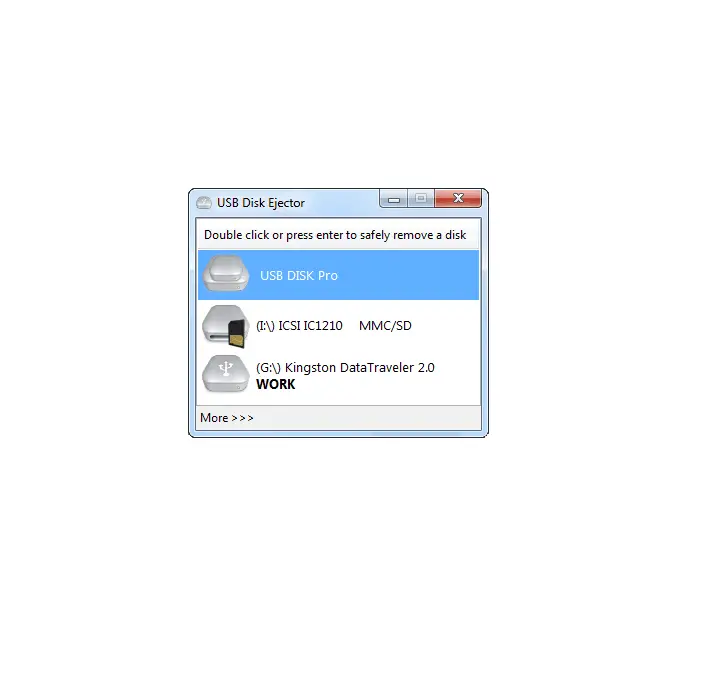
What is USB Disk Ejector?
USB Disk Ejector is a lightweight and portable utility that offers a fast and efficient way to safely remove USB drives, memory cards, and external disks. Unlike the default Windows eject tool, it provides a user-friendly experience with customizable options, hotkeys, and command-line support for power users. Whether you’re using it on a personal PC or carrying it on a flash drive for use across multiple machines, USB Disk Ejector ensures a clean and secure removal process, minimizing the risk of data corruption or device errors.
For those who frequently work with multiple external devices, USBDeview is another excellent tool that allows you to view, manage, and control all connected USB devices easily.
Key Features
- Instant USB, Firewire, and card reader drive ejection.
- Portable – runs directly from removable media.
- Create custom shortcuts and hotkeys for specific drives.
- Command-line support for automation and scripting. If you love automating tasks, check out TinyTask, a free portable automation utility for Windows.
- Close open Explorer windows and running apps on the drive.
- Compatible with Windows XP through Windows 11.
Monitor USB Device Activity
Before downloading the tool, you might also want to analyze how and when your drives connect or disconnect from your computer. Tools like USBLogView can display real-time logs of USB connections, giving deeper insights into device activity and performance.
Download the USB Disk Ejector
If you need it, you can grab the USB Disk Ejector from its official website. It’s completely free and doesn’t require installation—simply extract and run the executable file.
Conclusion
USB Disk Ejector is a powerful yet user-friendly tool that simplifies the process of removing USB drives, FireWire disks, and memory cards from your computer. With its quick and easy drive ejection, portability, customization options, and command-line support, the USB Disk Ejector offers a seamless experience for managing your storage devices. Whether you’re a casual user or a tech-savvy professional, USB Disk Ejector is a must-have utility to ensure the safe and efficient removal of your drives. Download it today and enjoy a hassle-free ejection process.
After safely ejecting your drives, consider cleaning your system traces with USB Oblivion, a lightweight utility that removes all USB connection history from Windows for improved privacy.