

USB devices are an integral part of our digital lives, but they can leave behind traces in our computer’s registry. These remnants can clutter the system and potentially cause issues. Thankfully, there’s a user-friendly utility called USB Oblivion that can effectively erase all traces of connected USB devices from your Windows system.
In this article, we’ll explore how USB Oblivion can help streamline your system by removing unwanted USB traces.
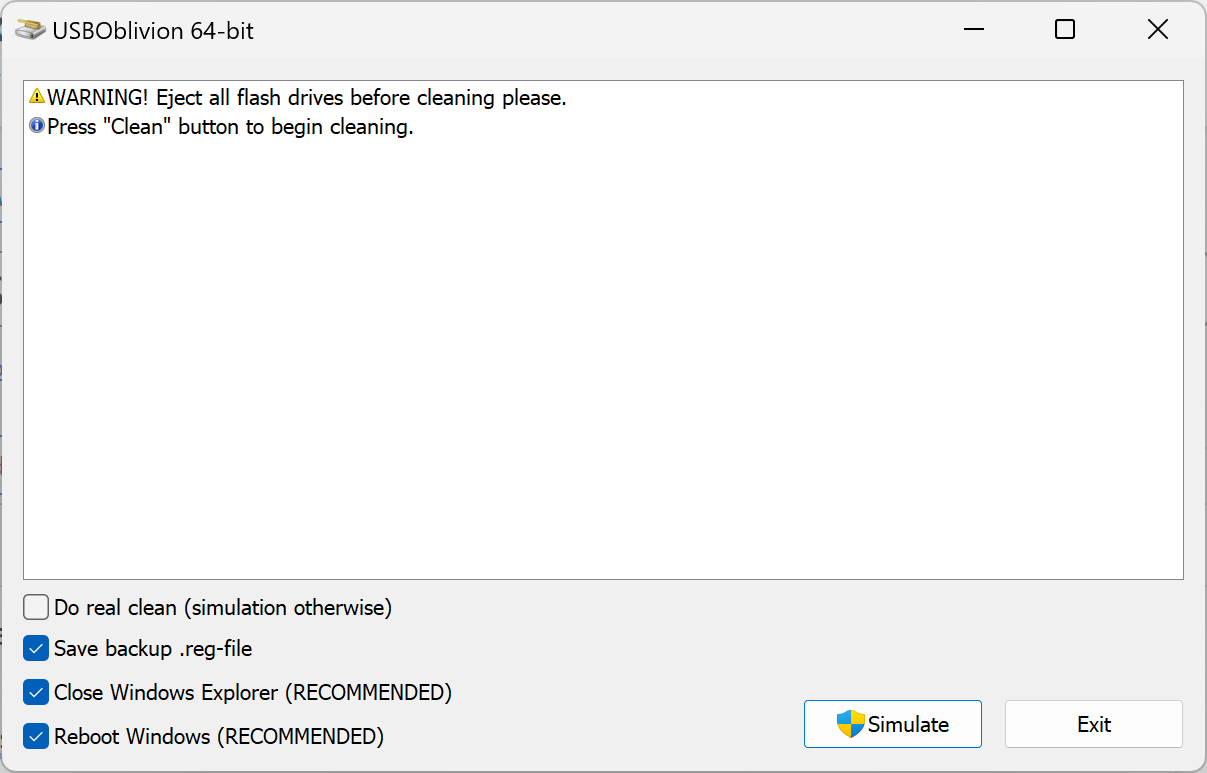
What is USB Oblivion?
USB Oblivion is a handy utility tool designed to clean up the Windows registry by removing leftover traces of connected USB devices. It supports a range of Windows operating systems, including Windows XP, Windows 2003, Windows Vista, Windows 7, Windows 8, and Windows 10 (both 32-bit and 64-bit versions). Whether it’s a malfunctioning USB device or simply a desire for a cleaner system, USB Oblivion can help.
If you prefer tools that let you view and manage USB devices before cleaning, check out USBDeview — a great companion for inspecting device history and details.
Key Benefits
- Easy-to-Use Interface: USB Oblivion offers a user-friendly interface, making it accessible even for those with limited technical expertise. You don’t need to be a computer whiz to take advantage of its benefits.
- Test Mode: USB Oblivion features a convenient test mode that allows you to simulate the removal process without actually deleting any data from the registry. This provides peace of mind and lets you review potential changes before committing to them.
- Undo Changes with .reg File: In case you want to revert any modifications made by USB Oblivion, it automatically creates a .reg file. This file can be used to undo the changes and restore the registry to its previous state, ensuring flexibility and safety.
- Fully Automatic Mode: USB Oblivion also offers a fully automatic mode for a hassle-free experience. With just a few clicks, you can let the utility do its job and clean up the USB traces from your system without any manual intervention.
Before you clean registry traces, it’s wise to view what has been recorded. USBlogView can help you inspect USB device activity and logs so you know exactly what might be removed.
How to Use USB Oblivion?
Using USB Oblivion is straightforward. Here’s a step-by-step guide to get you started:-
Step 1. Begin by downloading USB Oblivion from a trusted source and installing it on your Windows computer.
Step 2. Open USB Oblivion from your desktop or the Start menu. The user-friendly interface will guide you through the process.
Step 3. Choose whether you want to use the test mode to simulate the removal process or opt for the fully automatic mode for a hands-free experience.
Step 4. Click on the “Clean” button to initiate the cleaning process. USB Oblivion will scan and remove any traces of connected USB devices from your computer’s registry.
Step 5. If you used the test mode, review the potential changes before proceeding. USB Oblivion will also create a .reg file that you can use to undo any modifications if needed.
After cleaning, if you want to lock or restrict USB access to prevent future unwanted devices, consider using tools such as Ratool for USB access control.
Download USB Oblivion
You can download USB Oblivion from SourceForge.
FAQs
Is USB Oblivion safe to use?
Yes — USB Oblivion is widely used for cleaning USB-related registry entries. To be safe, use the built-in Test mode first and keep the generated .reg undo file until you’re satisfied with the changes.
Will USB Oblivion delete files from my USB drives?
No. USB Oblivion only removes registry traces of connected devices and does not delete data from USB drives themselves.
Can I restore registry entries if something goes wrong?
Yes. USB Oblivion creates a .reg file before making changes; run that .reg file to restore the removed entries if needed.
Does USB Oblivion work on Windows 11?
USB Oblivion was developed for older Windows versions up to Windows 10; it often works on newer systems, but test it in Test mode first. For broader system cleanup and privacy, you may also consider tools like Privazer.
Conclusion
USB Oblivion is a user-friendly utility tool that simplifies the process of removing traces of connected USB devices from your Windows computer’s registry. Whether you’re troubleshooting USB-related issues or seeking a cleaner system, USB Oblivion is a valuable tool for streamlining your computer’s performance. With its easy-to-use interface, test mode, automatic mode, and the ability to undo changes, USB Oblivion empowers users to take control of their system’s cleanliness and optimization. Give USB Oblivion a try and experience the benefits of a clutter-free Windows registry.
Related: If you’re interested in improving USB device security (write-protection, malware prevention), see our roundup of Best Free USB Security Tools for Windows.