

CDBurnerXP is a free and easy-to-use software that allows you to burn data, audio, and video CDs, DVDs, and Blu-ray discs. It was first released in 2004 and has been continuously updated and improved since then. The software is compatible with all versions of Windows, from Windows 2000 to Windows 10. If you’re looking for a more modern alternative for Windows 11, try BurnAware Free — it’s lightweight, reliable, and supports Blu-ray as well.
Why CDBurnerXP?
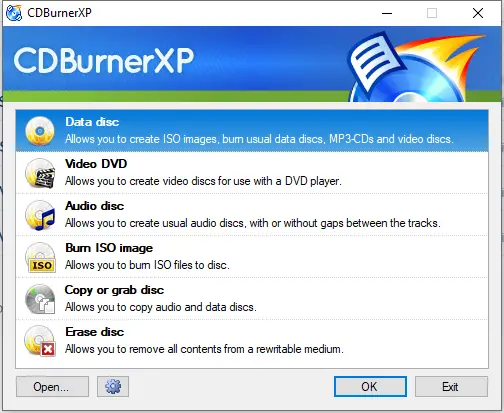
Using CDBurnerXP is quite straightforward. Once you download and install the software, you can start by selecting the type of disc you want to create from the main menu. You can choose between a data disc, an audio disc, or a video disc. If you want to create a bootable disc, there is an option for that as well. For ISO and bootable image creation, you can also use ISO Toolkit or GUW ISO Opener to prepare or extract ISO files easily before burning.
To create a data disc, you simply select the files and folders you want to burn and drag them into the project window. You can then arrange the files and folders in the order you want them to appear on the disc. Once you are satisfied with the layout, you can click on the Burn button, and the software will start the burning process.
Creating an audio disc is just as easy. You can add audio files in various formats, including MP3, WAV, and WMA. You can also create audio CDs from playlists in formats such as M3U and ASX. The software also supports adding CD-Text and can automatically retrieve track information from an online database. To enhance your music collection, you might also try Ashampoo Music Studio 2022 for editing and managing audio files before burning them.
CDBurnerXP also has a video burning feature that allows you to create video DVDs and Blu-ray discs. You can add video files in various formats, including AVI, MP4, and WMV. The software also supports creating a DVD menu with custom backgrounds and buttons. If you work with large video files, you may like Free HD Video Converter Factory for converting them into disc-compatible formats before burning.
One of the standout features of CDBurnerXP is its ability to burn ISO images. An ISO image is a file that contains a complete copy of a CD, DVD, or Blu-ray disc. With CDBurnerXP, you can burn ISO images to a disc, or you can create an ISO image from a disc. You can also try AnyBurn — another reliable freeware for ISO burning and image management.
Download CDBurnerXP
If you need, you can download it from its official website.
Conclusion
Overall, CDBurnerXP is a powerful and versatile software that can handle all your disc burning needs. It is easy to use, has a clean and intuitive interface, and supports a wide range of formats. Best of all, it is completely free to use. So, if you need to burn CDs, DVDs, or Blu-ray discs, give CDBurnerXP a try. If you prefer open-source options, explore InfraRecorder — a simple and fast disc-burning alternative for Windows.