

ImgBurn is a popular and free disc-burning software that allows users to create, burn, and copy CD, DVD, and Blu-ray discs. The software has been around since 2005 and has since become a staple among disc-burning enthusiasts due to its extensive range of features, user-friendly interface, and overall reliability.
In this article, we’ll take a closer look at ImgBurn and what makes it such a great disc-burning solution. If you’re looking for other similar tools, you may also explore BurnAware Free, a well-rounded alternative for everyday disc-burning tasks.
Features
ImgBurn offers a comprehensive set of features that make it a versatile disc-burning software. One of the standout features is the ability to burn ISO files to disc, which makes it easy to create a bootable CD or DVD. ImgBurn also supports a variety of disc image formats, such as BIN, CUE, DI, DVD, GI, IMG, ISO, MDS, NRG, and PDI.
In addition to burning disc images, ImgBurn allows users to create their own ISO files from files and folders on their computers. This is a useful feature for users who want to create a backup of their data or create a disc image for distribution. For users who prefer a beginner-friendly approach, CDBurnerXP is another excellent free alternative for creating and burning ISO images.
ImgBurn also includes options for burning audio CDs and DVD video discs, as well as creating and burning data discs. The software offers a range of options for disc burning, such as multisession discs and support for dual-layer discs.
Interface
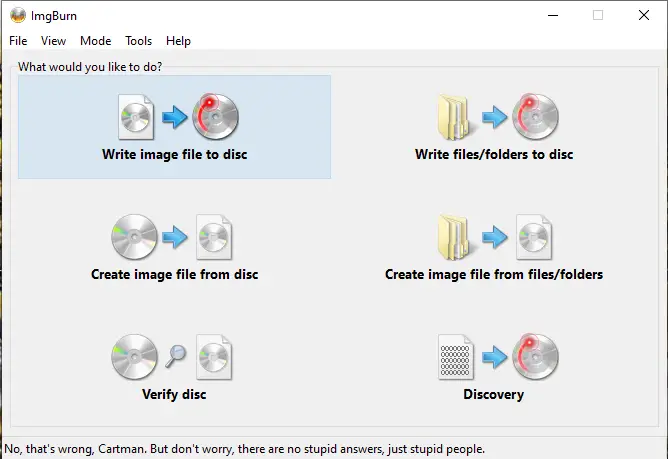
One of the strengths of ImgBurn is its user-friendly interface. The software is easy to navigate and includes a variety of options for customizing disc-burning settings. The main menu includes options for creating, writing, verifying, and discovering discs, making it easy for users to find the feature they need.
The software also includes a preview pane that allows users to preview their disc image before burning it to a disc. This is a helpful feature for ensuring that the disc image is correct and that there are no errors or issues. Similarly, tools like InfraRecorder also provide an intuitive interface for users who want simplicity with advanced options.
Overall, the interface is clean, intuitive, and easy to use, making it accessible for both novice and experienced users.
Reliability
ImgBurn is known for its reliability and stability. The software is regularly updated and maintained, which ensures that it remains compatible with the latest hardware and software. Additionally, ImgBurn includes error-checking features that help prevent disc-burning errors and issues.
The software also includes a log feature that records all burning activities, making it easy for users to troubleshoot issues and identify the cause of any problems that may arise during the burning process. If reliability is your top priority, you may also consider FinalBurner, another trusted free tool for creating CDs and DVDs with consistent results.
Download ImgBurn
You can download ImgBurn from its official website. Before you install, you might also want to compare it with other ISO burning tools by checking our roundup of the 5 Best Free ISO Burners for Windows.
FAQs
Is ImgBurn safe to use?
Yes. ImgBurn has been a trusted disc-burning utility for years. Always download it from the official website to avoid bundled installers or unwanted software.
Can ImgBurn create ISO files?
Absolutely. ImgBurn lets you create ISO images from files and folders, ideal for backups or creating bootable media.
Does ImgBurn support Blu-ray burning?
Yes, ImgBurn supports CD, DVD, HD DVD, and Blu-ray burning with extensive format support.
Is ImgBurn compatible with Windows 11?
Although ImgBurn was last officially tested on Windows 10, it works smoothly on Windows 11 for most users.
Conclusion
ImgBurn is a comprehensive disc-burning software that offers a range of features, an intuitive interface, and reliable performance. It’s a great choice for users who need a versatile disc-burning solution for their CD, DVD, and Blu-ray needs. Best of all, it’s completely free, making it accessible to anyone who needs to burn discs efficiently and securely.
Related reading: You can also explore BurnAware Free or InfraRecorder as excellent alternatives for disc creation and backup tasks.