

In today’s digital world, ensuring the security of our data has become paramount. USB Disabler is a powerful yet user-friendly program designed to give you control over USB storage access on your Windows computer. In this article, we will explore the features and benefits of USB Disabler and how it can help you protect your sensitive information from potential threats.
Why USB Disabler?
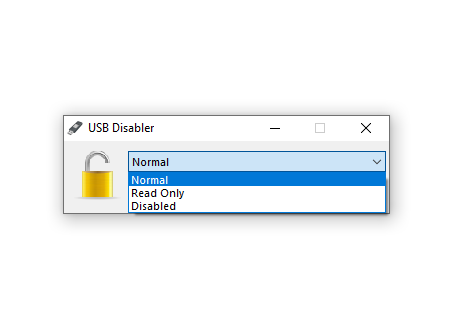
USB Disabler is a lightweight, portable utility designed to help users take full control over USB storage access. Ideal for securing systems in shared, public, or professional environments, it allows you to enable, disable, or set USB drives to read-only mode with minimal effort. With its simple interface and strong compatibility across Windows versions, USB Disabler is a practical solution for preventing unauthorized data transfers and maintaining device security. For more options, you may also explore our roundup of USB security tools.
Key Features
- Simplified USB Management: Quickly enable or disable USB storage device access.
- Disable USB Storage: Block recognition and access of external storage devices to prevent data theft or infection.
- Read-Only Mode: Allow view-only access to files without permitting copy, modification, or deletion.
- Easy Configuration & Reset: User-friendly controls for toggling settings and restoring full USB functionality.
- Portable & Lightweight: No installation required; only 1MB zipped for convenient on-the-go use.
- Broad Compatibility: Supports Windows Vista, 7, 8/8.1, 10, and 11 with full UAC compliance.
Pros and Considerations
- Pros: Free, portable, lightweight, easy to use, supports read-only mode, and prevents unauthorized access.
- Considerations: No advanced reporting or monitoring features. For autorun malware protection, consider Bitdefender USB Immunizer or Panda USB Vaccine.
Frequently Asked Questions About USB Disabler
Is USB Disabler free?
Yes, USB Disabler is free to use and does not require installation.
Does it work on Windows 11?
Yes, it is compatible with Windows Vista through Windows 11.
Can I set the USB to read-only mode?
Yes, the software includes a read-only mode that lets you access files without making changes or copying data.
Is it safe to use in professional environments?
Yes, it is ideal for offices, schools, and shared systems where preventing unauthorized data transfers is critical.
Download USB Disabler
You can download USB Disabler from its official source.
Conclusion
USB Disabler provides a user-friendly and effective solution for managing USB storage access on your Windows computer. With its ability to disable or set read-only access, you can enhance the security of your system, protecting your sensitive data from unauthorized access or potential malware threats. Lightweight, portable, and easy to use, USB Disabler empowers you to take control of USB security with just a few clicks.