

In today’s digital world, where image-heavy websites are the norm, optimizing image file sizes is crucial for ensuring fast loading speeds and a smooth user experience. One innovative solution for reducing image sizes without compromising quality is the WebP image format developed by Google. However, working with WebP images on Windows or Mac requires third-party software—and that’s where WebP Converter by Vertexshare comes into play.
In this article, we’ll explore the user-friendly features of WebP Converter and show how it can simplify the process of converting images between WebP, JPG, and PNG formats.
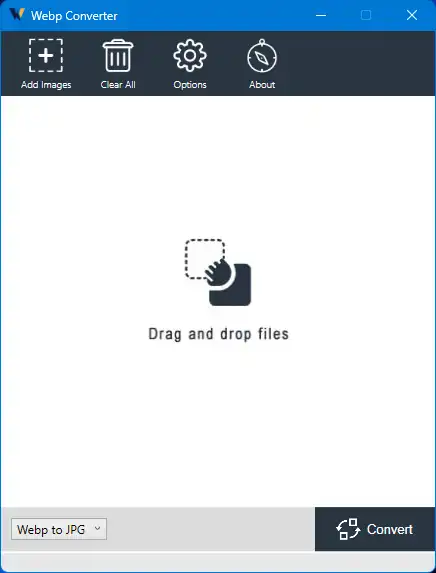
What is a WebP Converter?
WebP Converter is a free software tool developed by Vertexshare to convert images between the WebP, JPG, and PNG formats effortlessly. Whether you want to convert WebP images to more commonly supported formats or turn JPG/PNG images into WebP for website optimization, this tool makes the process quick and easy.
Why Convert Images to WebP?
WebP images combine both lossy and lossless compression, offering smaller file sizes without sacrificing image quality. By converting your images to WebP format, you can significantly reduce their size, leading to faster loading times and better performance for your website. This optimization is especially beneficial for mobile users or those on slower internet connections.
Key Features
- Simple and Intuitive Interface: The tool offers a clean and easy-to-use interface, perfect for both beginners and experienced users.
- Bidirectional Conversion: Easily convert WebP images to JPG or PNG, and vice versa, based on your needs.
- Batch Conversion: Convert hundreds of images at once with drag-and-drop convenience.
- Fast and Safe Processing: Enjoy quick conversion speeds while maintaining image quality and integrity.
- Offline Usage: Operates completely offline, ensuring your files remain private and secure.
- Standalone Application: No extra software or dependencies required—just install and start converting.
How to Use WebP Converter?
Follow these steps to use WebP Converter:
Step 1. Visit the CNET website or the official website to download WebP Converter for Windows or Mac. Install it on your computer.
Step 2. Launch WebP Converter after installation.
Step 3. Choose the direction of conversion: WebP to JPG/PNG or JPG/PNG to WebP, depending on your need.
Step 4. Click the “Add” button or drag and drop image files into the software. You can add multiple files for batch processing.
Step 5. Select your desired output format (JPG or PNG) and adjust any optional settings like quality or compression.
Step 6. Click on the “Convert” button to begin. The software will process and save your converted images promptly.
Conclusion
WebP Converter by Vertexshare is a reliable and user-friendly tool that streamlines the process of converting images between WebP, JPG, and PNG formats. With batch processing, offline functionality, and fast performance, this standalone application is perfect for anyone looking to optimize their image workflow. Whether you’re managing a website or editing a personal photo collection, WebP Converter makes the task quick and hassle-free.
In this gearupwindows guide, we explored how WebP Converter can help you manage image formats efficiently. You might also want to try XnConvert, a powerful image batch editor, or the intuitive Vovsoft WebP Converter for seamless format transitions.