

In an era where digital devices are an integral part of our lives, keeping a close eye on your computer’s processes and performance can be crucial. Whether you are a tech enthusiast, a professional IT administrator, or just a casual user wanting to ensure your system’s health, Glow is a free, open-source system overview tool that deserves your attention. Similar to the well-known Speccy from Piriform, Glow offers an array of features that allow you to gain comprehensive insights into your computer’s hardware, drivers, and services.
In this article, we’ll explore what Glow brings to the table and how it can be a valuable addition to your digital toolkit.
What is Glow?
Glow is a lightweight and portable system monitoring tool designed to provide users with detailed information about their computer’s hardware, system status, drivers, and services. Developed by an independent developer, it stands out as a viable alternative to Speccy, especially since Speccy’s acquisition by Avast in 2017, which led to a decline in its development and attention.
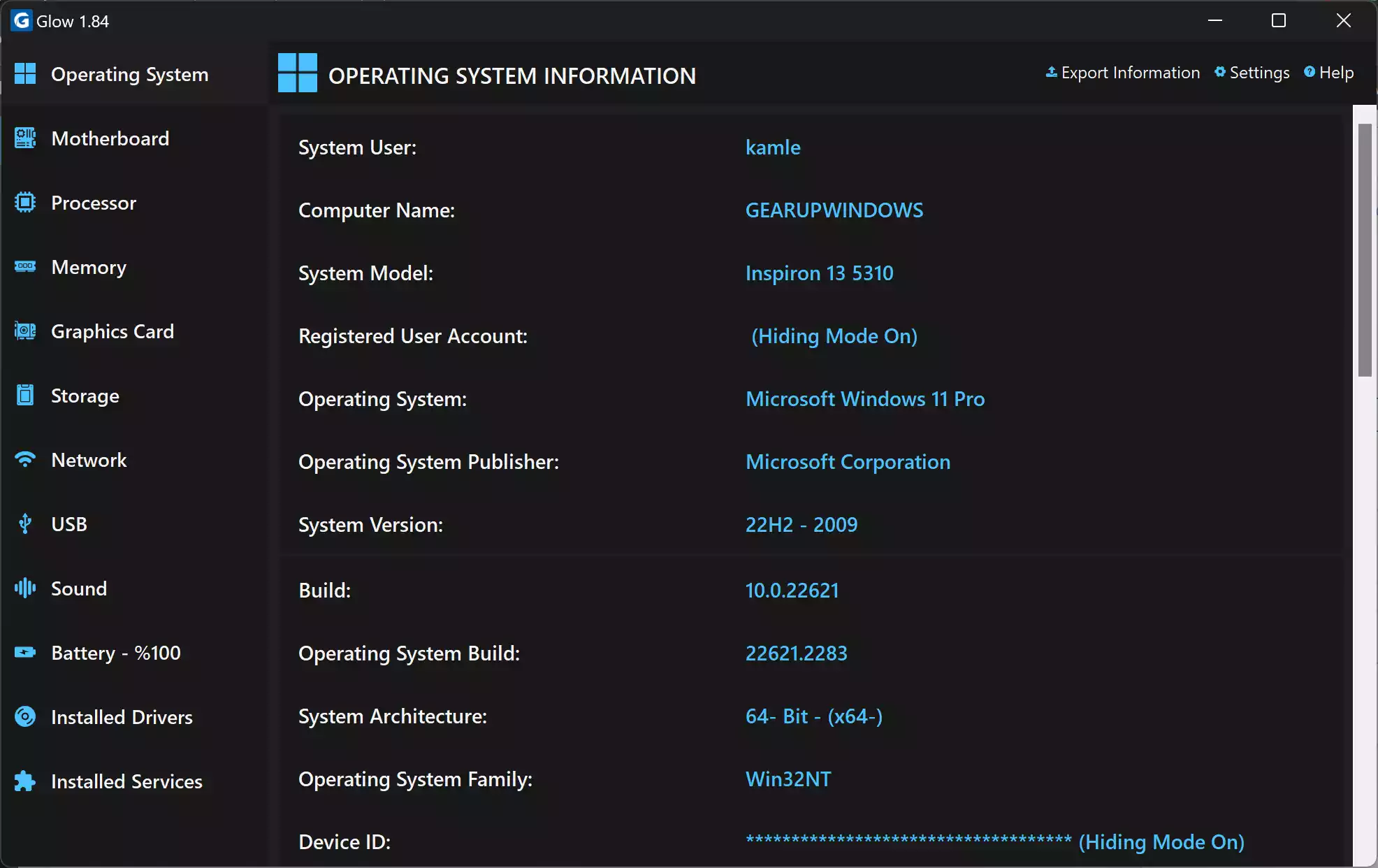
The primary goal of Glow is to simplify the process of monitoring your PC’s performance and health. It offers an intuitive user interface and neatly categorizes essential details about various components of your computer, including the motherboard, processor, memory, storage devices, and network. Let’s delve into some of its key features.
Key Features
- Hardware Information: Glow excels at categorizing and presenting hardware details in a user-friendly manner. Users can select specific categories from the left menu to access comprehensive information about each hardware component. This information includes the manufacturer and model of each component, its current status, health (if applicable), and additional specifications like size, speed, format, or type. Whether you need to identify your RAM’s specifications or check the status of your hard drive, Glow has you covered.
- System Information: Glow goes beyond hardware and provides insights into your system’s overall performance. You can find information about your system’s last boot time, current uptime, and even details as granular as the speed of your mouse wheel scroll. Additionally, it offers valuable data about your laptop’s battery level and voltage, helping you monitor its health and performance.
- Drivers and Services: Keeping your drivers and services up to date is crucial for a smoothly running computer. Glow simplifies this process by providing a list of all installed drivers and services. You can quickly identify which drivers are working correctly and which ones have stopped, making it easier to troubleshoot and update them as needed.
- Export Information: Glow understands the importance of maintaining records and allows users to export the program’s information as a text document. This feature is particularly useful for future reference or when seeking assistance from technical support.
- Hiding Mode: Privacy-conscious users will appreciate Glow’s “Hiding Mode.” This feature enables you to safeguard sensitive information from Glow’s system analysis, such as your email address, device ID, and hardware component serial numbers. This ensures that your private data remains confidential.
How to Download and Use Glow?
Getting started with Glow is a straightforward process:-
Step 1. Visit Glow’s GitHub Releases page.
Step 2. Download the zip file from the GitHub Releases page and extract the files within.
Step 3. Glow is a portable application, meaning you can run it directly without the need for installation.
Step 4. Due to its status as a tool from an independent developer, you may encounter security warnings from your browser and Microsoft Defender Smart Screen. Rest assured, Glow is safe to use. Click “Open,” then select “More info,” and finally, click “Run anyway” to proceed with the installation.
Step 5. To activate Hiding Mode for added privacy, click on “Settings” in the top-right corner of the program, select “Hiding Mode,” and restart the application. This will replace sensitive data with asterisks in the analysis.
Conclusion
In conclusion, Glow emerges as a powerful and accessible tool for monitoring your computer’s hardware and software. Its user-friendly interface and comprehensive features make it a compelling alternative to Speccy, catering to users of all technical backgrounds. Whether you’re a tech-savvy enthusiast looking to optimize your system or a regular user concerned about maintaining your computer’s health, Glow’s detailed insights and straightforward operation can benefit everyone.
With its status as a free, open-source tool, Glow demonstrates the collaborative spirit of the software community, providing a valuable resource for PC users worldwide. So, why not give Glow a try? Discover a reliable and easy way to keep tabs on your computer’s performance and ensure it continues to operate at its best. Your computer’s health and efficiency are just a few clicks away with Glow.
The best system information tool! 😍