

Ratool (Removable Access Tool) is a free and lightweight utility designed to give you complete control over USB storage devices on your Windows PC. Unlike stricter tools that simply block all drives, Ratool lets you choose between blocking, enabling, or setting USB drives to read-only mode. This makes it one of the most flexible freeware solutions for protecting your computer against data theft and malware spread via removable media.
Why Would a Beginner Use Ratool?
USB flash drives are one of the easiest ways to transfer files—but also one of the most common ways for malware to spread or for sensitive data to be stolen. Beginners may not want a complicated antivirus suite or a background service running all the time. Ratool offers a clean interface where you can simply select how USB drives should behave: blocked, enabled, or read-only. It’s portable, easy to use, and requires no installation, which makes it perfect for both home and small office users.
Main Features of Ratool
- Block all USB drives – Prevents any USB storage device from being recognized by your PC.
- Read-only mode – Allows files to be read from USB devices but prevents new files from being written, reducing malware risks.
- Enable USB drives – Switch back to normal access whenever you need to copy or transfer files.
- Password protection – Lock Ratool’s settings so only authorized users can change access modes.
- Selective blocking – Block all USB drives by default while allowing access only to trusted or whitelisted devices.
- Portable software – No installation required; you can run it directly from a folder or even a USB drive.
How to Use Ratool
Step 1. Download Ratool from the official Sordum website or a trusted freeware source.
Step 2. Extract the downloaded ZIP file and run the Ratool executable (no installation is required).
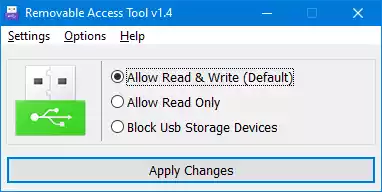
Step 3. Choose your preferred USB access mode:
- Block USB Storage Devices – Completely blocks USB storage.
- Allow Read Only – Files can be read but not copied to or from the USB drive.
- Allow Read & Write – Restores normal access to removable drives.
Step 4. Apply password protection if you don’t want others to change the settings.
Step 5. Click Apply Changes and close the tool—it will enforce your chosen policy even after you restart your PC.
Safe Use Tips for Beginners
While Ratool is powerful, you should still practice basic USB safety. Never connect unknown flash drives, always keep your Windows security patches updated, and scan your system regularly with a free malware scanner. Ratool is most effective when combined with safe computing habits.
When Ratool Can Help You
Ratool is useful in many scenarios, such as:
- Schools or labs where students should not copy data to USB drives.
- Offices where sensitive company files must not be copied to external devices.
- Shared or public computers where USB-based malware is a common risk.
- Personal PCs, where you want fine-grained control instead of a strict block.
Download Ratool
You can download the latest version of Ratool (Removable Access Tool) for free from the official Sordum website. Always use the official source to avoid tampered or bundled versions.
Frequently Asked Questions About Ratool
Is Ratool free?
Yes. Ratool is completely free to use and is developed by Sordum as a portable utility.
Does Ratool work on Windows 11?
Yes. Ratool works on Windows XP up to Windows 11 without issues.
Do I need to install Ratool?
No. Ratool is a portable program. You simply extract and run it without installation.
Can Ratool block only certain USB devices?
Yes. Ratool lets you whitelist specific USB devices so that only trusted drives can be used, while all others remain blocked.
Does Ratool require administrator rights?
Yes. Since Ratool changes system-level USB access settings, administrator privileges are required to apply its functions.
If you want to explore more free tools for both write protection and malware prevention, check out our roundup of the best USB security tools for Windows 11/10.
Conclusion
Ratool (Removable Access Tool) is one of the most powerful freeware utilities for controlling USB storage on Windows PCs. With features like read-only mode, password protection, and selective blocking, it offers far more flexibility than stricter tools such as IntelliAdmin USB Disabler. Whether you want to protect against malware, prevent data theft, or manage access in shared environments, Ratool is an essential USB security tool for Windows 11/10 users.