

Defragmentation decreases the number of fragmented files on a hard drive and improves your PC’s overall performance. This process reorganizes related data files and puts them in the exact physical location on your hard drive, such as programs, documents, music, videos, etc. Data gets divided into multiple pieces that the hard drive stores.
For your information, defragmentation is required on mechanical hard drives only because mechanical hard drives have disks that spin. The heads can read and write data files. Further, there is no need to defragment or defrag the Solid State Drive (SSD) because SSDs have no moving parts. The computer can pick and choose whatever files it needs, regardless of which memory chip it is located in. Because of the above reason, SSDs are more popular these days, and most new computers and notebooks come preinstalled with SSDs. There is also an option in Windows 10 to check if your PC uses SATA or NVMe SSD on Windows 10.
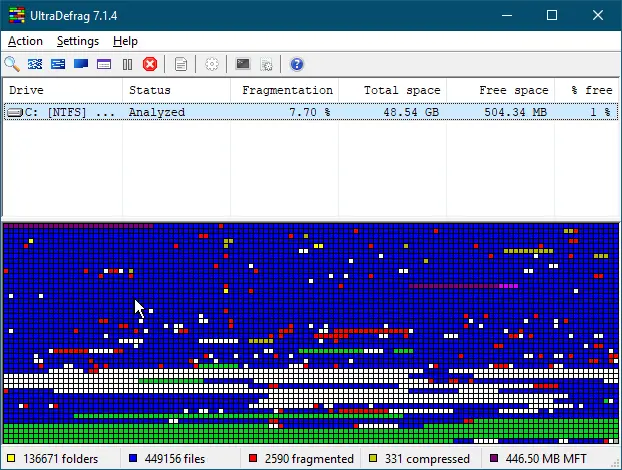
What is UltraDefrag?
UltraDefrag is a freeware application that quickly and effectively defragments the hard disk of a computer or laptop. To begin the defragmentation process using UltraDefrag, you first need to analyze the hard disk by clicking Action > Analyze in the toolbar. This step gives you a clear view of the file distribution on the disk, showing the total number of files and folders, as well as identifying fragmented and compressed files.
Once the disk analysis is complete, you can proceed with defragmentation. Keep in mind that the process may take a few minutes to complete, and if your drive contains a large number of fragmented files, it might take a bit longer. Running defragmentation helps enhance your computer’s performance and makes the system more optimized.
UltraDefrag also includes a built-in optimization feature that improves the arrangement of complex disk files. It supports popular file systems such as FAT, exFAT, and NTFS, making it a versatile tool for modern PCs.
The program features a user-friendly and straightforward interface, making it easy to operate without requiring any advanced configurations. Installation and usage are simple, just like with most other PC tools. UltraDefrag supports both 32-bit and 64-bit platforms, and it’s compatible with Windows 10, 8, and 7.
For your information, in the NTFS file system, all file details are stored as metadata in the Master File Table (MFT). UltraDefrag allows you to optimize the MFT as well, ensuring the best possible performance of your hard disk.
Key Features
- Boot Time Defragmentation to process the system files.
- Console interface for batch processing or setting up scheduled tasks.
- The graphical user interface allows the process to be visualized.
- Process single files, folders, or drives from the File Explorer’s context menu.
- Specialized processing algorithms for each situation.
- Available for 32-bit and 64-bit, including Windows 11, 10, 8, and 7.
- Optional dry run to get a preview of the resulting disk usage.
- Free to use.
Download UltraDefrag
As said above, if your PC is using an SSD, no need to defrag the drives. If your computer is not using an SSD and you want a good piece of defragmenting software, you can download this free version of UltraDefrag from Sourceforge.
You might also be interested in other free defragmentation tools, such as Puran Defrag, IObit Smart Defrag, DiskTuna, etc.