

In today’s digitally connected world, protecting your online privacy is more important than ever. One effective way to enhance your privacy and security is by changing your MAC address. Technitium MAC Address Changer is a free and user-friendly tool that allows you to modify your MAC address easily, giving you an added layer of anonymity and control.
In this gearupwindows article, we’ll explore the features, benefits, and usage of Technitium MAC Address Changer, helping you take full control of your network privacy.
What is a MAC Address?
Before exploring Technitium MAC Address Changer, it’s helpful to understand what a MAC address is. MAC stands for Media Access Control and refers to a unique identifier assigned to network interfaces like Ethernet and Wi-Fi adapters. These addresses are made up of hexadecimal characters (0–9 and A–F) and are permanently coded into your network hardware by the manufacturer.
What is Technitium MAC Address Changer?
Technitium MAC Address Changer is a powerful yet simple utility designed to spoof or change the MAC address of your network adapter. By modifying your MAC address, you can avoid tracking, bypass network restrictions, and improve your online privacy. Whether you’re a security expert or just someone who values digital privacy, Technitium is a must-have tool in your setup.
Key Features and Benefits
- Simple User Interface: Technitium features an intuitive interface that even non-technical users can navigate with ease. Changing your MAC address takes just a few clicks.
- Wide Compatibility: It supports Windows 11, 10, 8.1, 8, 7, Vista, XP, and several Windows Server editions, ensuring broad usability across devices and systems.
- Network Configuration Presets: The tool includes ready-to-use network presets with support for IPv6, making it easy to switch between different configurations as needed.
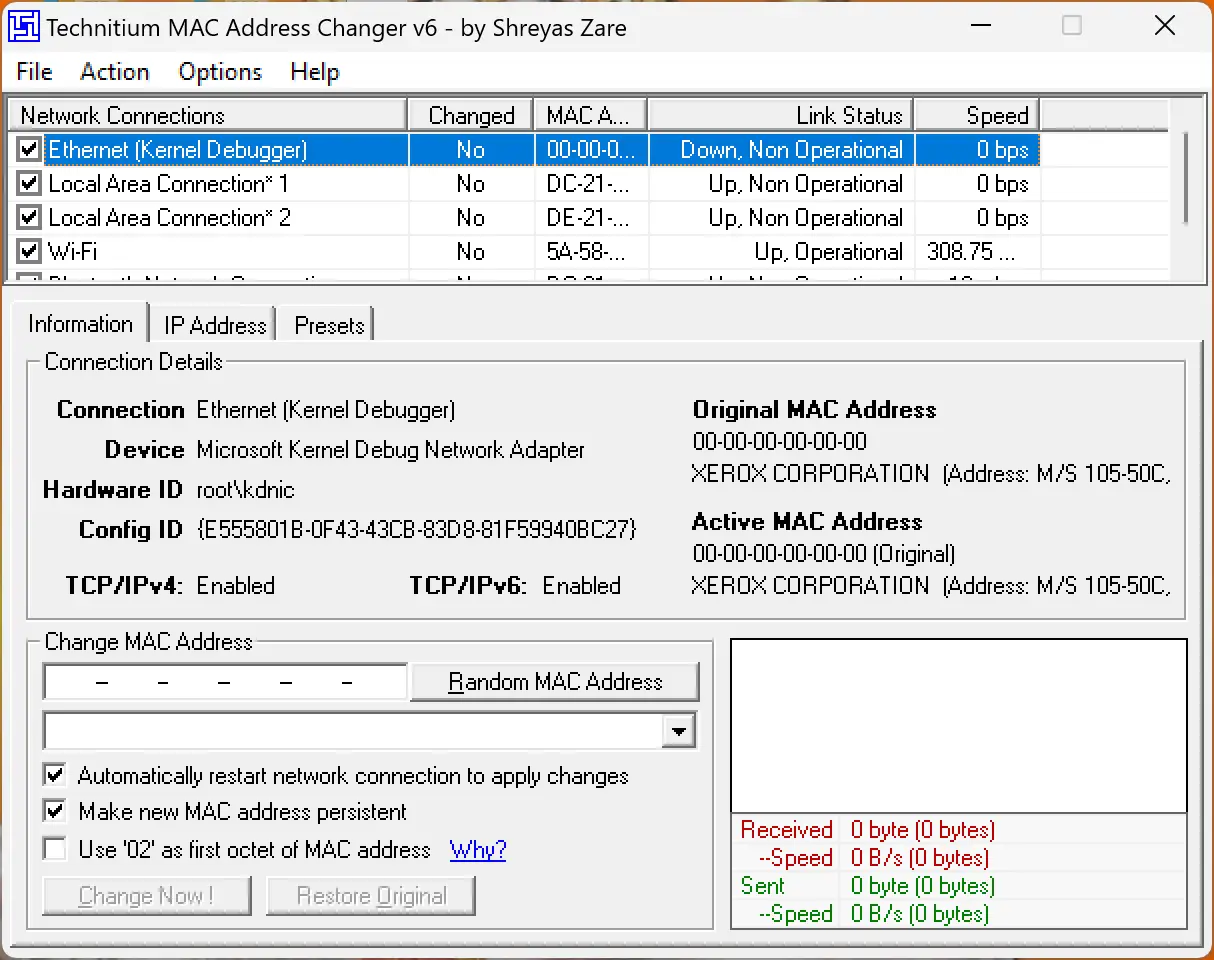
- Complete Adapter Configuration: View and manage detailed information for each network adapter, and configure settings based on your needs.
- Command-Line Options: Advanced users can take advantage of command-line support to automate MAC address changes or apply presets efficiently.
How to Use Technitium MAC Address Changer?
Using Technitium MAC Address Changer is quick and straightforward. Follow these steps:
Step 1. Download and install the tool from its official website.
Step 2. Launch the application. A list of network adapters on your system will appear.
Step 3. Select the adapter for which you want to change the MAC address.
Step 4. Under the Information tab, find the “Change MAC Address” section.
Step 5. Manually enter a new MAC address or click Random MAC Address to generate one.
Step 6. Click the “Change Now!” button to apply the new MAC address instantly.
Step 7. To revert changes, select the adapter and click “Restore Original“.
Download Technitium MAC Address Changer
You can download Technitium MAC Address Changer from its official website.
Conclusion
Technitium MAC Address Changer is a powerful, free, and easy-to-use tool for modifying MAC addresses on Windows systems. It helps protect your privacy, hide your network identity, and manage advanced configurations. Thanks to its simple interface, wide compatibility, and helpful features like presets and command-line support, it’s ideal for both casual users and IT professionals. Take control of your network identity and enjoy better privacy with Technitium MAC Address Changer today.
You might also be interested in SMAC (Spoof MAC Address), another tool that helps change MAC addresses on Windows 11 and 10 quickly and effectively.