

InfraRecorder is an open-source CD and DVD burning application that allows users to create data, audio, and mixed-mode discs, as well as copy and erase CDs and DVDs. The software has a user-friendly interface, making it easy for users to navigate and utilize its various features. Another excellent open-source alternative worth exploring is CDrtfe, which also supports CD, DVD, and Blu-ray burning tasks on Windows.
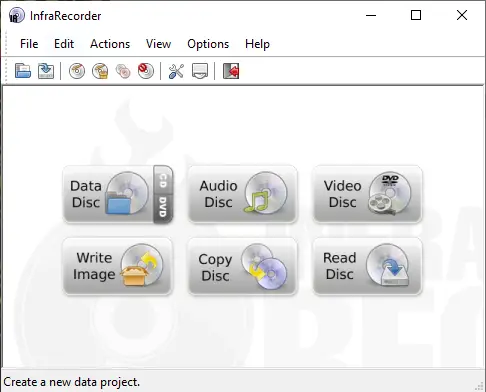
What is InfraRecorder?
One of the most significant advantages of InfraRecorder is that it is completely free to use. Unlike many other CD and DVD burning programs that come with a price tag, InfraRecorder provides users with all of the essential tools they need to create and burn CDs and DVDs without any hidden costs or fees.
InfraRecorder’s features include the ability to create data, audio, and mixed-mode discs. It also allows users to copy CDs and DVDs and erase rewritable discs quickly. Users can burn ISO images and create bootable discs, making it an excellent tool for system administrators who need to create installation media. For users who frequently deal with ISO images, ImgBurn is another trusted freeware that provides advanced ISO image burning and bootable disc creation support.
The software’s interface is intuitive and easy to use. Users can quickly access popular features such as data disc, audio disc, video disc, write image, copy disc, and read disc without navigating through multiple menus. The interface is also customizable, allowing users to configure the program to suit their preferences. If you prefer an alternative with a similar straightforward interface, consider DeepBurner, which offers both simplicity and reliability for everyday disc-burning needs.
Additional Features
One of the standout features of InfraRecorder is its support for various languages. The software supports more than 20 different languages, making it accessible to users around the world. This feature sets InfraRecorder apart from many other CD and DVD-burning applications that are only available in one or two languages.
InfraRecorder also enables users to burn ISO images and create bootable discs effortlessly. Those who wish to convert folders directly into ISO files before burning can try the Folder to ISO Converter, a handy tool for preparing disc images quickly.
Compatibility and System Requirements
InfraRecorder is compatible with Windows XP, Vista, 7, 8, 8.1, 10, and Windows Server 2003, 2008, and 2012. The software’s low system requirements mean that it can run smoothly even on older hardware, making it an excellent option for users with older computers.
Conclusion
Overall, InfraRecorder is an excellent CD and DVD-burning application that provides users with all the essential tools they need to create and burn CDs and DVDs. Its intuitive interface, customizable options, and support for multiple languages make it an accessible and user-friendly option for users around the world. Best of all, it is completely free to use, making it an excellent choice for individuals and organizations looking for a cost-effective solution for their disc-burning needs.
If you’re looking for another comprehensive freeware alternative, you can check out BurnAware Free, a versatile burning suite for all major disc formats. You can also explore our curated list of best free CD/DVD burner alternatives to Nero for more top-rated burning utilities.